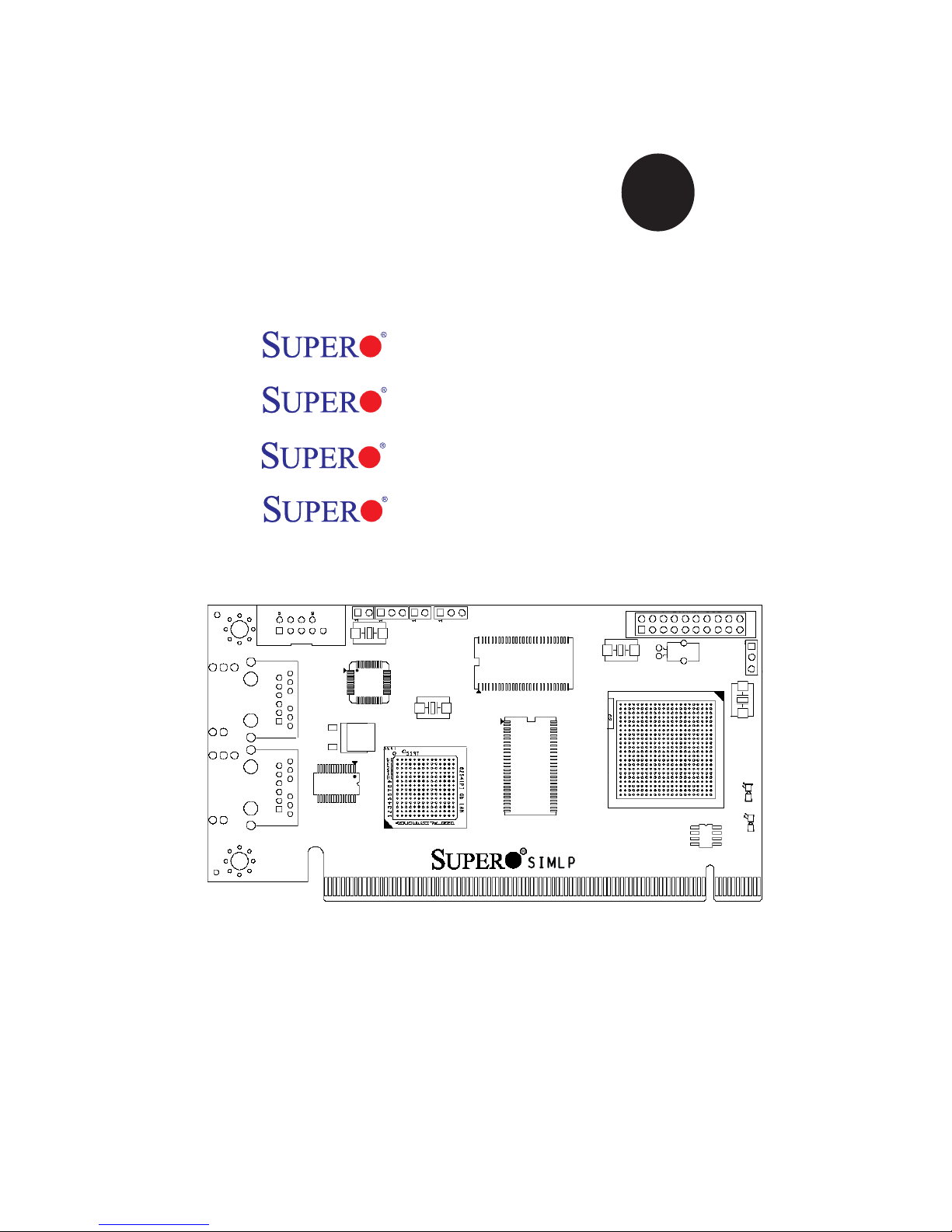
Supero Supero AOC-SIMLP-3 Manuale utente

Rev. 1.0c
®
SUPER
USER'S GUIDE
AOC-SIMLP-B
AOC-SIMLP-B+
AOC-SIMLP-3
AOC-SIMLP-3+

AOC-SIMLP-B(+)/AOC-SIMLP-3(+) User's Guide
1-2
The information in this User’s Guide has been carefully reviewed and is believed to be accurate.
The vendor assumes no responsibility for any inaccuracies that may be contained in this document,
makes no commitment to update or to keep current the information in this manual, or to notify any
person or organization of the updates.
Please Note: For the most up-to-date version of this manual, please see our web
site at www.supermicro.com.
SUPERMICRO COMPUTER reserves the right to make changes to the product described in this
manual at any time and without notice. This product, including software, if any, and documenta-
tion may not, in whole or in part, be copied, photocopied, reproduced, translated or reduced to any
medium or machine without prior written consent.
IN NO EVENT WILL SUPERMICRO COMPUTER BE LIABLE FOR DIRECT, INDIRECT, SPECIAL,
INCIDENTAL, OR CONSEQUENTIAL DAMAGES ARISING FROM THE USE OR INABILITY TO
USE THIS PRODUCT OR DOCUMENTATION, EVEN IF ADVISED OF THE POSSIBILITY OF
SUCH DAMAGES. IN PARTICULAR, THE VENDOR SHALL NOT HAVE LIABILITY FOR ANY
HARDWARE, SOFTWARE, OR DATA STORED OR USED WITH THE PRODUCT, INCLUDING THE
COSTS OF REPAIRING, REPLACING, INTEGRATING, INSTALLING OR RECOVERING SUCH
HARDWARE, SOFTWARE, OR DATA.
Any disputes arising between manufacturer and customer shall be governed by the laws of Santa
Clara County in the State of California, USA. The State of California, County of Santa Clara shall
be the exclusive venue for the resolution of any such disputes. Supermicro's total liability for all
claims will not exceed the price paid for the hardware product.
WARNING: Handling of lead solder materials used in this
product may expose you to lead, a chemical known to
the State of California to cause birth defects and other
reproductive harm.
Unless you request and receive written permission from SUPER MICRO COMPUTER, Inc., you
may not copy any part of this document.
Information in this document is subject to change without notice. Other products and companies
referred to herein are trademarks or registered trademarks of their respective companies or mark
holders.
Copyright © 2007 by SUPER MICRO COMPUTER, INC.
All rights reserved.
Printed in the United States of America
Manual Revision: Rev. 1.0c
Release Date: July 5, 2007

1-3
Chapter 1: Introduction
Table of Contents
Chapter I: Introduction.............................................................................1-4
1.1 Overview .................................................................................................. 1-4
1.2 IPMI Version 2.0....................................................................................... 1-5
1.3 Product Features...................................................................................... 1-6
1.4 Checklist ................................................................................................... 1-6
1.5 An important Note to the User .................................................................. 1-6
1.6 Contacting Supermicro.............................................................................. 1-7
Chapter 2: Technical Specifications and Software Installation ........... 2-1
2.1 AOC-SIMLP-B/SIMLP-B+/SIMLP-3/SIMLP-3+ Card Layout and Jumper .....
Locations ......................................................................................................... 2-1
2.2 Block Diagram ............................................................................................ 2-3
2.3 Safety Guidelines ....................................................................................... 2-4
Chapter 3: Software Application and Usage ..........................................3-1
3.1 Home Page ................................................................................................ 3-3
3.2 Functions Listed On the Home Page ..................................................... 3-5
3.2.1 Remote Control ....................................................................................... 3-5
3.2.2 Virtual Media............................................................................................ 3-7
3.2.3 System Health ........................................................................................3-11
3.2.4 User Management ................................................................................. 3-17
3.2.5 KVM Settings......................................................................................... 3-21
3.2.6 Device Settings...................................................................................... 3-25
3.2.7 Maintenance .......................................................................................... 3-38
3.3 Remote Console Main Page .................................................................. 3-42
3.3.1 Remote Console Options ...................................................................... 3-43
Chapter 4: Frequently Asked Questions ................................................ 4-1

AOC-SIMLP-B(+)/AOC-SIMLP-3(+) User's Guide
1-4
Chapter 1
Introduction
This manual is written for system integrators, PC technicians and
knowledgeable PC users who intend to integrate Supermicro's unique IPMI 2.0
Management functionality with the capability of KVM-over-LAN into their systems.
It provides detailed information for the application and use of the AOC-SIMLP-B/
SIMLP-B+/SIMLP-3/SIMLP-3+ that supports remote access for system monitoring,
diagnosis and management. With the most advanced technologies built-in, the
AOC-SIMLP-B/SIMLP-B+/SIMLP-3/SIMLP-3+ offers a complete, efficient, and cost
effective remote server management.
1.1 Overview
The AOC-SIMLP-B/SIMLP-B+/SIMLP-3/SIMLP-3+ is a highly efficient, highly com-
patible and easy-to-use IPMI card that allows the user to take advantage of BMC,
a baseboard management controller installed on a server motherboard and the
IPMIView, an IPMI-compliant management application software loaded in a PC, to
provide serial links between the main processor and other system components, al-
lowing for network interfacing via remote access. With an independent Peppercon's
KIRA100 processor built-in, the AOC-SIMLP-B/SIMLP-B+/SIMLP-3/SIMLP-3+
provides the user a solution to ease the complex and expensive systems, allow-
ing an administrator to access, monitor, diagnose and manage network interfacing
anywhere, anytime.
1.2 IPMI Version 2.0
The AOC-SIMLP-B/SIMLP-B+/SIMLP-3/SIMLP-3+ supports the functionality of IPMI
Version 2.0. The key features include the following:
Supports IPMI over LAN
Supports Serial over LAN
Supports KVM over LAN (*AOC-SIMLP-B+, AOC-SIMLP-3+ only)
Supports Virtual Media over LAN
Supports LAN Alerting-SNMP Trap
Supports Event Log
Offers OS (Operating System) Independency
Provides remote Hardware Health Monitoring via IPMI. Key features include
the following:
Temperature monitoring
Fan speed monitoring
•
•
•
•
•
•
•
•
•
•

1-5
Chapter 1: Introduction
Voltage monitoring
Power status monitoring, chassis intrusion monitoring
Remote power control to power-on, power-off or reboot a system
Remote access to text-based, graphic-based system information,
including BIOS configurations and OS operation information (KVM)
Remote management of utility/software applications
Provides Network Management Security via remote access/console redirec-
tion. Key features include:
User authentication enhancement
Encryption support enhancement, allowing for password configura-
tion security to protect sensitive data transferring via Serial over
LAN
1.3. Product Features
(a) The AOC-SIMLP-B/SIMLP-B+ Series: (IPMI 2.0 with a Dedicated
LAN)
• Low profile Form Factor (5.1" W x 2.7" H) (129.3 mm W x 68.8 mm H)
• Supports 2U systems and above
• Supports IPMI over LAN
(b) The AOC-SIMLP-3/SIMLP-3+* Series: (IPMI 2.0 with a Dedicated
LAN and the Intel 82541PI GLAN Controller)
• Low profile Form Factor (5.1" W x 2.7" H) (129.3 mm W x 68.8 mm H)
• Supports 2U systems and above (*AOC-SIMLP-3/AOC-SIMLP-3+ only)
• Supports IPMI over LAN
• Intel's 82541 PI Gigabit LAN Controller (with 3rd data LAN support)
• The AOC-SIMLP-3+ supports KVM
(c) Features Supported by Individual Models
•
•
•
•
•
•
•
•
Features Dedicated LAN
for IPMI
Intel 82541 PI for
Data Transmission
KVM-over-LAN
SIMLP-B Yes ----- -----
SIMLP-B+ Yes ----- Yes
SIMLP-3 Yes Yes -----
SIMLP-3+ Yes Yes Yes

AOC-SIMLP-B(+)/AOC-SIMLP-3(+) User's Guide
1-6
1.4 CheckList
If your shipping package came with missing or damaged parts, please contact
Supermicro's Tech. Support. Please refer to the following checklist when
contacting us.
i. AOC-SIMLP-B/SIMLP-B+/SIMLP-3/SIMLP-3+:
ii. Brackets: One full-size bracket, one low-profile bracket and two screws,
iii. CDR-SIMIPMI: One Installation CD
iv. White Box with Correct Barcode Label (showing AOC-SIMLP-B/SIMLP-B+/
SIMLP-3/SIMLP-3+).
1.5 An Important Note to the User
The drawings and pictures shown in this manual were based on the latest PCB
Revision available at the time of publishing of the manual. The AOC-SIMLP-B/
SIMLP-B+/SIMLP-3/SIMLP-3+ card you’ve received may or may not look exactly
the same as the graphics shown in the manual.

1-7
Chapter 1: Introduction
1.6 Contacting Supermicro
Headquarters
Address: SuperMicro Computer, Inc.
980 Rock Ave.
San Jose, CA 95131 U.S.A.
Tel: +1 (408) 503-8000
Fax: +1 (408) 503-8008
Web Site: www.supermicro.com
Europe
Address: SuperMicro Computer B.V.
Het Sterrenbeeld 28, 5215 ML
's-Hertogenbosch, The Netherlands
Tel: +31 (0) 73-6400390
Fax: +31 (0) 73-6416525
Asia-Pacific
Address: SuperMicro, Taiwan
4F, No. 232-1 Liancheng Road
Chung-Ho 235, Taipei Hsien, Taiwan, R.O.C.
Tel: +886-(2) 8226-3990
Fax: +886-(2) 8226-3991
Web Site: www.supermicro.com.tw
Technical Support:

AOC-SIMLP-B(+)/AOC-SIMLP-3(+) User's Guide
1-8
Notes

2-1
Chapter 2: Technical Specifications and Installation
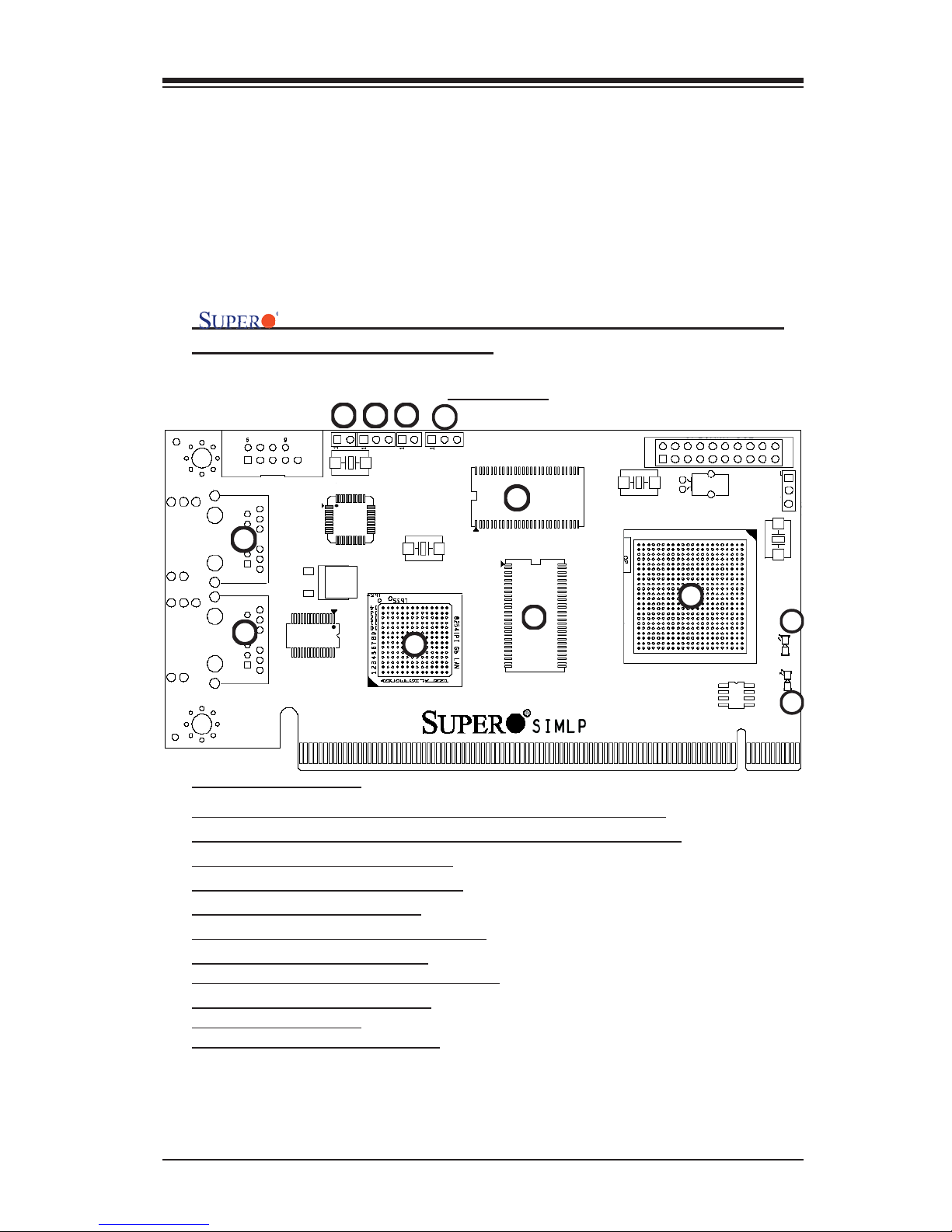
2.1 AOC-SIMLP-B/SIMLP-B+/SIMLP-3/SIMLP-3+ Card
Layout and Jumper Locations
AOC-SIMLP-B/SIMLP-B+/SIMLP-3/SIMLP-3+ Card
Layout and Jumper Locations
Front View
Chapter 2
Technical Specifications and Software
Installation
1
23
4
5
6
7 48
9
10
11
1
12
Front Components
1. LAN Port 1 (JLAN1) for IPMI/Keyboard/Video/Mouse over IP
2. LAN Port 2 (JLAN2) for 3rd Data via Intel's 82541PI Controller
3. Intel's 82541PI GLAN Controller
4. Peppercon's KIRA 100 Processor
5/6. SDRAM (128Mb/133MHz)
7. JP5: LAN Port1 Activity LED Jumper
8. JP7: JLAN 2 Control Jumper
9. JP6: GLAN Port2 Activity LED Jumper
10. JP1: JLAN1 Control Jumper
11. D3: Power-on LED
12. D4: Heart-beat (Activity) LED

AOC-SIMLP-B(+)/AOC-SIMLP-3(+) User's Guide
2-2
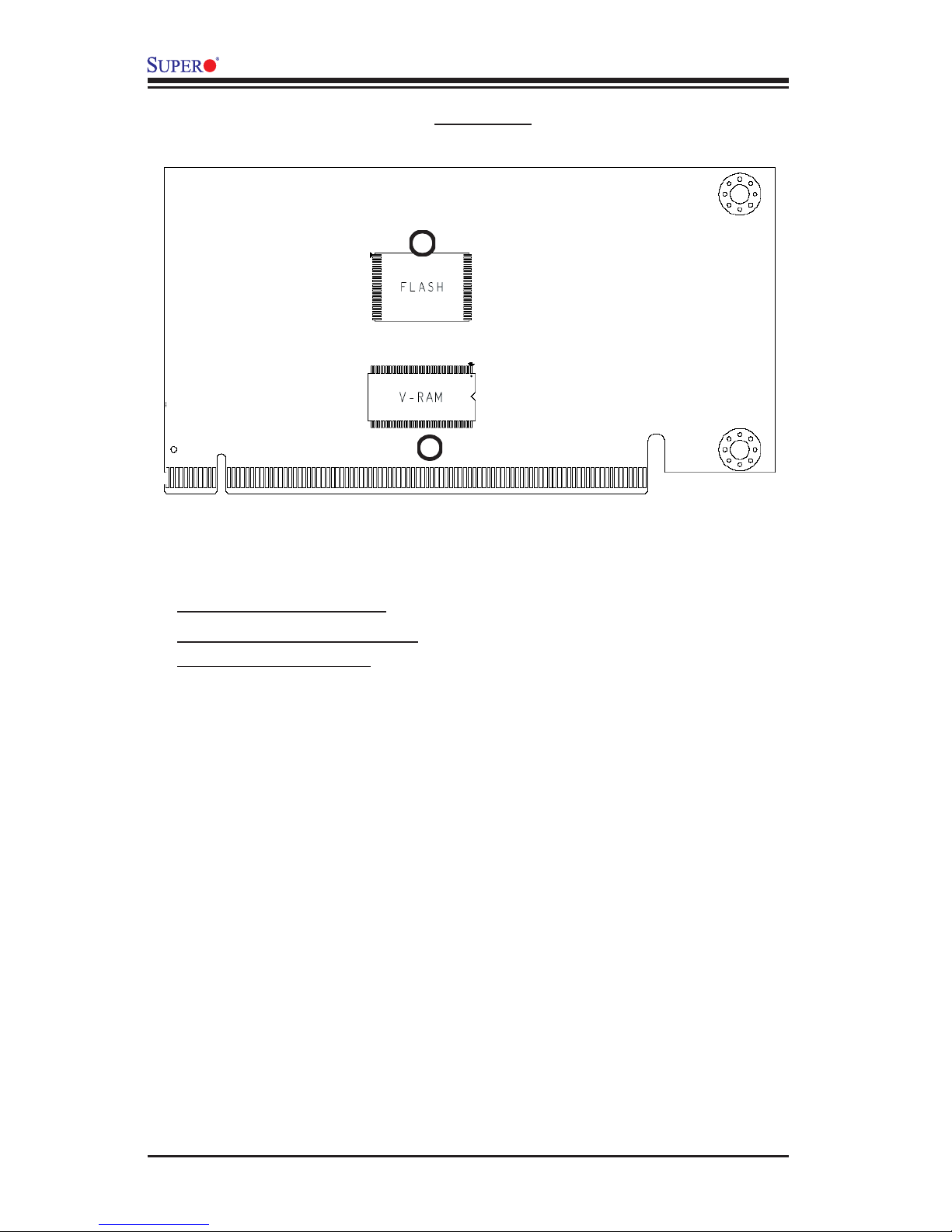
Rear View
Rear Side Components
1. Flash DRAM (64Mb/133MHz)
2. VRAM (64Mb/166MHz)
1
2
Questo manuale è adatto per i seguenti modelli
3
Indice
Altri manuali Supero Scheda di rete

Supero
Supero AOC-SIM1U-3B Manuale utente

Supero
Supero AOC-UINF-M2 Manuale utente

Supero
Supero AOC-USASLP-S8i Manuale utente

Supero
Supero AOC-SAT2-MV8 Manuale utente

Supero
Supero AOC-SG-i2 Manuale utente

Supero
Supero AOC-LPZCR2 Manuale utente

Supero
Supero AOC-USAS-S8i Manuale utente

Supero
Supero AOC-USAS-H8ir Manuale utente

Supero
Supero AOC-USASLP-L8i Manuale utente
Manuali Scheda di rete popolari di altre marche

Buffalo
Buffalo AirStation WLI-PCM-L11GP Manuale utente

National Instruments
National Instruments NI 9234 Manuale utente

Hama
Hama 49276 Manuale utente

Linksys
Linksys WCF54G - Wireless-G Compact Flash Card Manuale operativo

Compaq
Compaq Wireless LAN 100 Manuale utente

Bose
Bose PowerMatch Dante Manuale utente