
That Little Box GpiO BOX USB Manuale utente

!
www.thatlittlebox.co.uk
1!
!
!
!
!
!
!
!
!
!
The!GpiO!BOX!USB!is!a!user!programmable!MIDI!control!system!designed!for!use!
with!remote!buttons!and!triggers.!!Based!on!the!popular!USB!GO!BOX,!the!GpiO!
BOX! USB!uses! buttons! attached! to! its! 2! XLR! sockets! rather! than! on! board!
controls!to!trigger!MIDI!commands.!!
!
!
!
!
!
!
!
!
!
!
!
!
!
!
!
!
!
!
!
!
!
!
!
!
!
!
!
!
!
!
The!GpiO! BOX!has!2! XLR!connectors!on!
its! front! face.! These! are! inputs! for!
Buttons,!switches!or!any!contact!closure,!
such! as! the! GPIO! output! from! a! mixing!
desk! or! redundant! switch! system.! Each!
XLR! can! be! used! to! connect! up! to! 2!
Controls! or! a! single!illuminated! Control.!!
The! front! panel! also! features! a! 3-
position! slide! switch! used! to! set! the!
operating!mode!of!the!box.!
!
The! rear! of! the! GpiO! Box! is! the!same! as! that! found! on! the! USB! GO! BOX! and!
features! 2! USB! B! outputs,! allowing! for! simultaneous! control! of! 2! computers.!
There! is! also! a! Power! /Status! LED! Status! LED! that! will! display! the! currently!
selected!mode!of!the!GpiO!BOX!USB.!
USB
USB!1!
USB!2!
Power/Status!LED!
!
www.thatlittlebox.co.uk
2!
Modes!
!
The!GpiO!box!has!3!modes,!the!Modes!are!selected!using!a!3!position!slide!switch!
and! are! only! checked! on! power! up.! Operation! of! the! slide! switch! once! the! box!
has!been!turned!on!will!have!no!immediate!effect.!The!3!modes!are:!!
!
1. 2-Button!Mode!!!Switch!to!the!LEFT!
2. Button!learn!Mode!!!!Switch!Centre!
3. 4-Button!Mode.!!!Switch!to!the!Right!!
!
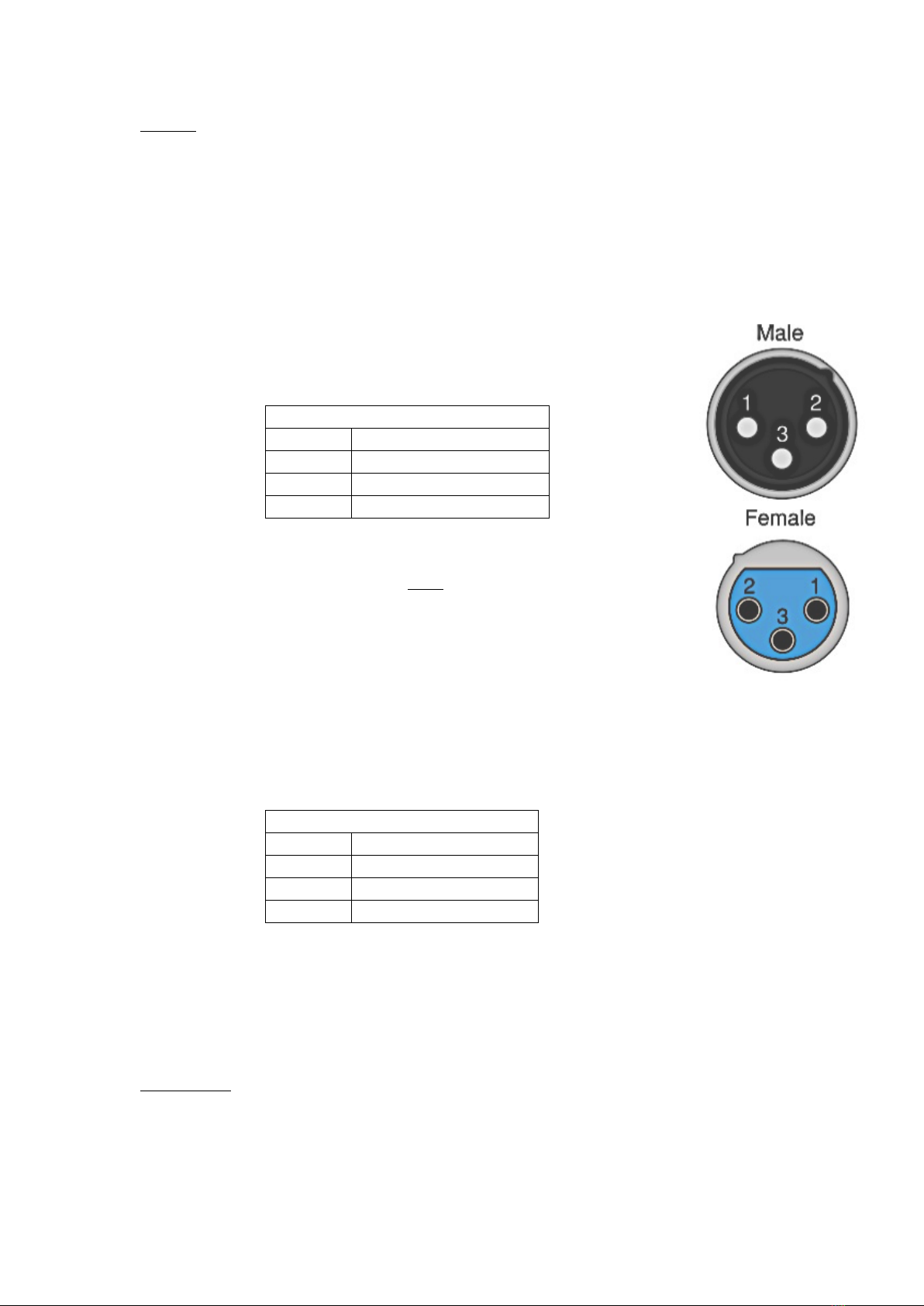
In!2-Button!mode!the!GpiO!BOX!will!accept!a!single!Control!per!XLR.!
This!may!be!illuminated.!!In!this!mode!a!control!should!be!wired!as!
Follows:!
!
!
!
!
!
!
A!MIDI!message!is!fired!when!the!control!line!(pin!2)!is!shorted!to!
ground!!(pin!1)!
It!should!be!notes!that!Pin!3!does!NOT!have!a!resistor!in!line.!When!!
attempting!to!light!an!LED!a!resistor!should!be!added!in!series.!!
If!using!That!Little!Box!“Button!Box”!products!a!resistor!is!included!!
in!the!design.!
!
2-Button!mode!is!selected!by!positioning!the!slide!switch!to!the!left,!
closest!to!XLR!1+2!when!the!GpiO!BOX!is!powered!up!!
!
In!4-Button!mode!the!GpiO!BOX!will!accept!up!to!2!controls!per!XLR!.!These!may!
not!be!illuminated.!!In!this!mode!a!Control!should!be!wired!as!Follows:!
!
!
!
!
!
!
!
A!MIDI!message!is!fired!when!either!control!line!(pin!2!or!3)!is!shorted!to!ground!
(pin!1).!
!
4-Button!mode!is!selected!by!positioning!the!slide!switch!to!the!right,!closest!to!
XLR!3+4!when!the!GpiO!BOX!is!powered!up!!
!
Status!LED!!
!
The! Power/Status! LED! displays! the! currently! selected! mode! and! shows! when!
MIDI!data!is!sent.!In!2-Button!mode!the!LED!will!be!solid!amber!and!will!blink!
red!when!MIDI!data!is!sent.!In!4-Button!mode!the!LED!will!be!solid!red!and!will!
blink!amber!when!MIDI!data!is!sent.!
!
4-Button!Mode!
Pin!
Function!
1!
Ground!
2!
Control!1!
3!
Control!2!
2-Button!Mode!
Pin!
Function!!
1!
Ground!
2!
Control!
3!
Illumination!!

!
www.thatlittlebox.co.uk
3!
Learn!mode!
!
The!GpiO!BOX!is!fully!user!programmable!and!can!be! configured! to! output!any!
Musical!MIDI!when!any!of!its!4!input!control!lines!are!triggered.!!To!enter!Learn!
mode!position!the!slide!switch!to!the!center!when!powering!up.!!!!
!
!Programing!!
!
When!the!GpiO!Box!is!powered!up!in!Learn!Mode!the!Status!LED!on!the!
rear!of!the!unit!will!begin!to!slowly!flash.!This!indicates!that!the!GpiO!box!
is!in!Learn!Mode!and!awaiting!further!instruction.!!
!
Next! connect!the! control! button! (or! other! control)! you! wish! to! use! and!
press!it.!The!Status!LED!with!stop!flashing!amber!and!go!to!solid!red.!This!
indicates!that!the!GpiO!BOX!has!detected!a!button!press!and!is!awaiting!a!
MIDI!command.!
!
As!a!safety!feature,!if!no!buttons!are!pressed!the!GpiO!BOX!is!left!in!
learn!mode!for!60!seconds!the!unit!will!exit!learn!mode!and!restart!
to! its! most! recently! selected! button! mode.! This! is! designed! to!
reduce!the!risk!of!an!accidental!mode!change!when!mounted!in!a!
rack!adversely!effecting!operation.!
!
Once!the!LED!is!solid!red!a!MIDI!command!can!be!send!in!to!either!of!the!
MIDI! ports! on! the! rear! of! the! GpiO! Box.! To! do! this,! simply! connect! the!
GpiO!Box! to! the!Output! of! a!MIDI! device! or!USB! MIDI! interface.! !Once! a!
command! has! been! received! and! stored! the! status! LED! will! return! to!
slowly! flashing.! ! At! this! point! you! can! either! repeat! the! process! with!
another!button,!or!set!the!slide!switch!to!the!desired!mode!(2-Button!or!
4-Button)!and!power!cycle!the!GpiO!Box.!!
!
Once!programed!the!GpiO!box!will!output!its!new!“Learnt”!commands!in!
both!Button!modes!until!either!reprogramed!or!reset.!
!
Reset!!
!
To!reset!the!GpiO!BOX!back!to!its!factory!default!MIDI!!commands!(shown!the!in!
the!table!bellow)!connect!a!button!to!line!3,!and!hold!this!down!while!powering!
up!the!unit!in!learn!mode.!The!status!LED!will!blink!rapidly!to!confirm!reset!and!
the!GpiO!box!will!return!to!its!most!recently!selected!button!mode!
!
!
!
!
!
!
!
!
!
!
!
Factory!default!MIDI!commands!!
Input!line!!
Default!MIDI!command!!
1!
Program!change!0!Chan!1!
2!
Program!change!1!Chan!1!
3!
Program!change!2!Chan!1!
4!
Program!change!3!Chan!1!

!
www.thatlittlebox.co.uk
4!
Cable!length!!
!
While!it!is!advisable!to!keep!cable!runs!between!a!control!and!the!GpiO!BOX!as!
short!as!possible!very!long!runs!of!up!to!and!in!excess!of!1Km!are!possible!and!
do!not!adversely!effect!the!GpiO!BOX’s!operation.!!The!GpiO!BOX!has!been!tested!
using! a! button! connected! to! up! 1.5Km! of! cable.! All! tests! have! been! done! using!
high! quality! modern! microphone! cable! and! no! practical! limit! has! been! found!
beyond!witch!the!GpiO!BOX!cases!to!function.!!Despite!this!That!Little!Box!do!not!
guarantee!function!in!cable!runs!exceeding!1Km!as!cable!and!button!quality!can!
vary!greatly.!
!
If! you! have! any! questions! regarding! your! GpiO! Box! or! would! like! to! talk! to! us!
about!custom!button!boxes!or!custom!GpiO!BOX!features!then!please!get!in!touch!
via!our!website!www.thatlittlebox.co.uk.!
!
!
!
!
!
!
Indice


