
TPI 665L Manuale utente

665L
Differential Input Logging
Manometer Instruction Manual

TABLE OF CONTENTS
A. INTRODUCTION
1. Congratulations..................................................3
2. Product Description ..........................................3
B. SAFETY CONSIDERATIONS..........................................4
C. TECHNICAL DATA
1. Features and Benefits ........................................5
2. Specifications ....................................................6
D. CONTROLS & FUNCTIONS
S..........................................7 .
E. MAKING A MEASUREMENT ........................................9
F. SAVING DATA .... ..................................................10
G. LOADING SAVED DATA ..............................................10
H. MIN / MAX ............................................................10
I. PRINTING DATA ....................................................10
J. CHANGING DATE & TIME ..........................................11
K. LOGGING DATA .... .............................................12
L. PC COMMUNICATION ................................................16
M. MAINTENANCE ....................................................16
N. TROUBLE SHOOTING AND SERVICE ........................17
O. ACCESSORIES ....................................................18
2

A. INTRODUCTION
1. Congratulations!!
Thank you for purchasing TPI products. The 665L is
easy to use and is built to last. The sensor used in the
665L enables it to perform measurements in non-corro-
sive liquid applications. It is backed by a 3 year limited
warranty. Please remember to complete and return your
product warranty registration card.
2. Product Description
The slim design 665L is a hand-held, differential input
manometer with data logging capability. Digital filter,
min/max, one touch zero, and backlight display are just a
few of the features of the 665L.
The 665L comes complete with the following acces-
sories:
Instruction Manual
Battery
3

4
B. SAFETY CONSIDERATIONS
WARNING: Please follow manufacturers test
procedures whenever possible. Do not attempt to
measure unknown pressures. Damage to the instru-
ment may result.
GENERAL GUIDELINES
ALWAYS
• Ensure connections are secure prior to applying pres-
sure.
• Inspect hoses and fittings for cracks or bends prior to a
pressure test.
• Make sure the instrument battery is in good condition
and there is no lo battery indication in the display.
• Have someone check on you periodically if
working alone.
NEVER
• Attempt to measure unknown high pressures.

5
C. TECHNICAL DATA
1. Features and Benefits
Pressure The 665L sensor enables it to be used
Sensor in non-corrosive liquid applications.
Display 5 digit dual line with backlight
Units of Seven units of measure (bar, kPa,
Measure PSI, mmHg, inHg, mmH2O, inH2O).
Logging Record test data with time stamp and
display with optional software.
Data Store Save up to 16 readings.
MAX/MIN Records Min/Max readings
Auto Off Conserve batteries.

6
2. SPECIFICATIONS
Measurement Range: ±101.5 psi (±7bar)
Sensor: Can be used in non-corrosive liquid applications
Display: 5 Digit Dual line LCD with backlight
Input Type: Differential
Resolution (max): 0.01 psi (0.001 bar) (0.1 inH2O)
Accuracy: 0.2% Full scale
Repeatability: 0.1% Full scale
Mean Temperature Coefficient: 0.1% of reading per ºC
Functions: One Touch Zero, Data Hold, Back-light, Unit
Selection, Data Logging, Auto power Off, Min / Max Record,
Resolution Selection
Units of Measure: 7Units (bar, kPa, PSI, mmHg, inHg,
mmH2O, inH2O)
Data logging: 5000 Data, 1sec ~ 24 hour.
Data Storage: 16 data points
Communication: IR to USB Interface and PC Application soft-
ware (optional p/n A665L)
Battery Type: AA(1.5V)*2 alkaline (MN1500, LR6)
Battery Life: 600hour (Typical)
Auto Power Off: 20 minutes (can be disabled)

7
D. CONTROLS & FUNCTIONS
Input Connectors (1/4” NPT)
Keypad
IR Ports for PC communica-
tion using optional A665L
docking station
IR Port for
printing
using
optional
A740 print-
er
Display
8
D. CONTROLS & FUNCTIONS (Continued)
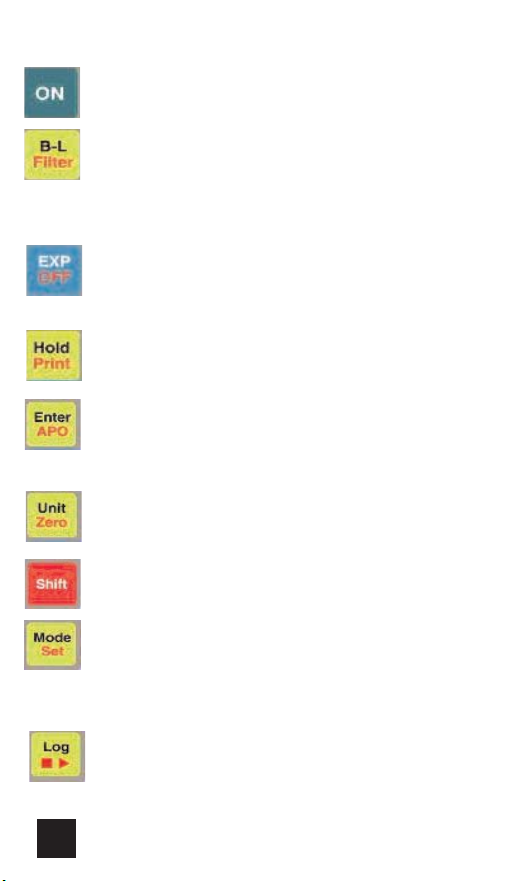
Press to turn the 665L on.
Press to activate the display backlight. Backlight
powers off after 15 seconds.
Press the SHIFT key first then this key to acti-
vate the digital filter. Use to smooth fast chang-
ing measurements.
Press to activate “blue” functions (Load, Save,
Min, Max). “EXP” will display when active.
Press the SHIFT key first, then this key to turn
the 665L off.
Press to activate/deactivate the display hold.
Press the SHIFT key first, then this key to print
readings to the optional A740 printer.
Press to select resolution and confirm menu
selections.
Press the SHIFT key first, then this key to turn
deactivate/activate auto power off.
Press to change the unit of measure.
Press the SHIFT key first, then this key to zero
the 665L prior to making a measurement.
Press to activate shift mode (red key functions).
Press to cycle through bottom display modes
(percent of fullscale, current time, number of
logged readings.
Press the SHIFT key first, then this key to acti-
vate EDIT mode.
Press to display number of logs made.
Press the SHIFT key first, then this key to acti-
vate/deactivate log mode.
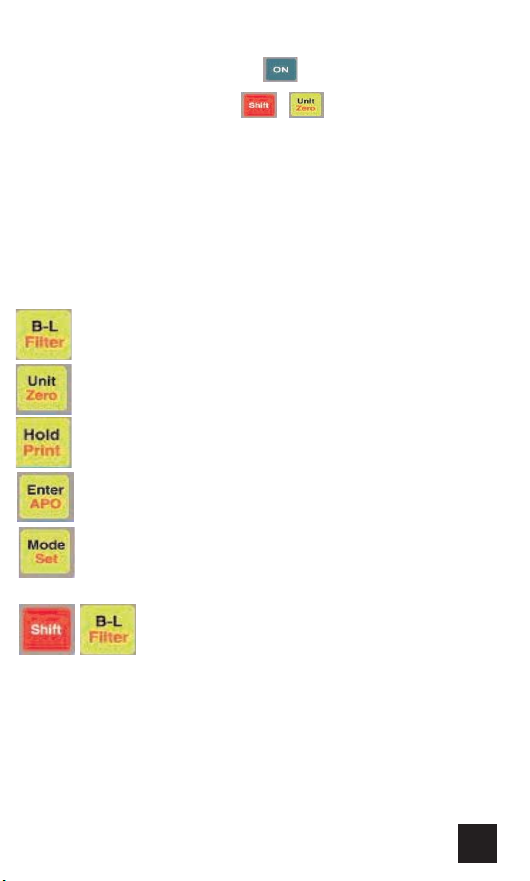
1. Turn the 665L by pressing
the
2. Zero the 665L by pressing
3. Connect the device under test to the “+” port of the 665L. If
a differential measurement is being made, connect the other
pressure source to the “-” port.
Note: Any pressure connected to the “-” port will be subtracted
from the “+” port and the result will be displayed.
4. Read the measurement in the display.
5. Remove pressure prior to diconnecting the lines from the
inputs.
9
E. Making a Measurement
Activates the display backlight. Backlight powers off
after 15 seconds.
key.
Press to change the unit of measure.
Press to activate/deactivate the display hold.
Press to select resolution.
Press to cycle the bottom display through cur-
rent time, ration in percent of reading compared
to full scale, and number of logged data (NUM)
Press the SHIFT key first then this key to acti-
vate the digital filter. Use to smooth fast chang-
ing measurements.
There are many other features such as data storage and log-
ging that can be used. Please see next sections.

10
Press to print readings to the optional A740
printer.
Press to save displayed readings. Data automat-
ically saved in one of 16 locations.
Press to display the minimum reading mea-
sured.
F. Saving Data
During a measurement data can be saved for retrieval later.
Follow these steps.
Press to display the maximum reading mea-
sured.
Press to display saved data. The stored data will
be shown in the main display and the storage
location will be dispalyed on the bottom display.
G. Loading Saved Data
While “EXP” is displayed pressing the key will cycle
the storage location up and pressing the key will cycle
the storage location down. This data can be printed also. Please
see section I.
H. MIN / MAX
I. Printing Data (requires A740 printer)
The 665L will display a 10 second countdown giving you time to
align the back holes approximately 4” away from the printer win-
dow. “Out” will display and a 9 second countdown will proceed
while printing takes place. Saved data can be printed also after
loading data as outlined in section H.
Indice
Altri manuali TPI Strumento di misura


