
Varimixer Cinnabon 40 Manuale utente

THE PROGRAMMABLE
CONTROL SYSTEM
MK-IV
User’s Manual


General descriptions
MODES
The system contains six different modes:
1. MANUAL MODE: The mode when the mixer is operated like a man-
ual controlled mixer. Instead of executing a programmed recipe, the
mixer is started and operated until it is manually shut off.
2. PROGRAMMING MODE: The mode where all programming and
editing takes place.
3. PROGRAM MODE: The mode where all programmed recipes are
executed.
4. FIXED MODE: A pure executional mode , mixer will only run the pro-
grammed recipes. Neither editing or speed/time overwriting can take
place. Manual mode is void.
5. RPMMODE: Computer displays the speed in actual R.P.M.
6. SPEED MODE: Computer displays the speed.
(speed 1, 2, 3 and 4)
1

The Keypad
The Keypad is used for entering data to the system.
ITEM FUNCTION EXPLANATION
1. Program No. Displays the program Number being executed.
2. Step Displays the step number being executed.
3. Speed Displays the set-speed.
4. Time Displays the elapsed time since start or
displays
the remaining time to shut down.
5. Text Area OVERLOAD:
MIxer cannot maintain set speed,
too much mix or speed set too high.
MIN SPEED: The mixer is running at absolute
minimum speed.
MAX SPEED:
The mixer is running at absolute
maximum speed.
READY:
The mixer is ready to start.
2

6. Enter Used for stepping through a program.
7. CLR
8. Speed up/down arrows.
9. Time up/down arrows.
10. Program
11. Pause
12. Numeric keys
13. Emergency Stop
Clears a flashing display.
Used for adjusting the the speed while the mixer
is running.
Used for adjusting the the time.
Used to enter/exit program-programming mode.
Pauses the mixer without losing recipe.
Used for setting time and speed.
Stops the mixer instantly.
14. Start
15. Stop
17. Green L.E.D.
16. Bowl Lift
Starts the mixer.
Stop and reset key - reduces the speed to
If available, used for raising and lowering the
Lights up when mixer is paused.
minimum and stops the mixer.
mixing bowl.
ITEM FUNCTION EXPLANATION
How to run the mixer manually.
R.P.M. Mode.
Enter the speed desired.
Push
Enter the time desired.
Push
Push
3

How to run the mixer manually.
SPEED Mode.
Enter the speed desired.
Push
Enter the time desired.
Push
Push
How to input a program.
A flashing display indicates that it is expecting the operator to key in a value.
A step is always a combination of speed and time.
An example is 100 R.P.M. for 5:00 minutes or 0 R.P.M. for 15 seconds (which is a 15 second pause)
Please note that the mixer will not
start automatically after a pause, the start button must be pushed
to proceed to the next step.
Up to 25 programs , each constisting of 9 steps , can be stored in memory.
A Sample Program
Program Number Step Speed Time
11
2
3
4
5
6
60
200
0
110
180
0
1:00
5:00
:20
4:00
2:00
0:00
“0” Speed and “0” Time in the last step
is mandatory. The control system will read it as a “end of pro
-
gram” mark.
4

To program a recipe.
Push
Push
Enter the speed desired.
“HOLD FOR 3SECONDS”
Repeat this process for as many as 9 steps per program, after the 9th step , the next program num
-
ber will display, ready to enter a new recipe.This will continue up to 25 programs.
Push
Push
Enter the time desired.
Example
To edit a recipe or to correct mistakes, use the same step above to enter the programming mode,
then push “ENTER” to reach the program/step that you wish to edit.
To delete a recipe, use the same step above to enter the programming mode, then push “ENTER” to
reach the program/step that you wish to erase. Enter “0” in speed and “0” in time in all steps.
5

To run a programmed recipe.
Push
Push
Enter the Program number.
Push
After the ENTER key has been pushed, the data in step 1 will be displayed along with the program
number.
After the last program step has been executed, the mixer will slow to minimum speed and shut off.
The mixer can be stopped at any time during a recipe by using the “PAUSE” button, the mixer will
slow to stop and the recipe will not be lost. To continue on with the same recipe, push “START”.
Fixed Mode
Fixed mode is basically designed for users who operate the same recipes over and over again with
-
out frequent updating.
The maximum numbers of programs available in fixed mode is reduced from 25 to 10.
Fixed mode is a purely executional mode, its not possible to adjust the speed or time while in this
mode.
The mixer will only run recipes that are programmed.
The advantage to this mode is that no one can “cheat” the programmed recipe.
The only applicable keys are START, STOP, PAUSE,BOWL LIFT, emergency stop and numeric
keys.
6

To enter “FIXED MODE”
Push
Push “99”
“HOLD FOR 3SECONDS”
Push
Push “1 2 3 4”
Push
Push the program number.
Push
To exit “FIXED MODE”
Push
“HOLD FOR 3SECONDS”
Push “1 2 3 4”
Push
7
Control Data for Program 26
Program 26 contains the control data required by the computer to operate. This data differs from
model to model.
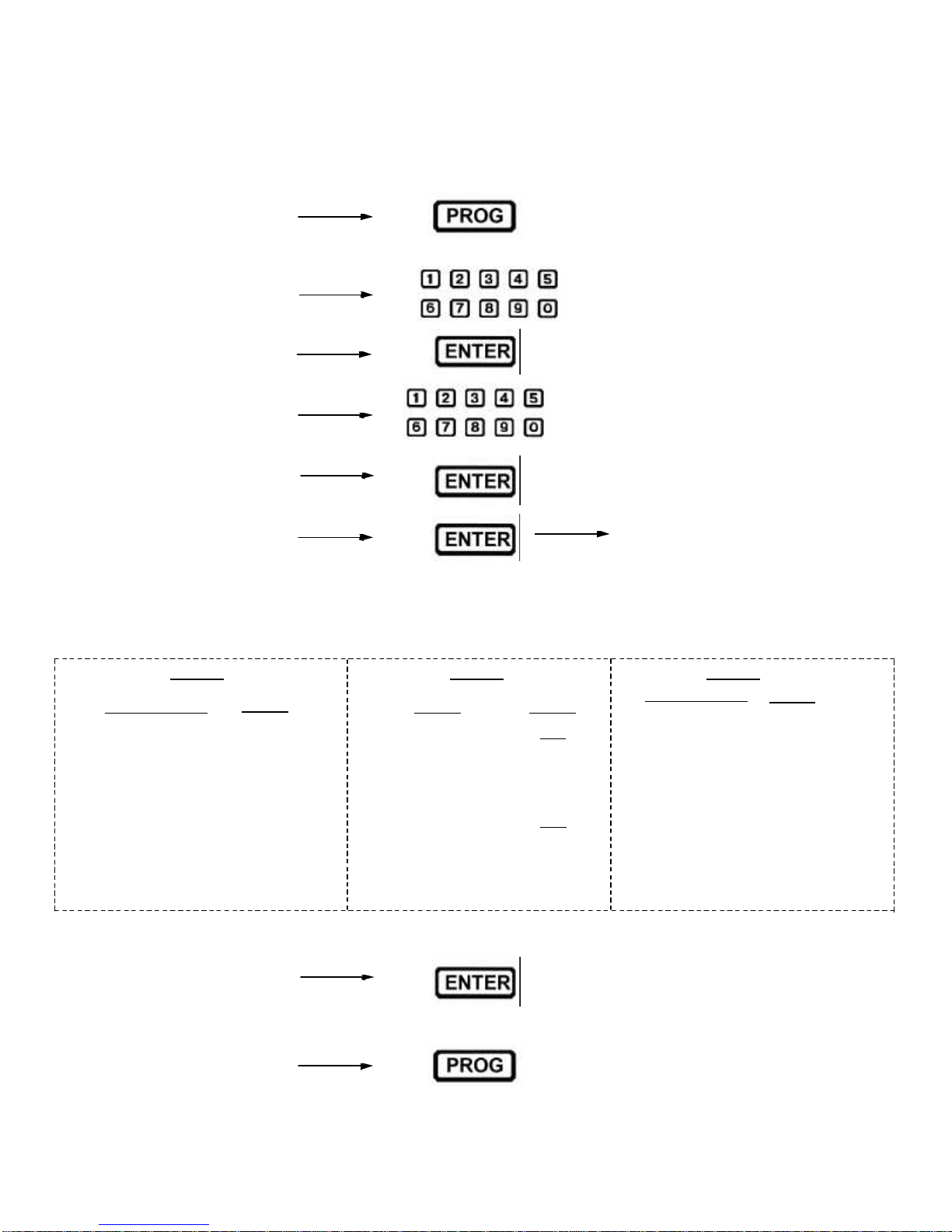
To access Program 26.
Push
“HOLD FOR 3SECONDS”
Push
Push “26”
Push “1 2 3 4”
Push
Push until you reach Step 7.
Enter the value on the following chart that matches the mixer model. Repeat for step 8 and 9.
Step 7
Mixer Model
W30
W40
W60
W80
W100
W150
Cinnabon 40
Cinnabon 60
Value
30
40
60
80
100
150
401
601
“SPEED MODE” :02
(Speeds 1-4)
“RPM” MODE :00
(Speeds RPM)
Step 8 Mixer Model
W30
W40
W60
W80
W100
W150
Krispy Kreme
Cinnabon 40
Cinnabon 60
Value
369
390
375
422
422
422
425
737
660
Step 9
Mode Value
OR
Push
Push
8
Questo manuale è adatto per i seguenti modelli
5
Indice


