
VIDAR DiagnosticPRO Edge Manuale utente

Installation guide for
DiagnosticPRO™Edge
Multi-film feeder
Serial numbers
380,000 to 389,999
19616-001 Rev. D DiagnosticPRO Edge Film Digitizer Installation Guide 2
© Copyright 2013 by VIDAR®Systems Corporation. All rights reserved.
Terms denoted by the trademark symbol (or ®) used in this publication are trademarks or
service marks registered in the United States or other countries.
NOTE
The digitizers do not include application specific software (Picture Archiving and Communications [PAC] system,
Teleradiology, Oncology Systems, or Computer Aided Detection [CAD] software). The manufacturer of the
application software will determine specific indications for use. These third-party software packages or complete
systems are approved separately from a regulatory perspective.
The digitizers are marketed as a component to application software development companies, who will
incorporate the digitizer into their respective PACS or Teleradiology, CAD system(s). The software developer is
ultimately responsible for detailing the Contraindications for the PACS System (or Teleradiology software
package) or Oncology Systems as a whole, including the digitizer.
365 Herndon Parkway
Herndon, VA 20170 U.S.A.
Sales: 1-800-471-SCAN or
1-800-471-7226
Email: sales@VIDAR.com
Phone: 1-703-471-7070
Fax: 1-703-471-7665
Internet: www.filmdigitizer.com
Technical Support:
1-800-471-SCAN or 1-703-471-7070
E-mail: medtech@VIDAR.com
Emergo Europe
Molenstraat15
2513 BH, The Hague
The Netherlands
Phone: +31 (0) 70.345.8570
Fax: +31 (0) 70.346.7299
E-mail: service@emergogroup.com

19616-001 Rev. D DiagnosticPRO Edge Film Digitizer Installation Guide 3
Caution: No operator-serviceable parts inside. Refer servicing to qualified personnel.
Achtung: Gehäuse nicht öffnen. Wartung uno reparatur nur durch eletrofachkräfte.
Attention: Aucune piece ne peut etre remplacee par l’utilisateur. Toute operation de
maintenance doit etre effectuee par une personne qualiee.
Atencion: Acceso interno solo autorizado a personal tecnico cualificado.
Attenzione: Non appire. Rivolgersi a personale qualificado.
Radio Frequency Emissions
This equipment has been tested and found to comply with the limits for a Class A digital
device, pursuant to Part 15 of the FCC Rules. These limits are designed to provide
reasonable protection against harmful interference when the equipment is operated in a
commercial environment. This equipment generates, uses, and can radiate radio
frequency energy and, if not installed and used in accordance with the instruction manual,
may cause harmful interference to radio communications. Operation of this equipment in
a residential area can cause harmful interference, in which case the user will be required
to correct the interference at his or her own expense.
Product compliance testing was conducted using VIDAR shielded cables. Modifications
to the digitizer or the VIDAR shielded cables or the use of cables other than those
available from VIDAR could void the user’s authority to operate the equipment.
Acceptable shipping conditions
Temperature: –18° to +60°C (0° to +140°F)
Relative humidity: 20% to 85%, non-condensing
Atmospheric pressure: 500 to 1060hPa (+18,000 to –1,200ft)
Operating conditions
Temperature: 10°C to 35°C (60°F to 95°F)
Relative humidity: 20% to 85%, non-condensing
Atmospheric pressure: 696 to 1013hPa (10,000 to 0 ft)
Electrical supply
Voltage: 100 to 240 VAC
Current: 0.75 to 1.5 A
Frequency: 47 to 63 Hz

19616-001 Rev. D DiagnosticPRO Edge Film Digitizer Installation Guide 4
Safety and compliance information
MEDICAL –GENERAL MEDICAL EQUIPMENT AS TO ELECTRIC SHOCK, FIRE
AND MECHANICAL HAZARDS ONLY IN ACCORDANCE WITH: CAN/CSA C22.2
No.601.1-M90, IEC 60601-1, UL 60601-1, ANSI/AAMI ES60601-1(2005, 3RD Ed.),
CAN/CSA-C22.2 No.60601-1(2008). IEC 60601-1:2005(3RD Ed.).
Accessory equipment connected to the analog and digital interfaces must be certified
according to the respective IEC standards (i.e. IEC 60950 for data processing equipment
and IEC 60601-1 for medical equipment). Furthermore all configurations shall comply
with the system standard IEC 60601-1-1 or IEC 60601-1 3rd edition.
Everybody who connects additional equipment to the signal input part or signal output
part configures a medical system, and is therefore responsible that the system complies
with the requirements of IEC 60606-1-1 or IEC 60601-1 3rd edition. If in doubt, consult
the technical services department or your local representative.
This product is rated for continuous use.
This product is in the Ordinary Equipment Class. It provides no protection against the ingress of water.
This product is not suitable for use in the presence of flammable anesthetic mixtures with air or with oxygen
or with nitrous oxide.
Class I Medical Device; No Applied Parts. This product provides Class I medical device protection against
electrical shock.
WARNING: To avoid the risk of electric shock, this equipment must only be connected to a supply mains with
protective earth.
Grounding reliability can only be achieved when the equipment is connected to an equivalent receptacle marked
“HOSPITAL ONLY” or “HOSPITAL GRADE”.
WARNING: Do not modify this equipment without authorization of the manufacturer.
Do not position the product so that it is difficult to disconnect the product from the mains power supply.
Mains power may be removed from the product by disconnecting the power cable at the rear of the product. The
Mains power may also be disconnected by unplugging the power cord from the external power supply adapter or
unplugging the power cord from the wall outlet.
Power cords used with this device in North America must be rated by Underwriters Laboratories for hospital use.
Power cords used with this device in Europe must meet the requirements of IEC 227 Designation 53 or IEC 245
Designation 53.
Correct and safe operation of the digitizer requires familiarity with
information that is not marked on the product. The following symbols
indicate that the operator should consult the manual for additional information:
This Class 1 LED device is safe under reasonably foreseeable conditions of
operation.
The LED illumination system consists of 20 Class 1 LEDs, a
mirror system to spread the light, and a diffuser to distribute
the light approximately uniformly across an area of 2.4 sq in
(15.5 sq cm). Light from the LED illuminator may be
indirectly observed in the digitizer’s film entry and exit areas.
5RA9

19616-001 Rev. D DiagnosticPRO Edge Film Digitizer Installation Guide 5
Contents
Intended Use.............................................................................................................................6
Unpack the digitizer..................................................................................................................7
1. Look for damage...........................................................................................................7
2. Unpack the shipping carton..........................................................................................8
3. Identify the parts.........................................................................................................11
Standard items............................................................................................................11
Optional items.............................................................................................................12
4. Identify important features..........................................................................................13
Power switch...............................................................................................................13
Rear panel...................................................................................................................13
5. If anything is missing..................................................................................................14
6. Record important information and activate your product warranty. ...........................14
Assemble the digitizer............................................................................................................15
Place the digitizer on a table .................................................................................................18
Final assembly........................................................................................................................19
Connect the USB cable and power supply........................................................................19
Install the exit tray..............................................................................................................20
Install Device Drivers for Windows 7...................................................................................21
1. Apply Power to the Digitizer and the PC.......................................................................21
About the VIDAR Drivers...................................................................................................22
2. Install the VIDAR Drivers...............................................................................................22
Install Device Drivers for Windows XP................................................................................29
1. Apply Power to the Digitizer and the PC.......................................................................29
About the VIDAR Drivers...................................................................................................30
2. Install the VIDAR Drivers...............................................................................................30
Appendix: Electromagnetic guidance..................................................................................38
Appendix: Patient Vicinity ....................................................................................................42
Appendix: Symbols...............................................................................................................43

19616-001 Rev. D DiagnosticPRO Edge Film Digitizer Installation Guide 6
Intended Use
The DiagnosticPRO Edge digitizer is used for making digital copies of medical x-ray film, including
printed and radiographic film. The target users of these devices are medical professionals or trained staff
for use as secondary capture images for consultation, review and final interpretation.
The devices are indicated for the digitization of mammography images for review and analysis, but not as
the sole basis for screening or diagnosis.
Note:
The DiagnosticPRO Edge with ClinicalExpress or other DICOM standard
software meets or exceeds ACR and DICOM standards for use of secondary
capture images for consultation, review and final interpretation. Images
captured as DICOM MG are to be used as reference or comparison only, and
not for primary diagnosis.

19616-001 Rev. D DiagnosticPRO Edge Film Digitizer Installation Guide 7
Unpack the digitizer
In this chapter, you will:
Unpack and inspect the digitizer’s parts.
Identify the digitizer’s parts.
1. Look for damage.
Before unpacking the DiagnosticPRO Edge film digitizer, examine the shipping carton
for damage.
If the carton is damaged:
Notify the shipper immediately.
Take photographs of the damage.
Send pictures and description of damage to m[email protected].
Notify VIDAR Medical Support at 1-703-471-7070.
19616-001 Rev. D DiagnosticPRO Edge Film Digitizer Installation Guide 8
2. Unpack the shipping carton.
IMPORTANT: Save all packing materials. If you need to ship
the digitizer later, you should repack the digitizer in the original
materials by reversing the procedure described here. Failure to
properly pack, or failure to use VIDAR authorized shipping
materials, will void the product’s warranty, and will likely result
in costly repairs.
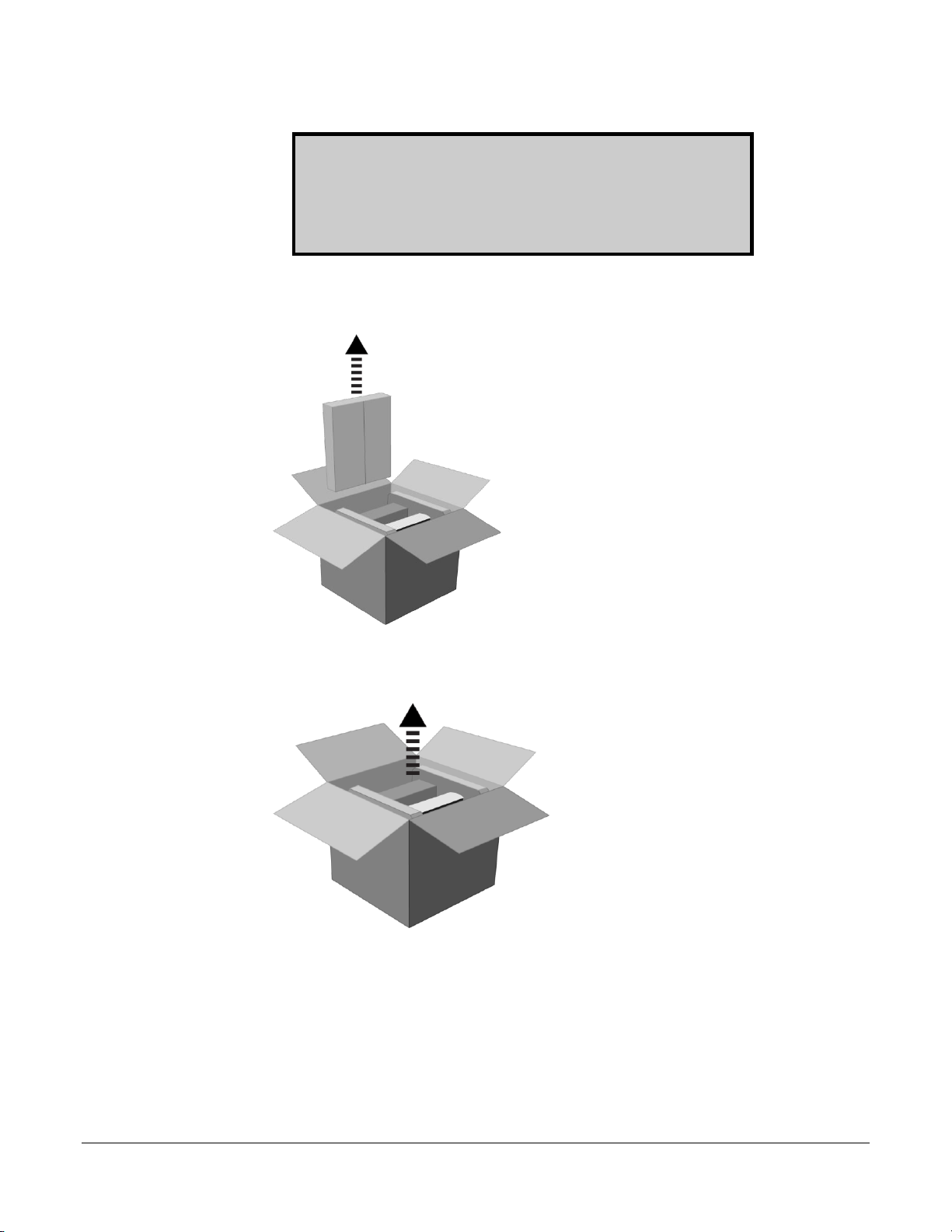
a. Remove the accessory box.
b. Lift the digitizer, feeder box and foam end caps—together—out of the shipping
container.

19616-001 Rev. D DiagnosticPRO Edge Film Digitizer Installation Guide 9
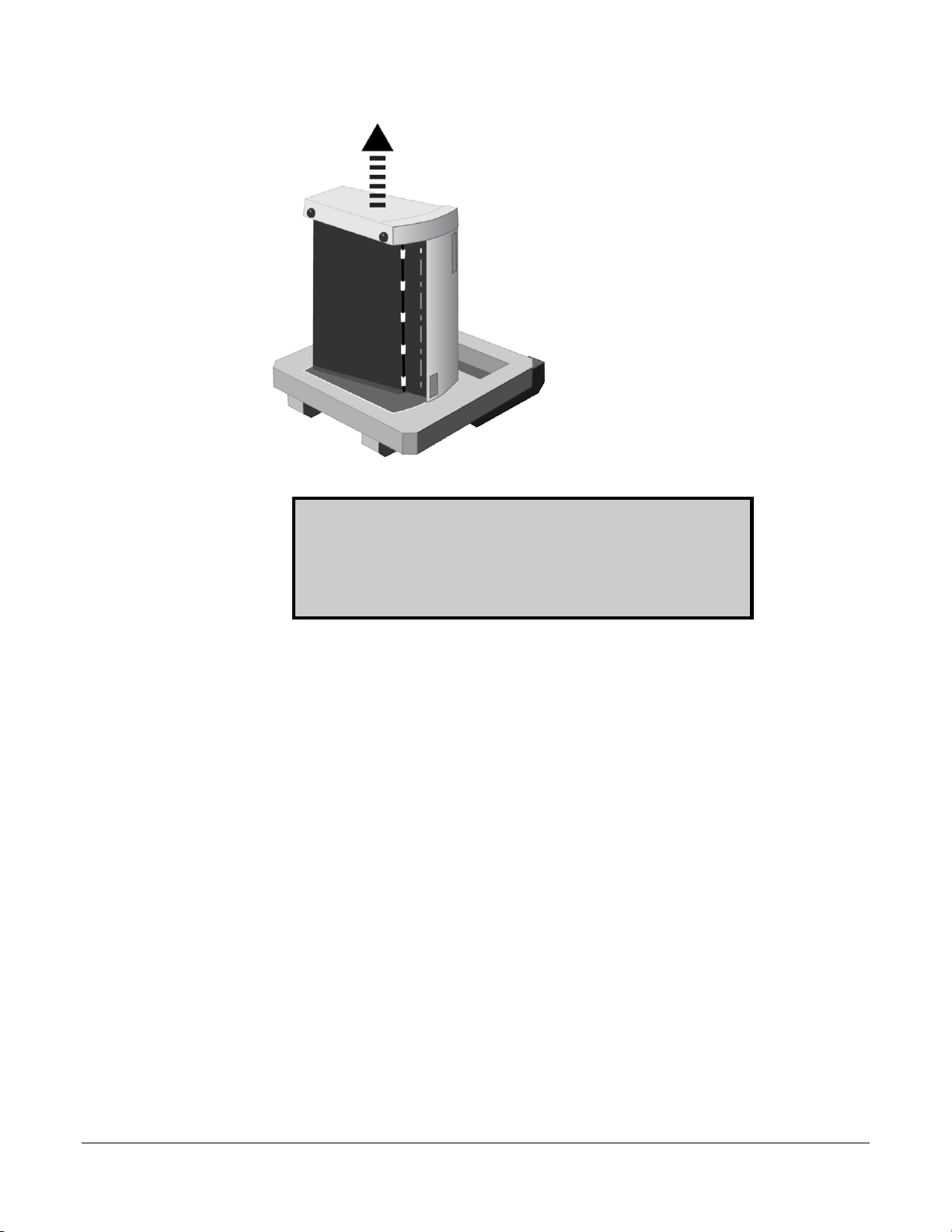
c. Place the group on one foam end cap. Lift off the upper foam end cap.
d. Remove the feeder box from the lower end cap.
19616-001 Rev. D DiagnosticPRO Edge Film Digitizer Installation Guide 10
e. Remove the digitizer from the lower end cap.
IMPORTANT: Save all packing materials. If you need to ship
the digitizer later, you should repack the digitizer in the original
materials by reversing the procedure described here. Failure to
properly pack, or failure to use VIDAR authorized shipping
materials, will void the product’s warranty, and will likely result
in costly repairs.
Altri manuali per DiagnosticPRO Edge
2
Indice
Altri manuali VIDAR Strumento di misura


