
WIKA CTH6500 Manuale utente

Operating Instructions
Betriebsanleitung
GB
D
Hand Held Thermometer, Model CTH6500
Hand Held Thermometer, Model CTH6500/CTH65I0
Handheld Thermometer, Typ CTH6500/CTH65I0

GB
D
WIKA Operating Instructions CTH65002
2079988.1 09/2011 GB/D
Hand Held Thermometer Page 3 - 32
Handheld-Thermometer Seite 33 - 61

GB
Hand Held Thermometer
CTH6500
1. General 4
1.1 General safety instructions 5
1.2 Safety instructions for Ex-operation 6
1.3 Operation and maintenance advice 7
1.3.1 Battery changing 7
1.3.2 Battery changing of the CTH65I0 7
1.3.3 Connecting/Changing temperature sensors 8
1.3.4 Maintenance 8
1.4 Operation 9
1.5 Switching On and OFF 9
2. Menu structure and settings 10
2.1 Menu structure 10
2.1.1 Changing the measuring units °C and °F respective
% rH, td or g/m³
11
2.1.2 Probe selection [Prob] 11
2.1.3 Dierence temperature activated/de-activated [Lin2]
(only 2-channel instruments)
13
2.1.4 Calibration function [CAL] 13
2.1.4.1 Calibration function of the combination probe [CAL]
(humidity/temperature)
16
2.1.5 Printer port [Pr€En] 17
2.1.6 Channel activation/[Chnl] (only 2-channel instru-
ments)
18
2.1.7 Enter Area for volume ow [ArEA] 18
2.1.8 Memory SETUP [Log] 19
2.2 Recalling data from the memory (HOLD, HAX, MIN,
AVE)
19
2.3 Measuring rate (FAST-mode) 20
2.4 AUTO-OFF function 20
2.5 Special-functions 21
2.5.1 Ohm/Micro volt/Volt/Hertz-display 21
2.5.2 Zero adjustment (Zero) 21
2.5.3 Deactivation of the 2nd channel (Toggle) 21
3. Interface Protocol RS-232 22
4. Connector Layout 23
5. Record of Probe calibration 26
6. Error Codes 27
7. Specications 28
8. Unit Diagramm 30
9. Accessories 31
10. Ex-Certicate 31
Contents
2079988.1 09/2011 GB/D
WIKA Operating Instructions CTH6500 3
Information
This symbol provides you with information,
notes and tips.
Warning!
This symbol warms you against actions
that can cause damage to persons or to the
instrument.

GB
Hand Held Thermometer
CTH6500
2079988.1 09/2011 GB/D
WIKA Operating Instructions CTH65004
1. General
In the following chapters detailed information on the CTH6500
and CTH65I0 Hand Held Thermometer and its proper use can be
found.
Should you require further information, or should there be
problems which are not dealt within detail in the operating instruc-
tions, please contact the address listed on the last page.
Factory calibration of the instrument is according to relevant inter-
national standards.
The warranty period for the CTH6500 and CHT65I0 Hand Held
Thermometer is 24 months according to the general terms of
supply of ZVEI.
The guarantee is void if the appliance is put to improper use or
if the operating instructions are not observed or if an attempt is
made to open the appliance.
We also point out that the content of these operating instructions
neither forms part of an earlier or existing agreement, assurance
or legal relationship nor is meant to change these. All obliga-
tions of WIKA Alexander Wiegand SE & Co. KG result from the
respective sales contract and the general business terms of WIKA
Alexander Wiegand SE & Co. KG.
WIKA is a registered trade mark of WIKA Alexander Wiegand SE
& Co. KG. Names of companies or products mentioned in this
handbook are registered trade marks of the manufacturer.
We reserve the right to eect reasonable changes on the basis of
technical improvements.
Any reproduction of this manual or parts thereof by any means is
prohibited.
© 2005 Copyright WIKA Alexander Wiegand SE & Co. KG

GB
Hand Held Thermometer
CTH6500
2079988.1 09/2011 GB/D
WIKA Operating Instructions CTH6500 5
1.1 General safety instructions
This device has been designed and tested in
accordance with the relevant safety regula-
tions for electronic devices. However, its
trouble-free operation and reliability cannot
be guaranteed unless the standard safety
measures and special safety advise given
in this manual is followed when using the
device.
■
Trouble-free operation and reliability of the device can only
be guaranteed so long as the device is not subjected to any
climatic conditions other than those stated under chapter
“7. Specication“.
■
The device and sensors must be handled with care (don‘t
throw, hit, etc.). Protect plugs and sockets from contamination.
■
Protect plugs and sockets from contamination.
■
For cleaning the instrument please do not use abrasive cleaner
but a dry or wet piece of cloth.
■
Do not use force to connect the probe or interface plugs in. The
interface plug is dierent form the probe plug.
■
If no sensor is connected to the instrument while switching on
“open” shows on the display. (Please refer to chapter “6. Error
codes”).
■
Please store the measuring insturment in a dry and clean place.
Operator safety may be at risk if
■
there is visible damage to the device
■
the device is not working as specied
■
the device has been stored under unsuitable conditions for an
extended period of time.
If there is any doubt, please return the device to the manufacturer
for repair or maintenance.
■
Customers must not attempt to alter or repair the device
themselves. Please return the device to the manufacturer for
any repair or maintenance.

GB
Hand Held Thermometer
CTH6500
Classe of tempera-
ture
Measuring point of tempera-
ture
T4 135 °C
T3 185 °C
T2 280 °C
T1 430 °C
2079988.1 09/2011 GB/D
WIKA Operating Instructions CTH65006
1.2 Safety instructions for Ex-operation
Additional operating instruction:
(To be read in conjunction with the general safety
instructions in Section 1.1)
■
Battery operation:
Only use batteries which are approved from
the manufacturer! (See listing under chapter
“1.3.1 Battery changing).
■
The battery must not be changed within the
hazardous area.
■
Power supply operation
It is not allowed to use a power pack.
■
Temperature probes
It is only allowed to use Pt100-probes which are supplied from
the manufacturer for use in hazardous areas. The following
temperatures depending on the temperature class are admis-
sible at the measuring point (measuring probe):
■
Appears of defects
If there is any reason to suspect that the safety of the equip-
ment has been aected then it must be immediately withdrawn
from use and precautionary measures taken in order to prevent
any further use of the equipment in hazardous area until such
time that all necessary checks and repairs have been carried
out.
It is not allowed to open the instrument in hazardous areas.
■
erial Interface
Is is not allowed to use the RS-232 port.
■
Ex-operation
Within the hazardous area the instrument may only be operated
provided it is tted with the specied accompanying leather
case.
■
Temperature range
In case of operation in a potentially non-explosive atmosphere,
the temperature ranges indicated in the manufacturer‘s operat-
ing instructions must apply. The instrument may not be operat-
ed below 0 °C. Permissible ambient temperature: 0 °C ... 40 °C

GB
Hand Held Thermometer
CTH6500
2079988.1 09/2011 GB/D
WIKA Operating Instructions CTH6500 7
Additional Ex-safety instructions:
Please adhere to the operating instruc-
tions and also the relevant local regulations
regarding the use of electrical equipment for
hazardous areas (e.g. VDE 0165).
1.3 Operation and maintenance advice
1.3.1 Battery changing
If the display shows the “BAT” segment, the battery needs chang-
ing. After showing the “BAT” segment the instrument has approx.
1 hour of battery life remaining.
A 9 Volt Dry-cell battery is used for the instrument power supply. To
change the battery, switch o the instrument and open the battery
cover on the rear of the instrument. Remove and disconnect the
battery from the instrument. Connect a new 9 V battery to the plug
and put the battery back into the instrument.
To protect the environment please don’t dispose
of batteries with household waste, but use
separate disposal.
If the device is not going to be used for some time, we advise that
the battery is removed.
1.3.2 Battery changing of the CTH65I0
The exchange of this maintenance element
may only be carried out outside of the
hazardous area. Take care and ensure that
when changing the battery, that only those
in the listed operating instructions are used.
The use of any other type of battery is strictly
forbidden in that it will invalidate the Ex-data
certication.
Professional Alkaline Battery Procell (Duracell)
Duracell Alkaline (Duracell)
Maximum Alkaline (Rayovac)
Everady Alkaline Energizer (Everady)
GP Super Alkaline Battery ISA (Gold Peak)
GP 15F8K Rechargeable (Gold Peak)
or Batteries which are approved according EN 50 020
chapter 10.9

GB
Hand Held Thermometer
CTH6500
2079988.1 09/2011 GB/D
WIKA Operating Instructions CTH65008
1. In order to open the battery compartment rst remove the
leather case.
2. Now the battery cover on the back side of the case can be
opened.
3. Then you remove the supply element.
4. After exchanging the battery ret the leather case in order to
use the equipment in the hazardous area.
Attention: By closing the battery compartment
please be attend not to damage the battery cable.
1.3.3 Connecting/Changing temperature sensors
■
Only use the delivered temperature sensors! For a sensor
exchange, switch o the instrument. Plug in the sensor before
switching on the instrument, or otherwise it may occur that the
sensor is not properly identied by the instrument.
Digital indicator and temperature sensor are connected using
a discrete connecting cable. When changing the temperature
sensor, always connect and disconnect at the sensor end of the
cable.
To connect the sensor, rotate the plug till it locates in the guide
slot, allowing it to plug in.
Stecker nicht verkantet anstecken. If the plug is correctly located,
it will slide in smoothly. To disconnect the sensor hold it by the plug
to release the connector lock. Do not pull the cable to release it.
1.3.4 Maintenance
■
Digital indicator and sensors are manufactured using solid-
state technology, and contain no moving parts which could
wear. If the instrument housing has been opened, the warranty
becomes invalid.
■
Cleaning
For cleaning the instrument please do not use aggressive
cleaners but a dry or wet piece of cloth.
■
Storage
The CTH6500 Measuring Instrument must be stored in a
dry and dust free environment. The ambient temperature for
storage must be between -10 °C and +50 °C.

GB
Hand Held Thermometer
CTH6500
2079988.1 09/2011 GB/D
WIKA Operating Instructions CTH6500 9
■
Disposal
WIKA provides for the correct disposal of used CTH6500/
CTH65I0 Digital Insturment. Simply return the Measuring Instru-
ment carriage paid to WIKA.
1.4 Operation
Before switching on the instrument, connect the probe/s to the
instrument and insert the battery (Please refer to chapter “1.3.1
Battery changing“). A number on the instrument’s housing marks
each port.
1.5 Switching ON and OFF
The instrument is switched On or O by pressing the ON/OFF
key. After switching on the instrument indicates a full segment
test for 1.5 sec., afterwards the instrument shows the calibration-
code and the adjusted measurement category for channel 1.
(Only 2-channel instruments: After a further 1.5 sec. the instru-
ment shows the calibration-code and the adjusted measure-
ment category for channel 2.) in the instrument then reverts to
measurement mode, indicating the actual measurement value (for
example: temperature). All instruments display the measurement
value of channel 1 in the top display line (large digits). Directly
below you will see the trend bargraph. For 2-channel instruments
the meas ured value of Channel 2 is displayed on the bottom line
(small digits).
Fig 1: Example of display after switching on.
channel 1
Line 1: [oFF P = calibration code of channel 1
according to standard linearization (DIN), probe
selection of channel 1 = Pt100.
channel 2
Line 2: [oFF P = calibration code of channel 2
according to standard linearization (DIN), probe
selection of channel 2 = Pt100.
On all instruments you can select the measure-
ment category (chapter “2.1.2 Probe selection
[Prob]”) according to the model version. Instru-
ments that are delivered with only one probe have
the correct measurement category preset. For all
other cases please check chapter “2.1.2 Probe
selection [Prob]” for the correct set-up.
1
2
GB
Hand Held Thermometer
CTH6500
Unit Prob Lin2 CAL PrEn Chnl ArEA Lo6
°C P T1-T2 OFF OFF OFF c OFF
°F J oP1 ON ON m ON
m/s K oP2
%rh L
g/m³ N
°C td R
°F td S
Pa T
hPa RH
m³/s D
Pr
H
2079988.1 09/2011 GB/D
WIKA Operating Instructions CTH650010
2. Menu structure and settings
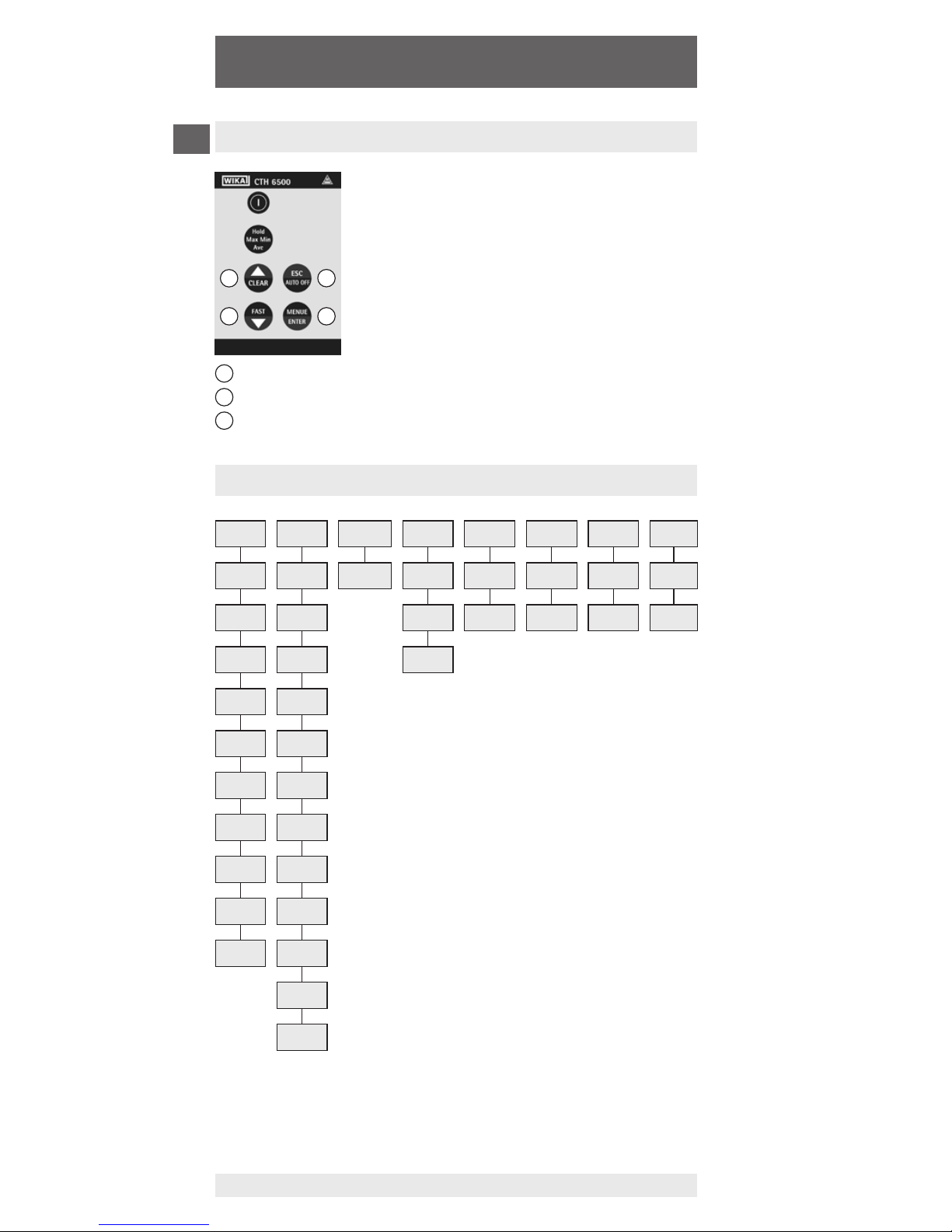
Settings of measurand, calibration data,
channel selection, etc. have to be done
according to the menu structure. You access
the main menu by pressing [ENTER/MENUE].
You can then select [▲▼] your required menu
item via the up and down keys. Press [ESC] to
return to the measuring mode.
2.1 Menu structure
up and down key
key [ESC]
key [ENTER/MENUE]
2
31
1
1
3
2
Questo manuale è adatto per i seguenti modelli
1
Indice
Lingue:
Altri manuali WIKA Termometro

WIKA
WIKA TF45 Manuale utente

WIKA
WIKA F73.100 Manuale utente

WIKA
WIKA CTH7000 Manuale utente

WIKA
WIKA CTH7000 Manuale utente

WIKA
WIKA TR10-A Manuale utente

WIKA
WIKA R52.100 Manuale utente

WIKA
WIKA TR57-M Manuale utente

WIKA
WIKA Intelli Therm TGT73.100 Manuale utente

WIKA
WIKA 55 Series Manuale utente

WIKA
WIKA 53 Series Manuale utente

WIKA
WIKA TR12 Series Manuale utente

WIKA
WIKA CTH 6200 Manuale utente

WIKA
WIKA TR33 Manuale utente

WIKA
WIKA DiwiTherm TR75 Manuale utente

WIKA
WIKA 1/4000 Manuale utente

WIKA
WIKA R5502 Manuale di installazione

WIKA
WIKA CTH6300 Manuale utente

WIKA
WIKA CTR3000 Manuale utente

WIKA
WIKA TF44 Manuale utente

WIKA
WIKA IntelliTHERM TGT73 Manuale utente


