5. Mounting the Control Box Assembly
6. Connecting the Zone Dampers
7. Connecting the AC
ŸMount the Control Box Assembly in the roof space in a location central to all of the Zone
Dampers, ideally near a ceiling access panel.
ŸMount in a well ventilated area and as far away from the roof surface as possible.
ŸThe Control Box Assembly should be screwed to the roof structure at a level to provide
easy access for the connection of cables.
DO NOT cover the Control Box Assembly with insulation
DO NOT mount below water heaters.
DO NOT mount near or below water pipes.
DO NOT mount near power cables or other sources of electrical noise.
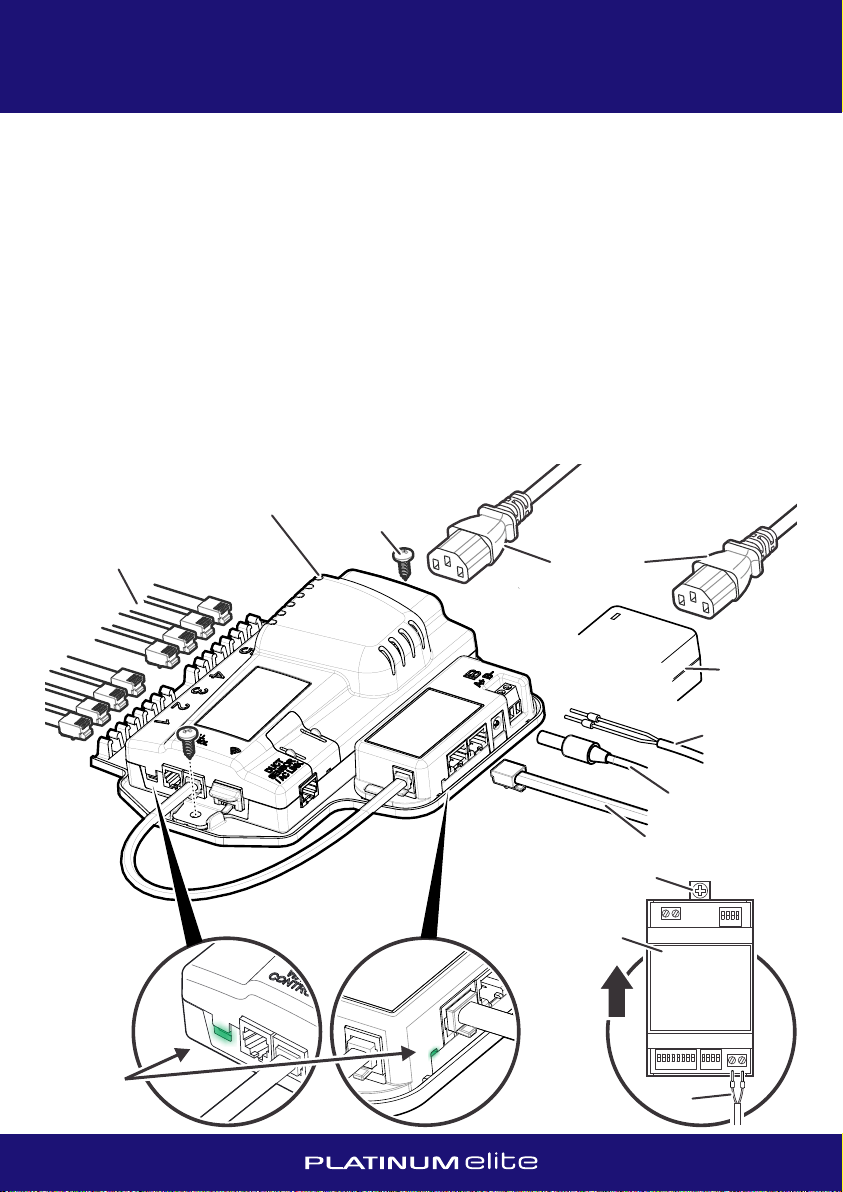
ŸPlug in the DC power supply to the Modbus Adapter socket and connect the twin plug IEC
power cord to the Control Box Assembly and the DC Power Supply.
ŸPlug in the Coms Cable from the wall mounted Tablet.
Ÿ
ŸThe last step is to plug in the power cord to a standard power outlet. The power outlet
must be fitted by a licenced electrician.
DO NOT power up the Control Box Assembly until all connections are made.
ŸPlug in the Zone Damper cables to the Control Box, starting at position number 1 and
continuing with adjacent consecutive sockets.
Ÿ
ŸRecord the position and size of each Zone Damper on the record sheet in the back of this
manual, noting which, if any, are designated as Relief Zones.
It is recommended to use an off-the-shelf cable tester to check the Coms Cable prior to
installation and in particular, after being pulled through a wall cavity.
Only Zone Damper cables and joiners (if necessary) supplied by Air Diffusion Agencies
must be used. It is recommended to use an off-the-shelf cable tester to check Zone
Damper cables prior to installation.
Once
the AC is successfully commissioned, turn off power and disconnect standard AC Wall
Controller from AC Indoor Unit if it’s not going to be used. For more information r
Ÿ
All AC systems must be initialised with a standard AC Wall Controller connected to the AC
Indoor Unit to complete necessary field settings and to confirm the AC runs normally.
efer to the
relevant brand AC Commissioning Notes provided and the Platinum Elite Gateway
instruction sheet. In general, to connect the AC to the Zone Control System:
Ensure power is off and refer to the relevant brand AC Control Wiring Diagrams to connect
the Platinum Elite Gateway.
MOUNTING THE CONTROL BOX CONNECTING THE AC
INSTALLATION MANUAL
45
240VAC
Power Cord
Control Box Assembly
Zone Damper Cables
Mounting Screw
Coms Cable (to Tablet)
24VDC
Power
Supply
From 24VDC
Power Supply
AC Link Cable
to Gateway
Ÿ
Ÿ
Ÿ
All Gateways require the 2-core AC Link Cable (PETCW) for the A+B- connection to the
Control Box Assembly.
ŸIt is recommended to mount the Gateway vertically, using the pull-out mounting tabs
provided and as far from the roof surface as possible.
ŸRefer to DIP switch settings (if applicable) on the AC Control Wiring Diagrams.
After completing wiring and setting the DIP switches, power up the system. AC unit,
Platinum Elite Gateway and Platinum Elite Zone Control System can be powered up at the
same time, but if powered up separately, ensure AC unit and Platinum Elite Gateway are
on before the Platinum Elite Zone Control System.
The system should automatically detect the Platinum Elite Gateway during the setup
process. (If the Gateway is added after the initial setup process, on the Zone Setup screen
it will be necessary to perform a ‘Recheck’ to allow the Gateway to be detected.) Follow
the onscreen prompts to complete the AC setup.
LED light
indicates
power
Mounting Screw
AC Link Cable to
Control Box Assembly
AC Link Cable to
Control Box Assembly
A+B-
Platinum Elite
Gateway
Platinum Elite
Gateway
UPUP