Anolis Robin MiniMe Manuale utente

1
Version 1.6

2
Table of contents
1. Safety instructions ......................................................................................................... 3
2. Fixture exterior view ...................................................................................................... 5
3. Installation....................................................................................................................... 6
3.1 Connection to the mains ............................................................................................ 6
3.2 Rigging the xture ...................................................................................................... 7
3.3 Positioning the Robin MiniMe .................................................................................... 8
3.4 Using the mounting bracket ................................................................................... 10
3.5 Installing the wide-angle lens module ..................................................................... 11
3.6 DMX-512 connection................................................................................................ 12
3.7 Ethernet connection ................................................................................................. 13
3.8. Wireless DMX operation ......................................................................................... 14
4. Control menu map........................................................................................................ 15
5. Control menu ............................................................................................................... 18
5.1 Addressing (DMXA) ................................................................................................. 18
5.2 Fixture information (Info) .......................................................................................... 18
5.3 Personality (Pers)..................................................................................................... 19
5.4 Manual Control (Manual).......................................................................................... 20
5.5 Stand-alone (St Alone)............................................................................................. 20
5.6 Reset (Reset) ........................................................................................................... 20
5.7 User Media (User Media) ......................................................................................... 21
5.8 Special functions (Special)....................................................................................... 22
6. Keystones ..................................................................................................................... 23
7. Using external HDMI input........................................................................................... 24
8. Error and information messages ................................................................................ 25
9. Technical Specications.............................................................................................. 26
10. Maintenance and cleaning......................................................................................... 31
10.1 Replacing a fuse .................................................................................................... 31
11. ChangeLog ................................................................................................................. 32
Robin MiniMe

3
The Robin MiniMe was not designed for merged projection as due to
the nature of the light source, each projector can look slightly different.
FOR YOUR OWN SAFETY, PLEASE READ THIS USER MANUAL CAREFULLY
BEFORE POWERING OR INSTALLING YOUR ROBIN MiniMe !
Save it for future reference.
This device has left our premises in absolutely perfect condition. In order to maintain this condition and to
ensure a safe operation, it is absolutely necessary for the user to follow the safety instructions and warning
notes written in this manual.
The manufacturer will not accept liability for any resulting damages caused by the non-observance of this
manual or any unauthorized modication to the device.
Please consider that damages caused by manual modications to the device are not subject to warranty.
The Robin MiniMe was designed for indoor use and it is intended for
professional application only. It is not for household use.
1. Safety instructions
DANGEROUS VOLTAGE CONSTITUTING A RISK OF ELECTRIC SHOCK IS PRESENT WITHIN THIS
UNIT!
Make sure that the available voltage is not higher than stated on the rear panel of the xture.
This xture should be operated only from the type of power source indicated on the marking label. If you are
not sure of the type of power supplied, consult your authorized distributor or local power company.
Always disconnect the xture from AC power before cleaning, removing or installing the fuses, or any part.
The power plug has to be accessible after installing the xture. Do not overload wall outlets and extension cords
as this canresult in re or electric shock.
Do not allow anything to rest on the power cord. Do not locate this xture where the cord may be damaged by
persons walking on it.
Make sure that the power cord is never crimped or damaged by sharp edges. Check the xture and the power
cord from time to time.
Refer servicing to qualied service personnel.
This xture falls under protection class I. Therefore this xture has to be connected to
a mains socket outlet with a protective earthing connection.
Do not connect this xture to a dimmer pack.
LED light emission. Risk of eye injury. Do not look into the beam at a distance of less
than 2 meters from the front surface of the product. Do not view the light output with
optical instruments or any device that may conncentrate the beam
If the xture has been exposed to drastic temperature uctuation (e.g. after transportation), do not switch it on
immediately. The arising condensation water might damage your device. Leave the device switched off until
it has reached room temperature.
Do not shake the xture. Avoid brute force when installing or operating the xture.

4
This xture was designed for indoor use only, do not expose this unit to rain or use near water.
When choosing the installation spot, please make sure that the xture is not exposed to extreme heat, moisture,
dust or entertainment smoke (haze)
Air vents and slots in the xture´s head and base are provided for ventilation, to ensure reliable operation of
the device and to protect it from overheating.
Do not block the light output with any object when the xture is under operation.
The openings should never be covered with cloth or other materials, and never must be blocked.
This xture should not be placed in a built-in installation unless proper ventilation is provided.
Only operate the xture after having checked that the housing is rmly closed and all screws are tightly faste-
ned.
Always use a secondary safety cable when mounting this xture.
Do not block the front objective with any object when the xture is under operation.
The xture becomes very hot during operation. Allow the xture to cool approximately 20 minutes prior to
manipulate with it.
Operate the xture only after having familiarized with its functions. Do not permit operation by persons not
qualied for operating the xture. Most damages are the result of unprofessional operation!
Please use the original packaging if the xture is to be transported.
Please consider that unauthorized modications on the xture are forbidden due to safety reasons!
If this device will be operated in any way different to the one described in this manual, the product may suffer
damages and the guarantee becomes void. Furthermore, any other operation may lead to dangers like short-
circuit, burns, electric shock, crash etc.

5
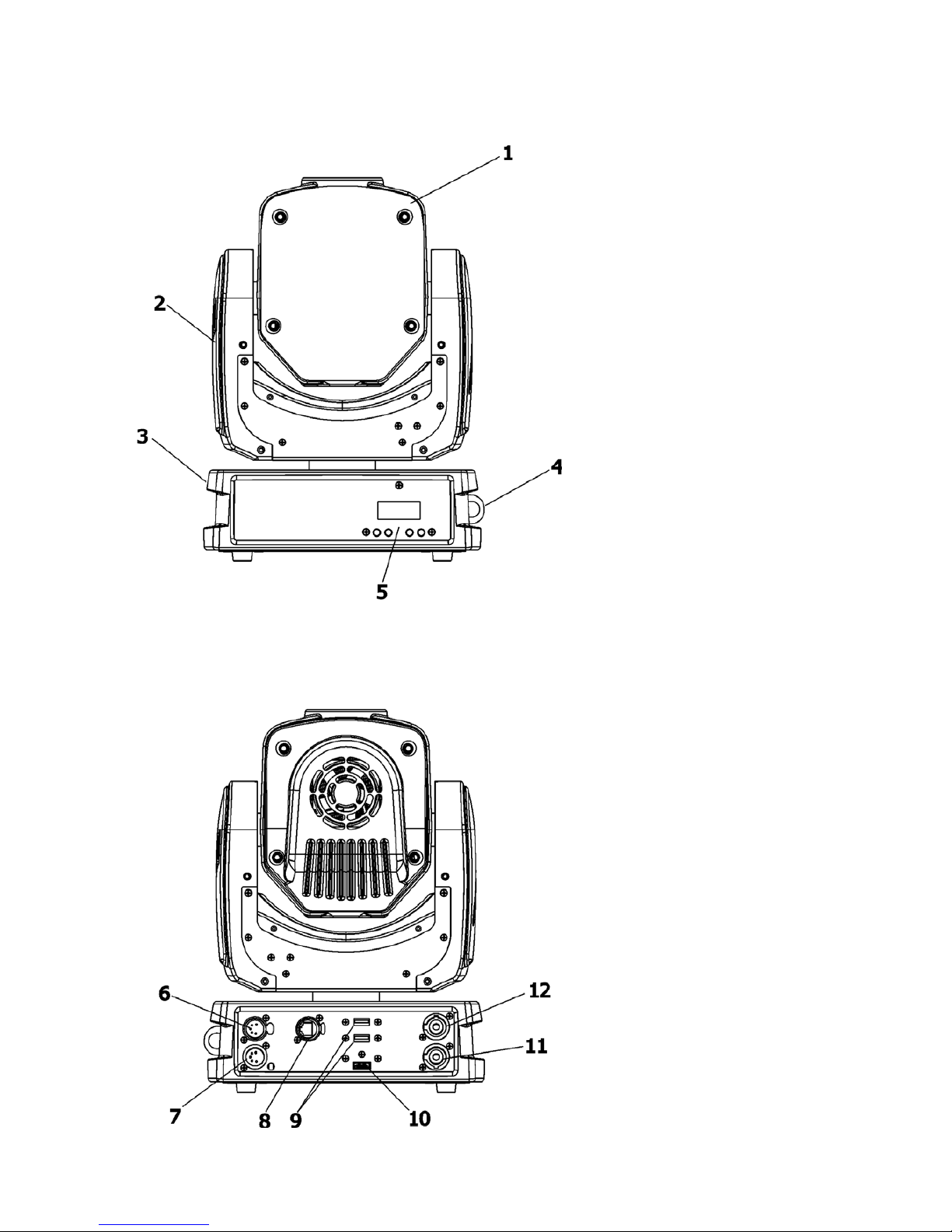
2. Fixture exterior view
6 - DMX Out (5-pin XLR)
7 - DMX In (5-pin XLR)
8 - Ethernet (RJ45)
9 - 2x USB input
10 - HDMI input
11 - Power Input
12 - Power output
1- Moving head
2 - Arm
3 - Base
4 - Attachment point for safety cable
5 - Control board

6
3. Installation
Fixtures must be installed by a qualied electrician in accordance with all
national and local electrical and construction codes and regulations.
3.1 Connection to the mains
For protection from electric shock, the xture must be earthed!
The Robin MiniMe is equipped with auto-switching power supply that automatically adjusts to any 50-60Hz AC
power source from 100-240 Volts.
Install a suitable plug on the power cord (if it is needed), note that the cores in the power cord are coloured
according to the following table. The earth has to be connected!
If you have any doubts about proper installation, consult a qualied electrician.
Core (EU) Core (US) Connection Plug Terminal Marking
Brown Black Live L
Light blue White Neutral N
Yellow/Green Green Earth
This device falls under class one and must be earthed (grounded)!
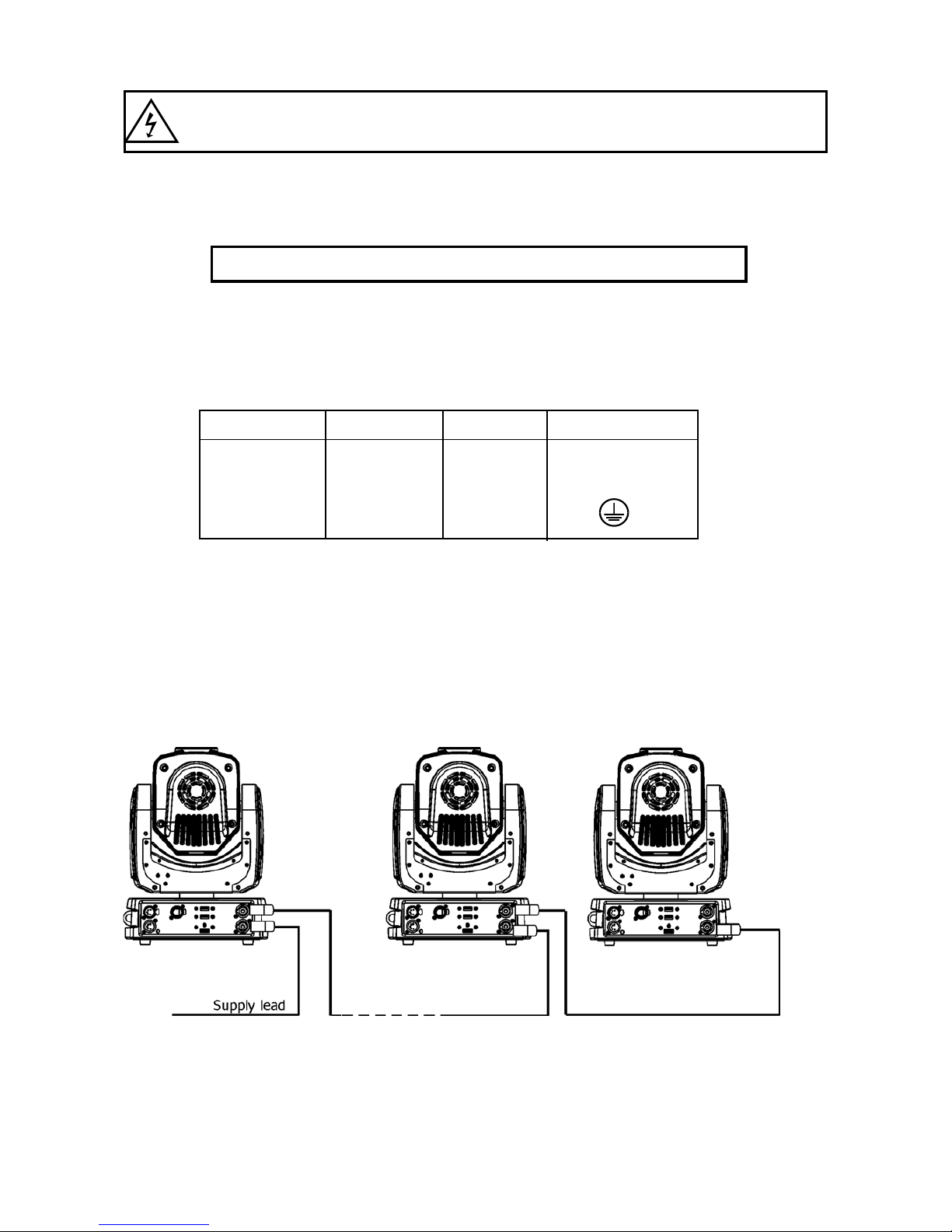
Design of the Robin MiniMe allows to connect several xtures to AC mains power in one interconnected daisy
chain using power input and throughput connectors. Needed daisy chain cords are stated in the chapter
“Technical specications “
The max. number of connected xtures depends on the AC mains power voltage:
19 xtures at power supply= 230V
16 xtures at power supply= 208V
10 xtures at power supply= 120V
Do not overload the supply line and the connecting leads.
Wiring and connection work must be carried out by qualied staff!

7
3.2 Rigging the xture
A structure intended for installation of the xture (s) must safely hold weight of the xture(s) placed on it. The
structure has to be certicated to the purpose.
The xture (xtures) must be installed in accordance with national and local electrical and construction codes
and regulation.
For overhead installation, the xture must be always secured with a safety wire
When rigging, derigging or servicing the xture staying in the area below the installation place, on bridges,
under high working places and other endangered areas is forbidden.
The operator has to make sure that safety-relating and machine-technical installations are approved by an expert
before taking into operation for the rst time and after changes before taking into operation another time.
The operator has to make sure that safety-relating and machine-technical installations are approved by a skilled
person once a year.
Allow the xture to cool for ten minutes before handling.
The projector should be installed outside areas where persons may walk by or be seated.
IMPORTANT! OVERHEAD RIGGING REQUIRES EXTENSIVE EXPERIENCE, including calculating working
load limits, installation material being used, and periodic safety inspection of all installation materials and the
projector. If you lack these qualications, do not attempt the installation yourself, but use a help of professional
companies.
CAUTION: Fixtures may cause severe injuries when crashing down! If you have doubts concerning the safety
of a possible installation, do not install the xture!
The xture has to be installed out of the reach of public.
The xture must never be xed swinging freely in the room.
When installing the device, make sure there is no highly inammable
material (decoration articles, etc.) in a distance of min. 0.5 m.
CAUTION!
Use an appropriate clamp to rig the xture on the truss.
Follow the instructions mentioned at the bottom of the base.
Make sure that the device is xed properly! Ensure that the
structure (truss) to which you are attaching the xtures is secure.
The xture can be placed directly on the stage oor or rigged on a truss without altering its operation characte-
ristics .
For securing a xture to the truss install a safety wire that can hold at least 10 times the weight of the xture.
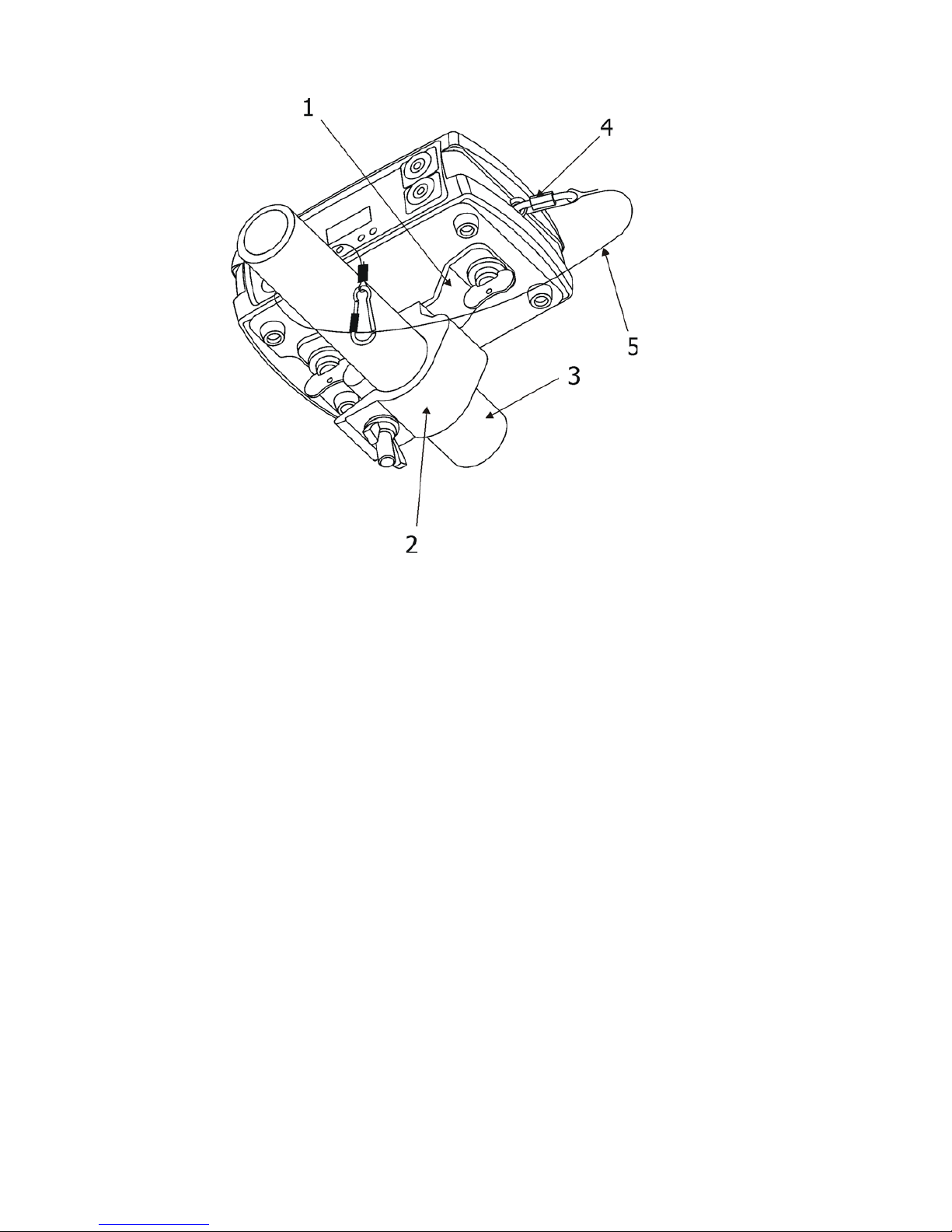
Use only safety wire with screw-on carabine. Fasten the safety cable in the attachment point and around
the truss as shown on the picture.
.

8
Rigging via omega holder:
1-Omega holder with a quarter-turn loks
2-Clamp
3-Trust
4-Attachment point
5-Safety wire
When installing xtures side-by-side, avoid illuminating one xture with
another!
3.3 Positioning the Robin MiniMe
The Robin MiniMe is designed to be installed in one of four possible installation locations:
1. Front Table - the xture is placed near the oor in front of the screen.
2. Front Ceiling - the xture is suspended upside-down from the ceiling (truss) in front of the screen.
Set Ceiling Projection in the menu Personality ("Pers--->"LED Engi" --->"Ceil P"--->"On")
3. Rear Table - the xture is placed near the oor behind the screen. Set Rear Projection in the menu
Personality ("Pers--->"LED Engi" --->"Rear P"--->"On")
Note that a special rear projection screen is required.
4. Rear Ceiling - the xture is suspended upside-down from the ceiling (truss) behind the screen.
Set Rear Projection in the menu Personality ("Pers--->"LED Engi" --->"Ceil P"--->"On") and
Ceiling Projection ("Pers--->"LED Engi" --->"Rear P"--->"On")
Note that a special rear projection screen is required.
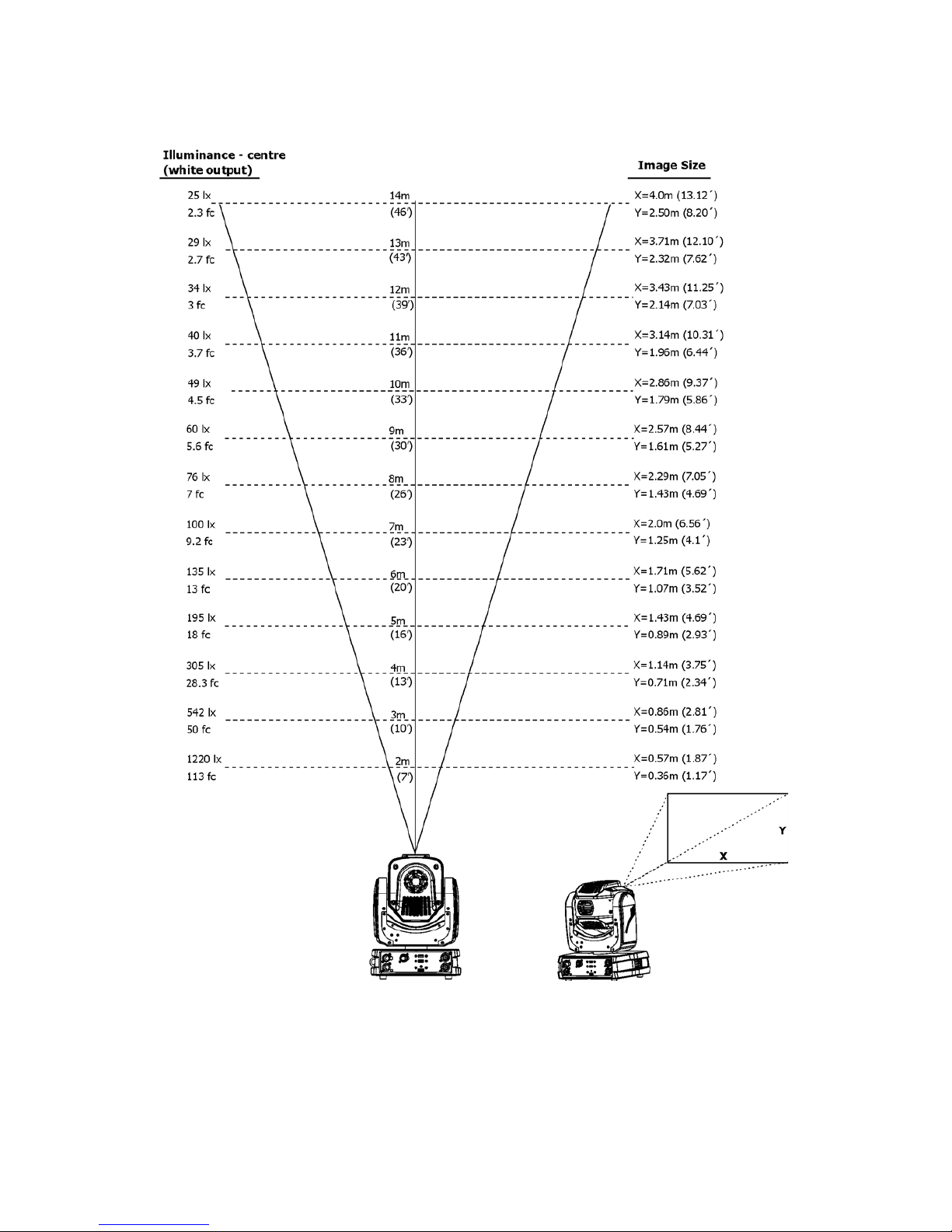
When determining the position of the xture and projection screen, you will need to account for the projected
image size, which is directly proportional to the projection distance.

9
Note: There is a tolerance among these numbers due to optical component variations. We recommend that if
you intend to permanently install the Robin MiniMe, you should physically test the projection size and distance
using the actual xture before you permanently install it.
There is a chart of throw distance ratio of 3.5 : 1 to assist you in determining the ideal location for your
xture.

10
3.4 Using the mounting bracket
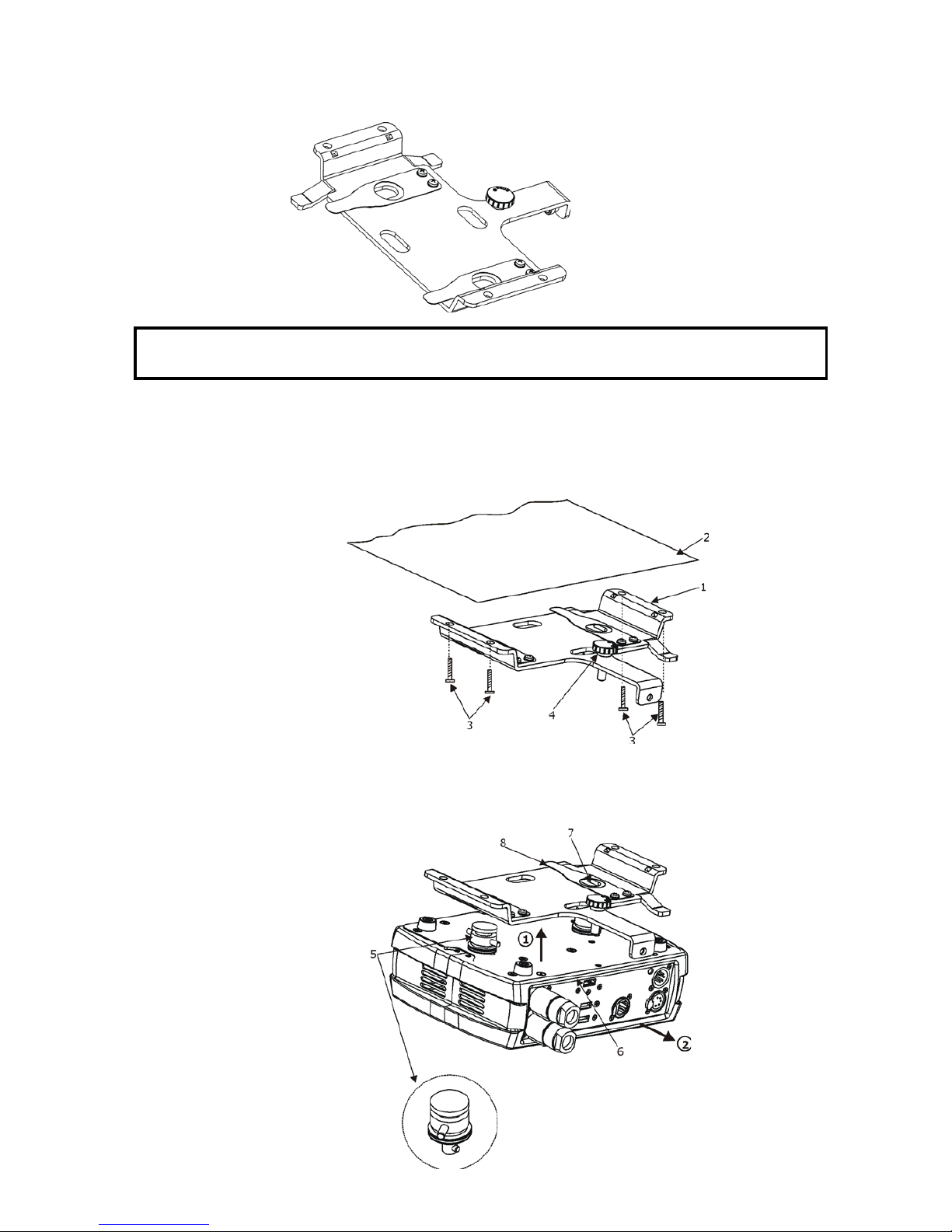
The mounting bracket allows simple mounting of the Robin MiniMe on the ceiling. The mounting bracket is
intended for horizontal mounting only.
IMPORTANT! Ceiling mounting requires extensive experience, including calculating
working load limits and installation material being used.
To fasten the Robin MiniMe on the ceiling via the mounting bracket, follow these steps:
1. Fasten the mounting bracket (1) on the ceiling (2) by means of the four screws (3). Check, that the stabiliza-
tion screw (4) is screwed into mounting bracket.
Note The screws are not supplied with the mounting bracket, their length, diameter and a type of screws de-
pends on conditions of given installation.
2. Insert a pivot (5) into the mounting point in the xture base (6) and turn it a full 1/4-turn clockwise to lock.
Instal the second pivot.
3. Insert the xture with both pivots (5) into circular slots under securing blades (8) and than move the xture
towards the stabilization screw (4) until the pivots (5) reach the rectangular slots (7) and both securing blades
(8) snap into groove in the pivots.
4. Check the fastening of the xture.
Questo manuale è adatto per i seguenti modelli
2
Indice
Altri manuali Anolis Attrezzatura di illuminazione

Anolis
Anolis ArcPar S1 Manuale utente

Anolis
Anolis ArcPad 48 Integral Manuale utente

Anolis
Anolis ArcSource Outdoor 24 MC Integral SmartWhite Manuale utente

Anolis
Anolis ArcPar 100 Manuale utente

Anolis
Anolis ArcPower 36 Manuale utente

Anolis
Anolis ArcPad 48 Integral Manuale utente

Anolis
Anolis ArcSource 96 Integral Manuale utente

Anolis
Anolis ArcWash Recessed 136 RGB Manuale utente

Anolis
Anolis ArcSource 1 MC Short Manuale utente

Anolis
Anolis ArcPower 48 Outdoor /W Manuale utente