
CYP CH-2540RX Manuale utente

CH-2540RX
UHD+ HDMI over HDBaseT Receiver with Amplier
Operation Manual
Operation Manual


DISCLAIMERS
The information in this manual has been carefully checked and is believed
to be accurate. Cypress Technology assumes no responsibility for any
infringements of patents or other rights of third parties which may result from
its use.
Cypress Technology assumes no responsibility for any inaccuracies that
may be contained in this document. Cypress also makes no commitment to
update or to keep current the information contained in this document.
Cypress Technology reserves the right to make improvements to this
document and/or product at any time and without notice.
COPYRIGHT NOTICE
No part of this document may be reproduced, transmitted, transcribed,
stored in a retrieval system, or any of its part translated into any language
or computer le, in any form or by any means—electronic, mechanical,
magnetic, optical, chemical, manual, or otherwise—without express written
permission and consent from Cypress Technology.
© Copyright 2018 by Cypress Technology.
All Rights Reserved.
TRADEMARK ACKNOWLEDGMENTS
All products or service names mentioned in this document are trademarks of
the companies with which they are associated.

SAFETY PRECAUTIONS
Please read all instructions before attempting to unpack, install or operate
this equipment and before connecting the power supply. Please keep the
following in mind as you unpack and install this equipment:
• Always follow basic safety precautions to reduce the risk of re,
electrical shock and injury to persons.
• To prevent re or shock hazard, do not expose the unit to rain, moisture
or install this product near water.
• Never spill liquid of any kind on or into this product.
• Never push an object of any kind into this product through any openings
or empty slots in the unit, as you may damage parts inside the unit.
• Do not attach the power supply cabling to building surfaces.
• Use only the supplied power supply unit (PSU). Do not use the PSU if it
is damaged.
• Do not allow anything to rest on the power cabling or allow any weight to
be placed upon it or any person walk on it.
• To protect the unit from overheating, do not block any vents or openings
in the unit housing that provide ventilation and allow for sucient space
for air to circulate around the unit.
• Please completely disconnect the power when the unit is not in use to
avoid wasting electricity.
VERSION HISTORY
REV. DATE SUMMARY OF CHANGE
RDV1 2019/11/13 Preliminary release

CONTENTS
1. Introduction...................................................... 1
2. Applications ..................................................... 2
3. Package Contents ........................................... 2
4. System Requirements..................................... 2
5. Features............................................................ 3
6. Operation Controls and Functions ................ 4
6.1 Front Panel.................................................. 4
6.2 Rear Panel................................................... 5
6.3 Remote Control ........................................... 7
6.4 IR Cable Pinouts.......................................... 8
6.5 RS-232 Pinout and Defaults........................ 8
6.6 OSD Menu................................................... 9
6.7 WebGUI Control ........................................ 15
6.7.1 Video Switch Tab.............................. 17
6.7.2 Audio Tab.......................................... 19
6.7.3 Relay Tab ......................................... 20
6.7.4 OSD Setting Tab............................... 20
6.7.5 Automation Tab................................. 21
6.7.6 EDID Tab .......................................... 24
6.7.7 Network Tab ..................................... 26
6.7.8 System Tab....................................... 27
6.8 Telnet Control ............................................ 28
6.9 Serial and Telnet Commands .................... 29
7. Connection Diagram ..................................... 48
8. Specications ................................................ 49
8.1 Technical Specications ............................ 49
8.2 Video Specications .................................. 50
8.3 Audio Specications .................................. 52
8.3.1 Digital Audio ..................................... 52
8.3.2 Analog Audio .................................... 53
8.4 Cable Specications.................................. 54
8.5 HDBaseT Features.................................... 55
9. Acronyms ....................................................... 56

1
1. INTRODUCTION
This UHD+ HDMI over HDBaseT Receiver with Amplier is a 2 by 1 switch
with standard HDMI and HDBaseT inputs, an HDMI output, as well as both
standard and amplied stereo audio outputs. This unit’s HDBaseT input can
receive uncompressed high-denition 4K UHD (up to 10.2Gbps) video along
with Ethernet, RS-232 and IR control over a single cable up to a distance of
100 meters while the HDMI input supports high bandwidth 4K UHD+sources
(up to 18Gbps) with support for 10/12-bit HDR. Pass-through of multiple
digital audio formats such as LPCM (up to 8 channels), Bitstream and HD
Bitstream is also supported via the HDBaseT and HDMI inputs. Additionally,
the integrated headphone mini-jack and class D stereo amplier outputs
provide easy ways to extract audio from the currently selected source (LPCM
2.0 sources only) for local playback, oering a exible sound experience.
Signal management features such as automatic switching based on input
signal and hot plug detection enable convenient hands-free operation. There
are also four built-in switching relay connections allowing control over direct
power devices such as projection screens, curtains, lights, etc. Front panel
controls and a comprehensive WebGUI provide access to manual input
selection, volume control, as well as additional functionality such as EDID
management, HDCP management and control over the four relay ports.
This switching receiver is ideal for use in residential or commercial point to
point applications that require long HDBaseT signal transmission distances
such as home theaters, conference rooms, huddle rooms, or lecture halls.
The integrated PoH (Power over HDBaseT) feature can provide power to
compatible transmitters, providing greater exibility in installations. This unit
can be controlled in a wide variety of dierent ways including front panel
buttons, WebGUI, Telnet, and RS-232.

2
2. APPLICATIONS
• Household entertainment sharing and control
• Lecture room display and control
• Showroom display and control
• Meeting room presentation and control
• Classroom display and control
3. PACKAGE CONTENTS
• 1×UHD+ HDMI over HDBaseT Receiver with Amplier
• 1×24V/3.75A DC Power Adapter
• 1×Power Cord
• 1×3.5mm to IR Extender Cable
• 1×3.5mm to IR Blaster Cable
• 1×Remote Control (CR-188)
• 1×Rackmount Ears (Set of 2)
• 1×Shockproof Feet (Set of 4)
• 1×Operation Manual
4. SYSTEM REQUIREMENTS
• HDMI source equipment such a media player, video game console or set-
top box.
• HDMI receiving equipment such as an HDTV, monitor or audio amplier.
• A compatible HDBaseT transmitter with PoH (PD) support is
recommended.
• The use of Premium High Speed HDMI cables, and industry standard
Cat.6, Cat.6A or Cat.7, is highly recommended.

3
5. FEATURES
• HDMI 2.0 and HDBaseT 1.0 compatible
• HDCP 1.x and 2.2 compliant
• 1×HDMI and 1×HDBaseT inputs
• 1×HDMI output
• HDBaseT input supports resolutions up to 4K@60Hz (4:2:0, 8-bit) or
4K@30Hz (4:4:4, 8-bit).
• HDMI input and output supports resolutions up to 4K UHD+(18Gbps,
4K@60Hz 4:4:4, 8-bit)
• Supports Deep Color input and output up to 12-bit at 1080p60
• Supports 10-bit and 12-bit HDR (High Dynamic Range) input/output (HDMI
bypass only)
• Supports CEC bypass
• Comprehensive EDID and HDCP management
• HDBaseT feature support: HD Video and Audio, 100BaseT Ethernet, PoH
(PSE) and Control (bi-directional IR/RS-232 pass-through)
• HDBaseT input receives video, audio and data over a single Cat.5e/6/7
cable and can reach distances up to 100m/328ft at 4K when using
Cat.6A/7
• Supports standard PoH (PSE) from the HDBaseT input to connected
HDBaseT (PD) transmitters (compatible transmitters only)
• Supports pass-through of HD audio formats including LPCM (up to 8
channels), Bitstream, and HD Bitstream
• High performance and ecient 2 channel, class D amplier with 20 watts
of power per channel and volume control
• Controllable via front panel buttons, WebGUI, Telnet, and RS-232

4
6. OPERATION CONTROLS AND FUNCTIONS
6.1 Front Panel
PWR MENUSELECTHDMIHDMICAT5e/6/7 ENTER
-
+
VOLUME MUTE
IN
SERVICE
1 2 3 4 5 6 7 8 9
1POWER LED: This LED will illuminate to indicate the unit is on and
receiving power.
2SERVICE Port: This slot is reserved for rmware update use only.
3CAT5e/6/7 & HDMI LEDs: The illuminated LED indicates which source is
currently selected.
4HDMI IN Port: Connect to HDMI source equipment such as a media
player, game console or set-top box.
5SELECT Button: Press this button to switch between the HDMI and
HDBaseT inputs.
6MENU Button: Press to enter the OSD menu, or to back out from menu
items.
7- (MINUS)/Volume - Button: Press to move down or adjust selections
within OSD menus. Pressing this button while not in a menu will
decrease the amplied analog audio output (L/R) volume.
8+ (PLUS)/Volume + Button: Press to move up or adjust selections within
OSD menus. Pressing this button while not in a menu will increase the
amplied analog audio output (L/R) volume.
9ENTER/MUTE Button: Press to conrm a selection within the OSD or to
go deeper into a menu item. Pressing this button while not in a menu will
toggle the mute function of the amplied analog audio output (L/R).
5
6.2 Rear Panel
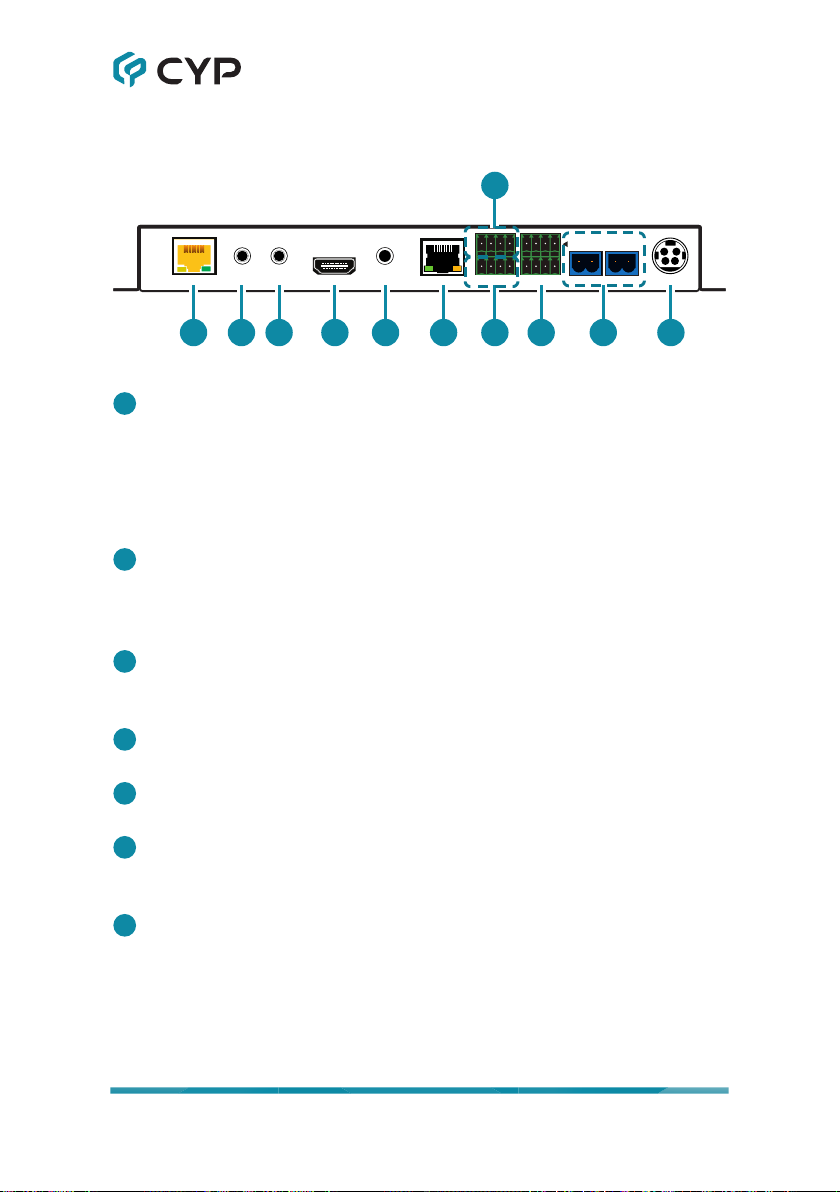
CAT5e/6/7 IN IR OUT HDMI OUT RS-232
CTL CLI
RELAY OUTL R DC 24V
--
AUDIO OUT LAN
IR IN
+
+
1 2 3 4 5 6
7
98 10 11
1CAT5e/6/7 IN Port: Connect to a compatible HDBaseT transmitter with a
single Cat.5e/6/7 cable for reception of all data signals. PoH will also be
supplied to a connected compatible PD transmitter.
Note: The PoH function is designed to power compatible transmitter
units only. Non-PoH transmitters will need their own power supply. Other
brands of transmitter may not be compatible.
2IR IN Port: Connect to an IR Extender to receive local IR signals to
control this unit as well as to extend them to devices connected to the
other end of the HDBaseT connection. Ensure that the remote being
used is within direct line-of-sight of the IR Extender.
3IR OUT Port: Connect to an IR Blaster to transmit IR signals from the
other end of the HDBaseT connection to devices within direct line-of-
sight of the IR Blaster.
4HDMI OUT Port: Connect to an HDMI TV, monitor, or amplier for digital
video and audio output.
5AUDIO OUT Port: Connect to powered speakers, headphones, or an
amplier for analog stereo audio output.
6LAN Port: Connect directly, or through a network switch, to your PC/
laptop to control the unit via Telnet/WebGUI and to extend the network
across the HDBaseT connection.
7RS-232 CTL 4-pin Terminal Block: Connect directly to a PC, laptop,
or other serial control device with a 3-pin adapter cable to send RS-232
commands to control the unit.
Note: The 24 volt pins are included to provide power to a dedicated
external control product and should NOT be used when connecting a
standard RS-232 device.
Indice
Altri manuali CYP Ricevitore

CYP
CYP PU-305BDA-TX Manuale utente

CYP
CYP CH-A320RX Manuale utente

CYP
CYP CWHDI-Tx Manuale utente

CYP
CYP 5-Play HDBaseT PU-507WPRX Manuale utente

CYP
CYP COH-Tx Manuale utente

CYP
CYP PU-507RX-2H Manuale utente

CYP
CYP PU-515PLRX-2HCD Manuale utente

CYP
CYP CPLUS-21FRX Manuale utente

CYP
CYP CH-507RXWP Manuale utente

CYP
CYP PRO-HDMIFO-4K Manuale utente

CYP
CYP CA-DVIAT Manuale utente

CYP
CYP CH-316TX Manuale utente

CYP
CYP CDVI-301TX & RX Manuale utente

CYP
CYP CH-2538TXPLWPKD Manuale utente

CYP
CYP CWHDI-TX1 Manuale utente

CYP
CYP CH-2538TXWPKD Manuale utente

CYP
CYP CH-1507TX Manuale utente

CYP
CYP AVX-101F-RX Manuale utente

CYP
CYP HDMI Over CAT5 Manuale utente

CYP
CYP CH-514RXWPL Manuale utente


