Diedrich Roasters Zenyth 2.5 Manuale utente

Zenyth 2.5 Automation Manual
Rev. A06
2021
DIEDRICH ROASTERS, LLC
31564 Hwy 200
Ponderay, Idaho 83852
Toll Free: (844) 343 3742 Fax: (208) 417 3742
Technical Support Email: support@diedrichroasters.com / Toll Free# (888) 519-0069
PROPRIETARY RIGHTS NOTICE: All rights reserved. No part of this material may be reproduced or transmitted in any form or by
means, electronic, mechanical or otherwise, including photocopy and recording or in connection with any information storage or
retrieval system, without the written permission of Diedrich Roasters, LLC.

Contents
INTRODUCTION.............................................................................................................1
1. INSTALLING HMI (IR ONLY)....................................................................................2
2. MAIN SCREEN..........................................................................................................3
3. LOGIN .......................................................................................................................3
4. SYSTEM.....................................................................................................................4
START STOP SYSTEM..........................................................................................................................5
HIGH LIMIT RESET................................................................................................................................6
HOPPER LOADED RESET....................................................................................................................6
CHAFF BARREL FULL RESET..............................................................................................................6
AGITATOR..............................................................................................................................................6
DESTONER MOTOR (Optional, Coffee Roasters only).........................................................................6
BLOWER (Roast Air Motor for CR) ........................................................................................................6
LOADER (Optional, CR / Coffee Roasters only) ....................................................................................6
HOPPER GATE (CR only)......................................................................................................................6
DRUM .....................................................................................................................................................7
DRUM DOOR .........................................................................................................................................7
COOLING BIN DOOR 1 (CR only) .........................................................................................................7
COOLER MOTOR (CR only)..................................................................................................................7
QUENCH (CR only) ................................................................................................................................7
CHAFF GATE 1 & 2 (CR only if equipped).............................................................................................7
5. SET-UP......................................................................................................................7
CROPSTER REPLAY.............................................................................................................................8
SEMIAUTO –USE PROFILE VIEW (CR-Only)......................................................................................8
COOLDOWN SET POINT (CR-Only).....................................................................................................8
RESET HOUR METER...........................................................................................................................9
FEED FORWARD...................................................................................................................................9
AUTO ROAST BY TEMP........................................................................................................................9
CELSIUS.................................................................................................................................................9
APPROACHING FIRST CRACK AUDIO................................................................................................9
TEMPERATURE AUDIO ........................................................................................................................9
AGITATOR RUN TIME...........................................................................................................................9
DRUM DOOR OPEN TIME.....................................................................................................................9
AUTO LOGOUT TIME............................................................................................................................9
APPROACHING FIRST CRACK TEMP .................................................................................................9
8 & 40 HOUR ALARM OPTION............................................................................................................10
CHAFF BARREL ROAST CAPACITY..................................................................................................10
HOPPER OPEN TIME (CR only)..........................................................................................................10
COOLER HIGH-SPEED TIME (CR only) .............................................................................................10

COOLING BIN WITH 2ND DOOR OPTION (CR only, Optional)...........................................................10
ENABLE AUTO QUENCH (CR only)....................................................................................................10
QUENCH OPTION (CR only) ...............................................................................................................10
QUENCH TIME (CR only).....................................................................................................................11
LOADER OPTION ................................................................................................................................11
LOADER TIME......................................................................................................................................11
DESTONER OPTION (CR / Coffee Roasters Only).............................................................................11
DESTONER TIME (CR / Coffee Roasters Only)..................................................................................11
DESTONER LOCATED AT COOLING BIN DOOR #1 (CR / Coffee Roasters Only) ..........................11
DESTONER LOCATED AT COOLING BIN DOOR #2 (CR / Coffee Roasters Only) ..........................11
OXIDIZER OPTION (OX-1 and OX-2 for retrofit needs) (Only available on Coffee Roasters)............11
OXIDIZER START TEMP (Oxidizer Temperature on IR screen) .........................................................11
OXIDIZER SET POINT (May not be used for 3rd party Oxidizers) .......................................................12
OXIDIZER RUN TIME...........................................................................................................................12
MAINTENANCE SCHEDULE...............................................................................................................12
MAINTENANCE LOG...........................................................................................................................12
DMI SETUP ..........................................................................................................................................13
DATA LOGS .........................................................................................................................................13
INFO BUTTON (TOP RIGHT) ..............................................................................................................14
HMI/PLC VERSION.................................................................................................................................14
SET DATE & TIME...................................................................................................................................14
LANGUAGE ............................................................................................................................................14
6. MENU.......................................................................................................................15
MAIN.....................................................................................................................................................15
SELECT ROAST...................................................................................................................................15
ROAST DATA.......................................................................................................................................15
SAVE ROAST.......................................................................................................................................15
PROFILE EDIT .....................................................................................................................................15
MAINTENANCE LOGS.........................................................................................................................15
PASSWORD SETUP............................................................................................................................16
EMAIL CONTACTS ..............................................................................................................................16
ALARMS ...............................................................................................................................................16
MANUAL...............................................................................................................................................16
AUTO....................................................................................................................................................16
EXIT......................................................................................................................................................16
START STOP SYSTEM........................................................................................................................16
7. SELECT ROAST......................................................................................................16
8. ROAST DATA..........................................................................................................17
9. SAVE ROAST..........................................................................................................17

10. PROFILE EDIT.......................................................................................................18
11. MAINTENANCE LOGS..........................................................................................19
12. PASSWORD SETUP .............................................................................................19
13. ALARMS................................................................................................................20
14. MANUAL................................................................................................................20
ADJ. CHARGE TEMP...........................................................................................................................21
FLAME VERIFICATION........................................................................................................................21
MANUAL ROAST FINISH TEMP..........................................................................................................21
TREND GRAPH....................................................................................................................................22
PROFILE & R/Min LINE........................................................................................................................22
RoR, ET In & ET Out (CR only)............................................................................................................22
FUEL ADJUSTMENTS .........................................................................................................................22
AIR ADJUSTMENTS ............................................................................................................................22
IR ROASTERS..........................................................................................................................................22
CR Roasters ...........................................................................................................................................22
HI LIM RESET ......................................................................................................................................23
END ROAST.........................................................................................................................................23
END ROAST CYCLE BUTTON (IR only) .............................................................................................23
AGIT......................................................................................................................................................23
DRUM DOOR .......................................................................................................................................23
LOADER (Only available on Coffee Roasters).....................................................................................23
QUENCH (CR only) ..............................................................................................................................23
DESTONER (Only available on Coffee Roasters)................................................................................23
SAVE ROAST.......................................................................................................................................24
EOR By Time........................................................................................................................................24
15. AUTO.....................................................................................................................24
AUTO CHARGE/ADJ. CHARGE ..........................................................................................................25
TREND GRAPH....................................................................................................................................25
SCATTER GRAPH ...............................................................................................................................26
FEED FORWARD ADJUST..................................................................................................................26
PROFILE INFORMATION ....................................................................................................................26
ADJUST END TEMP ............................................................................................................................27
16. REMOTE ACCESS................................................................................................27
TP LINK ROUTER................................................................................................................................27
CMT VIEWER APP...............................................................................................................................28
DIEDRICH REMOTE ACCESS ............................................................................................................28
CONNECTING TO A NETWORK..............................................................................................................28
TP LINK ROUTER (AC 750 TRAVEL ROUTER)..........................................................................................29

CHECKING CONNECTION STATUS .........................................................................................................29
17. BACKING UP PROFILES......................................................................................29
18. TIPS FOR EFFICIENT AUTOMATED ROASTING................................................30
FUEL PERCENTAGE...........................................................................................................................30
BEAN TEMPERATURE........................................................................................................................30
CHARGE TEMPERATURE ..................................................................................................................31
BOTTOM OUT TEMPERATURE..........................................................................................................31
19. ALARMS................................................................................................................31
Appendix A ..................................................................................................................33
CONFIGURING TP-LINK FOR INTERNET ACCESS TO HMI ............................................................33
Smart Device (iPhone, iPad, Android, etc.) or Computer with Wi-Fi card............................................33
Computer with Hardwired Ethernet Port .............................................................................................33
Revision
Purpose
Effective Date
Authorized By
(Initials)
A00
Validated publication.
01/25/2018
SR
A01
Updated to include new pictures and
procedures to install screen.
10/31/2018
LF
A02
Updated to include CR
6/13/2019
LF
A03
Fahrenheit/Celsius improvement + various
CR Chaff-Barrel-Full-Warning + CR Alarms
A04
Changed/added text for Setup page Oxidizer +
various cleanup + added USB for 9” screen
9/15/2020
SK
A05
Cropster Replay BETA
1/27/2021
SK
A06
Removed wording “The profile can be viewed
…… which allows the user to change profiles.”
on page 17. Edited image to remove coinciding
graphics.
5/25/2021
EM

Page 1of 36
INTRODUCTION
The Zenyth 2.5 Automation allows the operator to roast manually and save roasting profiles
for duplication in auto mode. It isdesigned to give the operator predictable consistency and
the ability to accurately repeat roast profiles.
This manual is NOT intended to teach how to roast. It is intended to explain the features
and the functions of the roast system buttons only.
The roast system uses a touch screen to control the roasting system. Buttons are
activated with slight pressure (finger or plastic stylus) directly on the screen.
To achieve the most versatility with Zenyth 2.5 Automation, please read the entire
manual before operating the equipment.
A UPS (battery backup) system is recommended.
Please review all safety and installation requirements listed in the appropriate roaster
operation manual.
Operators must understand how to start and stop the motors using the control system. In
particular, the operator should be aware of the emergency stop button on the control
panel. This button disconnects the outputs of the PLC which will end all functions of the
roaster.
Screen calibration can be accessed upon cycling power to the screen. On powerup, a
calibration screen will be displayed. After 10 seconds of inactivity, the screen with boot
up to the Main Screen.

Zenyth 2.5 Automation Manual-Rev. A06
Page 2of 36
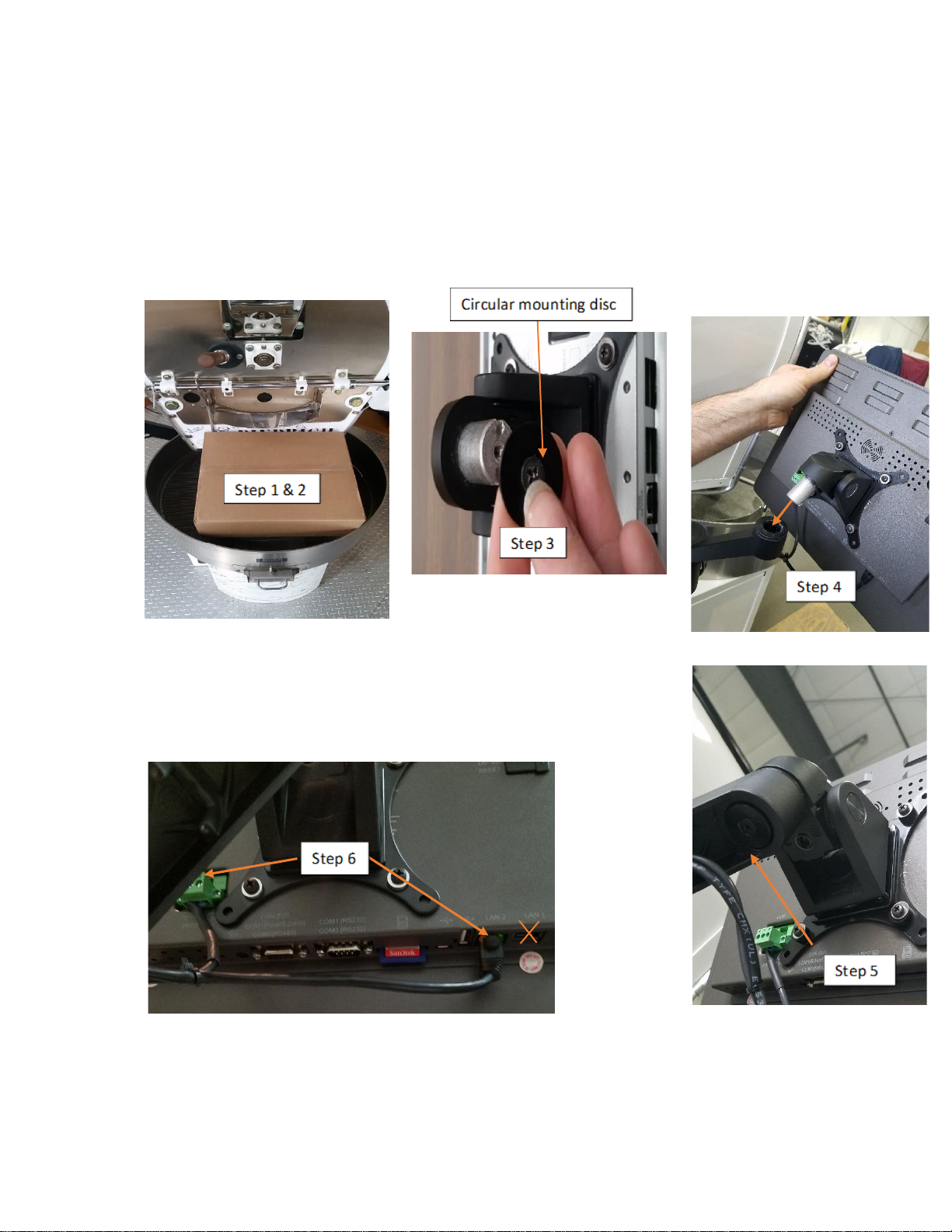
1. INSTALLING HMI (IR ONLY)
1. Remove the monitor box from the cooling bin.
2. Remove the monitor from the box.
3. Using a Phillips screwdriver, remove the black circular mounting disc from the monitor.
4. Insert the monitor into the monitor arm.
5. Using the screwdriver, re-install the mounting disc in the
post of the monitor post and fasten the screw.
6. Route and plug in the ethernet (LAN2 only) and power cable in to
the monitor –ready for use.

Zenyth 2.5 Automation Manual-Rev. A06
Page 3of 36
2. MAIN SCREEN
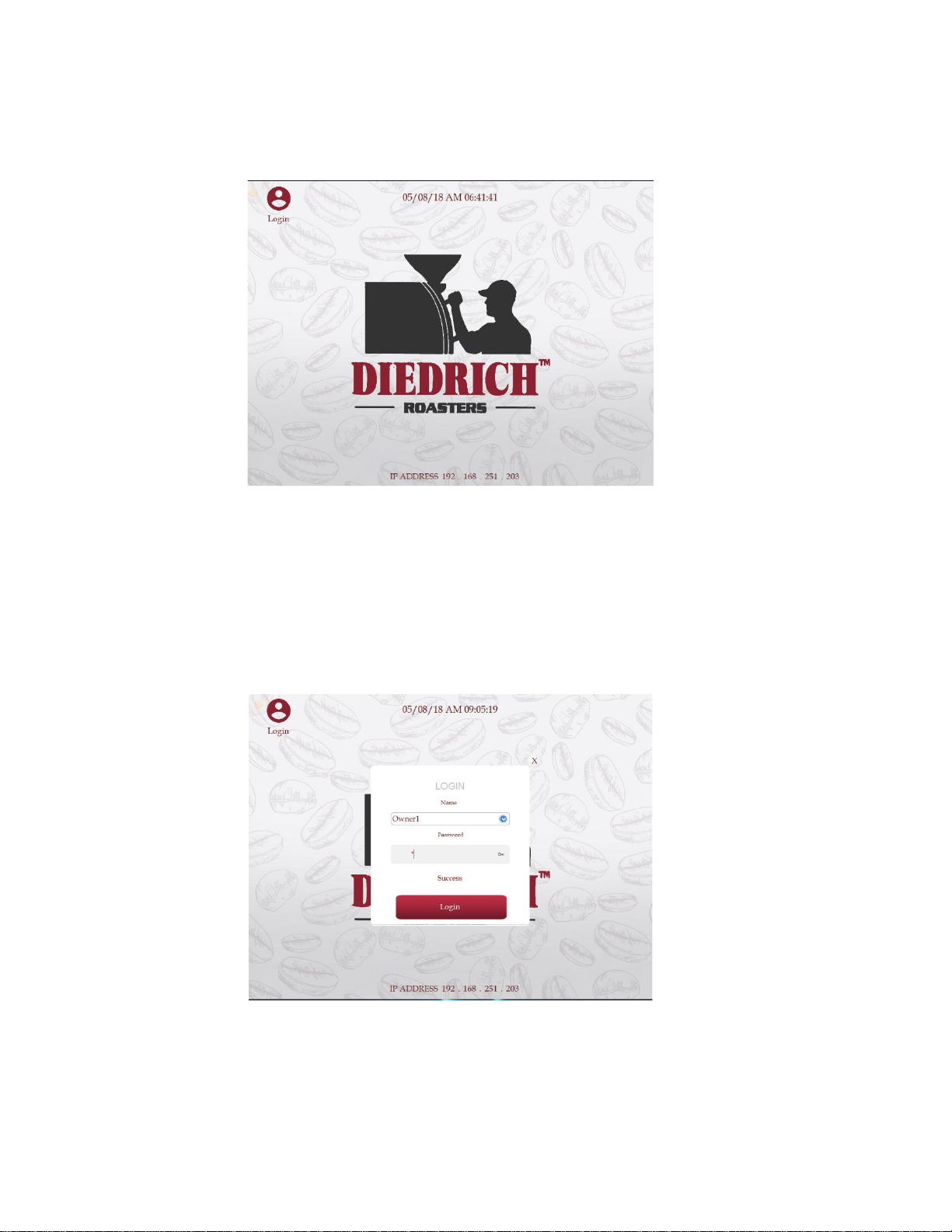
The MAIN screen is the first screen when powering on the automation.
3. LOGIN
To log on, press the “Login” button located in the top left of the “MAIN”
screen.
Press the drop-down arrow and select from the default user accounts. Once the user
account is selected, select the “Password” box and enter the password for that user

Zenyth 2.5 Automation Manual-Rev. A06
Page 4of 36
account. Hit enter on the keyboard and select “Login”. This will bring the user to the
“SYSTEM” screen.
The “Owner” has access to all the features. The “Roaster” cannot edit, rename or delete
profiles. The “User” can only load a profile and roast in auto.
Default passwords:
Login Name
Password
Login Name
Password
Login Name
Password
Owner1
1
Roaster1
1
User1
1
Owner2
2
Roaster2
2
User2
2
Owner3
3
Roaster3
3
User3
3
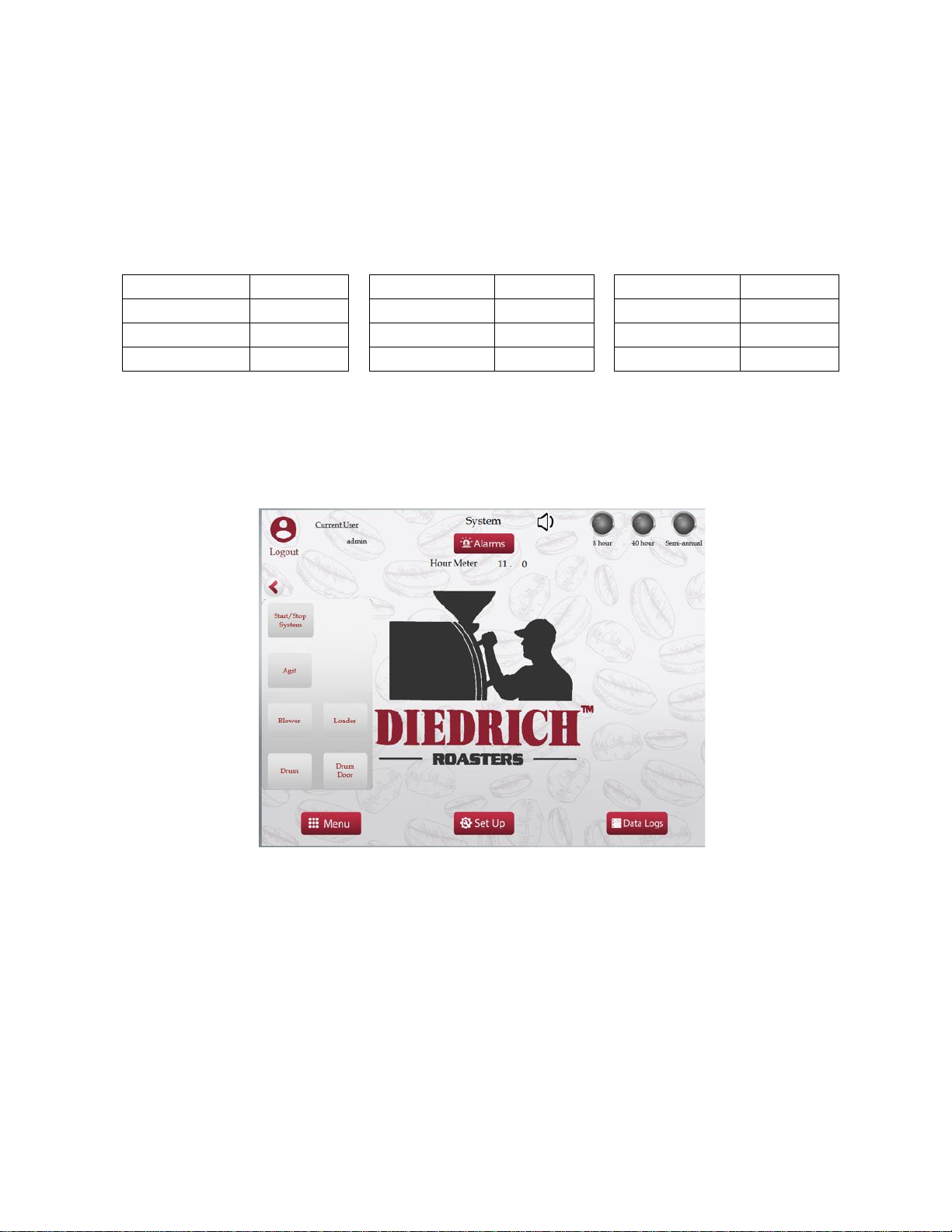
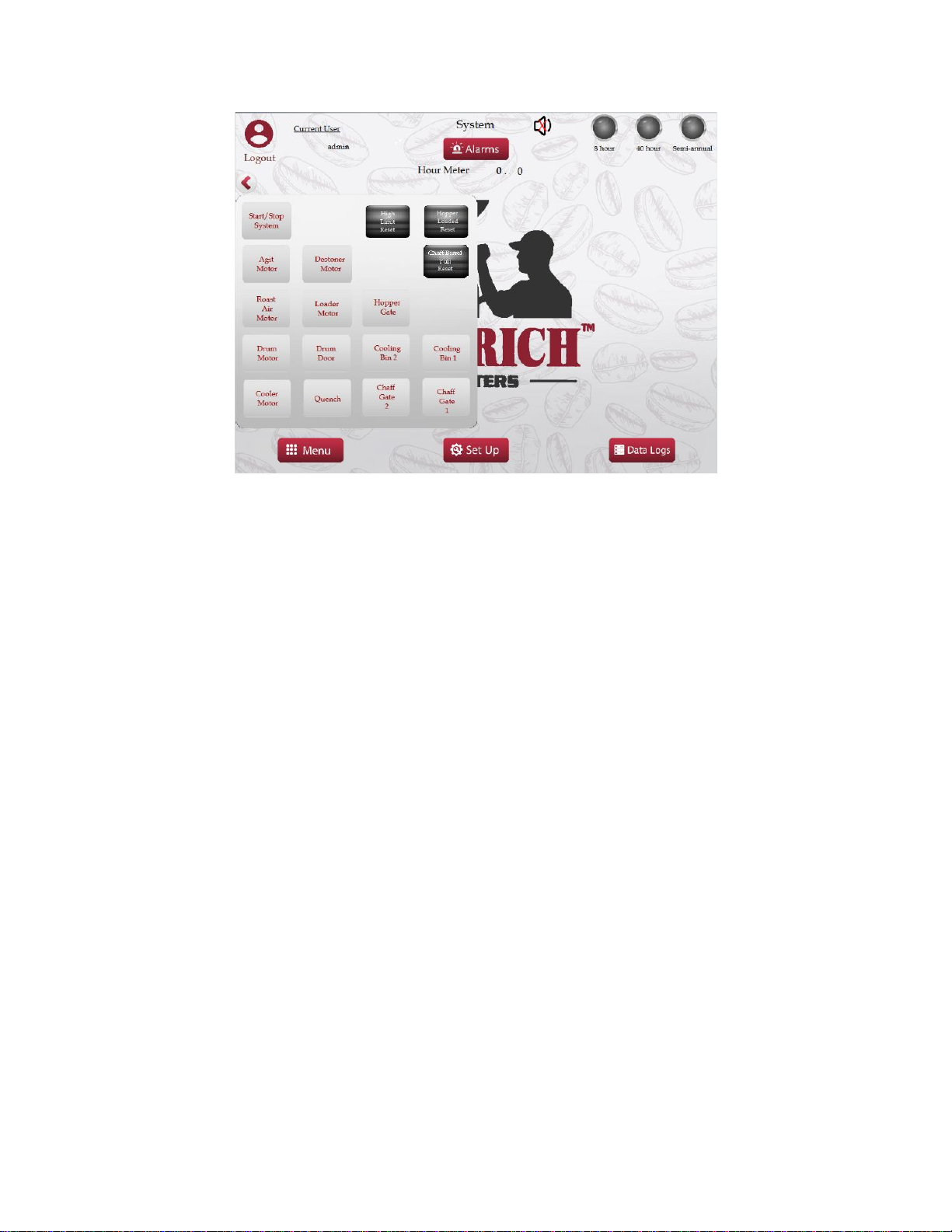
4. SYSTEM
IR Series Roaster System Screen

Zenyth 2.5 Automation Manual-Rev. A06
Page 5of 36
CR Series Roaster System Screen
The hour meter is located on this screen and shows the number of hours the roaster has
been in operation. This timer can be used to schedule cleaning/maintenance. On the
setup screen, the hour meter can be reset.
The 8-hour, 40-hour, & Semi-annual lamps will light up when those maintenance
intervals are due. There is a built-in maintenance schedule based on roasting time for
the 8 hour and 40-hour cleanings. The Semi-annual is based on every 6 months. Refer
to the “Maintenance Manual”, which covers the 8-hour, 40-hour, & Semi-annual
cleanings.
The “MENU”, “SET-UP” screen, and “DATA LOGS” screen can be viewed by pressing
the buttons along the bottom.
Click on the arrow at the top left of the screen for the pop-out menu to access the below
system functions. Here the roaster system or individual motors/functions can be started.
If equipped, the buttons for a loader will appear on this screen if the option is enabled on
the “SET-UP” screen. Other options work the same.
START STOP SYSTEM
Pull out the emergency stop button located on the side of the electrical panel. Press the
START STOP SYSTEM button to start the appropriate motors and the pilot. This button
starts everything needed to ignite the roaster’s pilot. While the roaster is operating the
START STOP SYSTEM will be green in color.
Indice
Altri manuali Diedrich Roasters Elettrodomestico da cucina

Diedrich Roasters
Diedrich Roasters IR-7 Manuale utente

Diedrich Roasters
Diedrich Roasters CR Series Manuale di istruzioni

Diedrich Roasters
Diedrich Roasters IR-5 Manuale utente

Diedrich Roasters
Diedrich Roasters IR Series Manuale utente

Diedrich Roasters
Diedrich Roasters IR Roaster Series Manuale utente