
Rhopoint Optimap3 PSD Manuale utente

Optimap3 PSD
A revolution in surface measurement
Operating Instructions
Thank you for purchasing this Rhopoint product.
Please read these instructions carefully before operating this product and retain them for future
reference. The images shown in this manual are for illustrative purposes only.
Manufactured by Rhopoint Instruments in the United Kingdom

2
Rhopoint Optimap3
This instruction manual contains important information about the setup and use of
the Optimap3™. It is therefore essential that the contents are read before powering
up and using the instrument.
If this instrument is passed to other users, you must ensure that the instruction manual is supplied with the
instrument. If you have any questions or require additional information about the Optimap™ please contact
the Rhopoint Authorised Distributor for your region.
The technology and components used in the device are based on state-of-the-art optic and electronics. As part
of Rhopoint Instruments commitment to continually improving the technologies used in their products, they
reserve the right to change information included in this document without prior notice.
© Copyright 2022 Rhopoint Instruments Ltd. All Rights Reserved.
Optimap™ and Rhopoint™ are registered trademarks or trademarks of Rhopoint Instruments Ltd. in the UK
and other countries.
Other product and company names mentioned herein may be trademarks of their respective owner.
No portion of the software, documentation or other accompanying materials may be translated, modified,
reproduced, copied, or otherwise duplicated (except for a backup copy), or distributed to a third party, without
prior written authorization from Rhopoint Instruments Ltd.

3
Rhopoint Optimap3
Contents
1Storage and Handling 4
2Instrument cleaning 4
3About the OptimapTM PSD 5
4Accessories 6
5Functional Overview 7
6Power 8
7Switching on the unit 8
8Operation 9
8.1 Main Screen 9
8.2 Profile Screen 11
8.3 Analysis Screen 12
8.4 Measurement Screen 15
8.5 Project Screen 17
8.5.1 No Opened Project Menu 17
8.5.2 New Project Screen 17
8.5.3 Project Menu 18
8.5.4 Close Batch 19
8.5.5 View Batches 19
8.5.6 Exporting Measurements 21
8.6 Settings Screen 27
8.6.1 Calibration 30
9Measurement Principle 31
10 Measurement Algorithms 32
10.1 O-Rough Algorithm 32
10.2 Altitude 32
10.3 Curvature 33
10.4 Texture 33
10.5 TAMS_STD 34
11 How to read *.res file format on PC 36
4
Rhopoint Optimap3
12 Instrument Specifications 37
13 Environmental Information 38
Storage and Handling
This instrument contains precision optics and electronics. You should therefore avoid knocking or
dropping the device as the resulting impact could cause serious damage.
In some circumstances the optical components in the instrument could become misted because of
temperature change. It is recommended that the instrument is not used until it has stabilised to
ambient temperature.
Ensure that the instrument is not exposed to moisture, chemicals or to any corrosive vapours.
Do not hold the instrument by the measurement aperture. No objects should be placed inside the
aperture as damage to the measuring system may occur.
The instrument housing and sample area locator are resistant to a variety of solvents however it
is not possible to guarantee resistance to all chemicals, therefore the surfaces of the instrument
should only be cleaned using a soft, moist cloth.
Prevent exposure of the instrument to direct sunlight for prolonged periods and to continuous
humidity and condensation.
Instrument Cleaning
It is recommended to regularly check that the internal screen is clean. Too much dust inside could affect
readings and measurement results.
Nevertheless, if dust is noticed inside the instrument, it is highly recommended to gently use pressurised
clean air to clean the inside of the unit.
In case dust dot would not go off, the user can also use a clean cotton swab with a little bit of alcoholic
solution.

5
Rhopoint Optimap3
About the OptimapTM PSD
Optimap™ PSD – The technology
Optimap™ PSD is an advanced portable handheld instrument capable of performing fast, full field 3D surface
measurements.
Using an optical measurement technique known as Phase Stepped Deflectometry (PSD) it objectively
measures and characterises many aspects of surface quality including texture, waviness and local defects
including orange peel, inclusions, dents, and scratches.
The instrument has a large area of measurement (65 mm x 54 mm) allowing the instrument to analyse larger
structure sizes that are visible from longer distances.
A lateral resolution of 37µm and fixed reference plane also allows the device to detect surface defects that are
invisible to the naked eye.
Optimap requires no movement over the surface as all measurements are made optically therefore
preventing any damage during operation. Although surface contact is needed, the devices measurement port
is rubberised to protect it during operation. Measurement results are displayed in graphical, image map and
numeric format according to the measurement scale selected.
A wide range of surface finishes can be measured from low gloss (2.0GU@60°) to mirror finish allowing the
complete characterisation of manufacturing processes from machining, moulding, and forming, through to
surface preparation and final coating.
Further technical information about PSD can be found later in this manual.

6
Rhopoint Optimap3
Accessories
The instrument is supplied as a standard package complete with all accessories needed to calibrate and
recharge the unit including: -
• Optimap3™ PSD Instrument
• Calibration tile
• Check tile
• Mains charger
• SD card with software and manual.
• Protective instrument carry case
.

8
Rhopoint Optimap3
Power
The Optimap™ PSD is powered by an integrated high-capacity lithium ion battery.
Fully charged the instrument will operate for approx. 3 hours depending on usage.
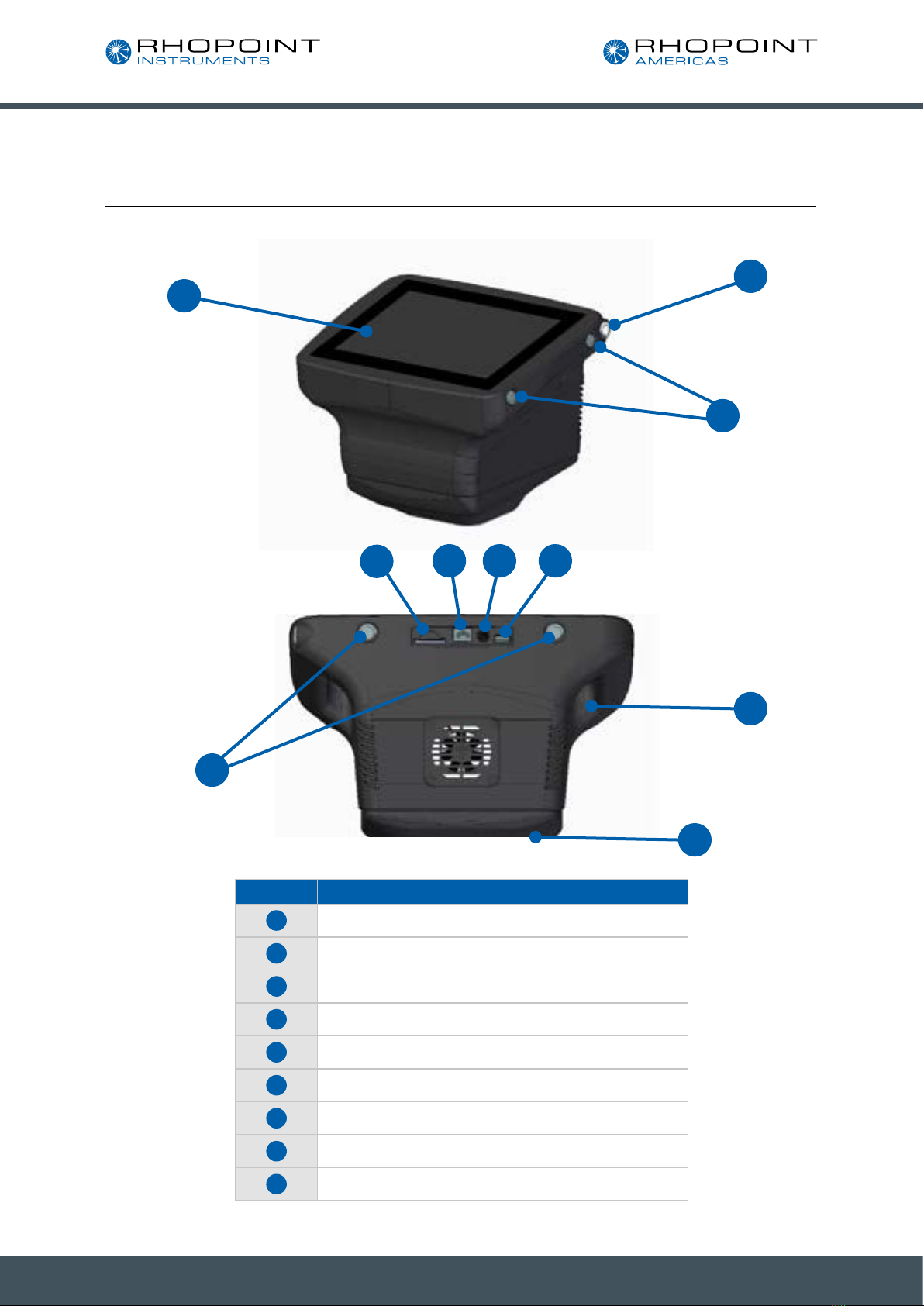
A mains powered battery charger is provided with the unit allowing it to be fully charged, when connected to
the unit’s charger input (4), in under 5 hours. The instrument can also be used with the charger plugged in. The
charging time will be longer if the instrument is used during charging. Battery status is shown by the indicator on
the front screen (2).
Lithium-ION cells do not suffer from “memory effects” so it will not reduce the life of the battery if the charger is
used to top up the battery between readings.
Switching on the unit
To switch Optimap on press and hold the Power button (1) found on the top right-hand side of the instrument
until an audible beep has been sounded, and then release the button.
The instrument will power up and when ready will display the main measurement screen, as shown in the next
section. The operation of the device is detailed in the next section.
To power the instrument off, press the Power button (1) until five audible beeps are heard. The instrument will
then safely enter its power down cycle.

9
Rhopoint Optimap3
Operation
Main Screen
The touch sensitive icon-based measurement screen provides operation and setup of the device. By pressing
each of the icons or active areas shown on the screen the instrument responds in a different way according to
the function.
The central window displays the last acquired or loaded map. On the right side of the window is the legend
which shows the minimum and maximum values in the displayed map, as well as the heat map colours
associated with them.
To the right of the measurement main screen there are six buttons to access the main features of the
instrument. In order these are:
• profile screen
• analysis screen
• live view button
• delete last measurement
• project menu
• settings menu
Measurement
data
Measurement
graph
Instrument status
message Project name Series/Batch
number Measurement
number
Battery level
indicator
Settings menu
Delete last
measurement
Project menu
Live view
button
Analysis
screen
Profile
screen

10
Rhopoint Optimap3
Each of these features are displayed in the next section.
Results are also displayed in numerical format in the results window at the left-hand side of the screen.
At the bottom of the screen below the map image, Project Name, Series / batch number, and Measurement or
count number indicators allow the storage and management of measurement results. Measurements are saved
by the Optimap in a logical sequence allowing clear identification of the surface being measured.
The naming method used for these will differ according to application, however it is the Project name that is the
key field holding all measurement data for each series.
For example, a typical naming setup for an automotive measurement would be to use the vehicle name or
model number as the Project Name and the surface to be measured, left door, right door etc as the Series.
Measurements can then be made according to requirement with each being stored as a separate measurement
number over the surface.
In the right of the map window of the main screen, a scale is displayed corresponding to the image displayed in
the map window.
Indice
Altri manuali Rhopoint Strumento di misura

Rhopoint
Rhopoint NOVO-GLOSS 60 Manuale utente

Rhopoint
Rhopoint Novo-Shade Duo+ Manuale utente

Rhopoint
Rhopoint NOVO-GLOSS Flex 60 Manuale utente

Rhopoint
Rhopoint Novo-Gloss 20/60/75 Manuale utente

Rhopoint
Rhopoint IQ Manuale utente

Rhopoint
Rhopoint Optimap PSD Manuale utente

Rhopoint
Rhopoint NOVO-GLOSS Manuale utente

Rhopoint
Rhopoint ID Manuale utente

Rhopoint
Rhopoint Hanatek Novo-Haze TX Manuale utente

Rhopoint
Rhopoint NOVO-SHADE DUO Manuale utente


