SEM DS-400 Manuale utente

Operation and Maintenance Manual
SEM Model DS-400
MAN-020 | Created: 1/30/20 | ECN: 00510
For Serial Numbers: S400-1743 and up
For service, parts, and customer support, contact us:
SECURITY ENGINEERED MACHINERY
5 Walkup Drive • Westborough, MA 01581
1-508-366-1488
www.semshred.com

semshred.com | 508.366.1488
2
Table&of&Contents&
Operation and Maintenance Manual ..................................................................................................................................... 1
SEM Model DS-400 ................................................................................................................................................................. 1
1. Safety Procedures .............................................................................................................................................................. 3
2. General Assembly Diagram ................................................................................................................................................ 4
3. Unpacking and Installation ................................................................................................................................................. 4
3.1 Unpacking ..................................................................................................................................................................... 5
3.2 Power ........................................................................................................................................................................... 6
3.3 Plug and Receptacle Information ................................................................................................................................. 6
3.4 Vacuum Installation Instructions .................................................................................................................................. 7
4. Startup and Operation ....................................................................................................................................................... 8
4.1 Before You Begin .......................................................................................................................................................... 8
4.2 Shreddable Materials ................................................................................................................................................... 9
4.3 Operation .................................................................................................................................................................... 10
4.4 Troubleshooting ......................................................................................................................................................... 10
5. Maintenance .................................................................................................................................................................... 11
5.1 Before Maintaining ..................................................................................................................................................... 11
5.2 Cleaning ...................................................................................................................................................................... 11
5.3 Lubrication .................................................................................................................................................................. 11
5.4 Filter ........................................................................................................................................................................... 11
5.5 Screen Change/Removal ............................................................................................................................................ 12
5.6 Belts ............................................................................................................................................................................ 12
5.7 Knife Changing and Sharpening .................................................................................................................................. 13
6. Electrical Schematics ........................................................................................................................................................ 20
7. Spare Parts ....................................................................................................................................................................... 20

semshred.com | 508.366.1488
3
1.) Safety Procedures
Your new SEM disintegrator incorporates powerful, heavy duty cutting mechanisms. Serious injury may result
if proper precautions are not followed.
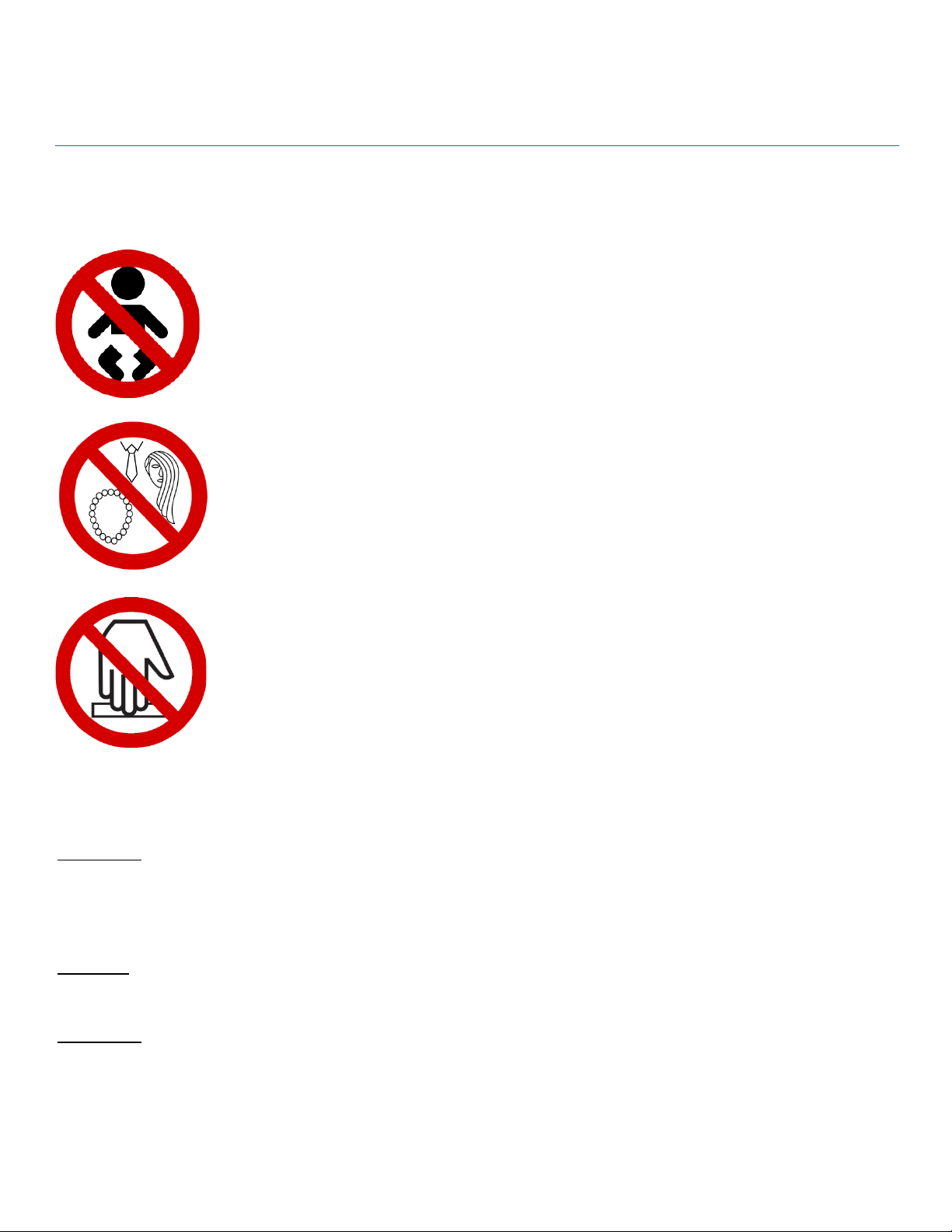
• This equipment should never be operated by children or individuals that are
incapable of understanding these safety precautions.
• Do not reach into the feed opening for any reason. Never insert fingers, hands,
or objects not meant to be shredded into the feed opening.
• Do not operate this equipment with long hair, a necktie, loose clothing, or
jewelry, as there is risk they may be pulled into the shredder.
• Maintenance or repair of this equipment should be performed only by trained,
authorized service personnel.
• Always disconnect electrical power (unplug) before removing or opening the
cover or other panels providing access to internal mechanisms.
• Under no circumstances should any items made of or containing heavy metal
pieces be inserted into the unit. Permanent damage to the cutting head may
result.
Important:
If you overfeed the disintegrator, or have an emergency and need to bypass the timed shutdown, open the front
door of the disintegrator to immediately shut the machine down. Note that the rotor will still be spinning for a short
period afterwards.
Warning:
Opening the front door to bypass the timed shutdown can result in jams or damage to the unit.
Important:
SEM recommends that machine operators wear safety glasses, hearing protection, a mask, and if doing
maintenance or opening the cutting chamber, cut resistant gloves. It is up to each customer to determine the
PPE for their individual site. A suggested minimum break in period for new operators is two hours.

semshred.com | 508.366.1488
4
2. General Assembly Diagram
Disintegrator Cabinet
Vacuum Cabinet
On-Off Selector
Switch
Feed Door
Cartridge Filter

semshred.com | 508.366.1488
5
3. Unpacking and Installation
3.1 – Unpacking
The Model DS-400 has been secured to a pallet for shipping. Please inspect equipment immediately for any
shipping damage.
Important Note: Prior to unpacking, if there is any visible damage to the Model DS-400 or to the crate during
shipping, the receiver must note what is damaged on the Bill of Lading and contact the shipping party
immediately. Retain packaging for 90 days.
Unpacking:
o Tools Needed
§ Lift truck or power jack
§ Strap cutters
o Cut straps holding unit down to the pallet.
o Remove cardboard packaging and foam.
o Remove four bolts, two on each side of the front border of the pallet.
o Use a fork truck or power jack to lift the unit from the pallet or set up a ramp. Do not attempt to
work the unit off the pallet without a ramp, unit is very heavy and could topple
o Rest unit on casters on floor
Transportation: To move the unit, unlock all caster locks and then the unit can be pushed on flat surfaces. DO
NOT push the unit on an inclined or declined surface as control of the unit can be lost and personal injury or
damage to the unit could occur.
Storage: If the unit requires storage, it may be stored in its shipping crate or unpackaged. If unpackaged,
ensure that the caster locks are engaged to prevent unwanted movement of unit.

semshred.com | 508.366.1488
6
3.2 – Power
Power: The Model DS-400 uses a three horsepower, 3-phase motor to run its cutting chamber with a one
horsepower single phase 120V vacuum motor run off of the main incoming power. The following table lists the
recommended disconnects for the DS-400 which should be installed to local electrical code by a licensed
electrician only.
VOLTAGE
FULL LOAD AMPS (FLA)
RECOMMENDED SERVICE
208 Volts
~18.2 FLA
25 Amp
230 Volts
~16.1 FLA
20 Amp
380-415 Volts
~10 FLA
15 Amp
460 Volts
~8.1 FLA
15 Amp
Voltage Drop: When operating at 208V, SEM recommends no more than a 3% voltage drop on the
receptacle for optimal performance (min. 200V while under load).
Note: Model DS-400 should be connected to a dedicated circuit regardless of voltage.
Note: Motors are normally dual voltages, 230/460, but can only be operated at the specific voltage as
wired at the factory. If a voltage change is required in the field, contact the factory for proper instructions.
3.3 - Plug and Receptacle Information
Power Cord: All Model DS-400 units are supplied with an open-ended power cord. This can be directly
hardwired to a power disconnect switch.
Disintegrator Location: The Model DS-400 can be located in an office area or warehouse within six feet of
a wall receptacle of a dedicated 15-25 amp line based on the above chart. It is recommended that the
machine be at least three to four inches away from the wall for proper ventilation.
A disconnect throw switch should be mounted in close proximity to the unit, approximately one to two
feet away.

semshred.com | 508.366.1488
7
3.4 – Vacuum Installation Instructions
Place the vacuum cabinet next to the disintegrator cabinet as shown so the holes in the sides are lined up with each
other. Then open doors on the cabinets and feed the vacuum hose through the hole in the bottom of the right side of
vacuum cabinet and fit over the angled tube of the transition in the disintegrator cabinet.
Plug vacuum cabinet into the back of the disintegrator cabinet
Disintegrator
Cabinet
Vacuum
Cabinet
Vacuum
Cabinet
Disintegrator
Cabinet
Transition
Vacuum
Plug

semshred.com | 508.366.1488
8
4. Startup and Operation
4.1 – Before You Begin
Important: Most problems occur during the first hours of operation. These can be eliminated by careful
review of the operating, maintenance, and recommended service instructions. Please carefully read this
section before operating the machine.
Warning: Disintegrating of materials for which the unit is not intended will likely result in jamming or damage
(see section 4.2).
The Model DS-400 has been shipped complete and tested and is operational when received provided proper
electrical requirements are met.
The Model DS-400 was designed to destroy solid state media, optical media, and paper products. But as with
any type of office machine, it can be overloaded or jammed if overfed. Product destruction rate depends on
the material, size, and desired particle size. Feeding the unit less volume at a higher frequency will result in
better feed rates and reduce the operating costs.
Time Delay Shutdown: All Model DS-400’s units are equipped with time shutdown to help prevent jamming of
the disintegrator. When the selector switch is in the OFF DELAY position, the disintegrator will run for an
additional 60 seconds to clear the chamber. This will help to prevent jamming the unit.
Diagrams: Refer to section 2 for diagrams.
Familiarize yourself with all controls and button locations.
Ensure that all guards and covers are in place.
Ensure that the area is clean.
Check input area for debris, discarded tools, etc.

semshred.com | 508.366.1488
9
4.2 – Shreddable Materials
THIS UNIT IS NOT INTENDED FOR ROTATIONAL MEDIA.
The Model DS-400 is capable of destroying the following products:
•
PC boards and solid state media (removed from case)
•
CD/DVD/optical media (with select screen sizes)
•
Thumb drives
•
PDAs and cell phones (batteries must be removed)
•
Paper
All capacitors, batteries, and liquid-crystal displays should be removed from solid state drives and other solid
state media before running through the Model DS-400. This will often involve opening the product before
running it through the unit.
This unit is not intended for shredding rotational hard drives. Shredding rotational hard
drives on this machine will cause damage to the machine and void your warranty.

semshred.com | 508.366.1488
10
4.3 – Operation
Vacuum: Verify that the vacuum is plugged in with the hose, connected to the transition, and all access
points are closed. Vacuum bag capacity is 35 gallons/approximately 200 sheets/5 reams of paper. Be sure to
change this periodically. The line on the vacuum cabinet window shows SEM’s recommended fill point.
Powering On: Turn the selector switch. The unit will start and illuminate the green operating lamp.
Feeding: Lift feed tray cover and drop material into the hopper.
•
Feed Rates: The following are recommended feed rates for this unit:
o Paper – 10 Sheets every 10 seconds
o CDs – 3 per feed every 15-20 seconds
o Floppy Disks – 3-5 per feed every 20 seconds
o USBs – 3-4 per feed every 20 seconds
o Phone Boards – 1 per feed every 45-60 seconds
o SSD Boards – 1 per feed every 30 seconds
o Feed rates will vary depending on volume of shredded material, overall knife wear, and
screen size. Larger screens have faster feed rates.
Shut down: Allow the unit to run for 60 seconds before turning the power selector switch to off. This will
initiate an additional 60 second timed shutdown to allow the chamber and evacuation line to clear
Warning: Bypassing timed shut down can result in jams or damage to the cutting chamber. In case of
emergency open the front door of the unit to shut the unit down and bypass the timed shutdown.
4.4 – Troubleshooting
Jams: If the unit jams, follow the instructions below.
•
Disconnect unit from power using proper LOTO procedures.
•
Open the front door.
•
Remove the screws from the hopper cover.
•
Use belts to rotate the rotor.
•
Only reach in to remove a piece of material if necessary.
•
If rotor cannot make a full 360º rotation then the unit is still considered jammed.
•
Reattach hopper cover and close door.
•
Restart machine.
Unit Not Starting: If the unit will not start follow the instructions below:
•
De-energize unit before proceeding.
•
Ensure all guards and covers are properly secured to the unit. This ensures limit switches are active.
•
Open electrical panel and reset circuit breakers if necessary.
•
Make sure the unit is connected to a dedicated receptacle of proper voltage. Confirm receptacle
has a >3% voltage drop.
Indice
Altri manuali SEM Distruggidocumenti

SEM
SEM 0300 Manuale utente

SEM
SEM 0300 Guida rapida

SEM
SEM 0205 Manuale utente

SEM
SEM 0303 Manuale utente

SEM
SEM 1201CC Guida rapida

SEM
SEM Model 0202 OMD Guida all'installazione

SEM
SEM 0200 OMD Guida all'installazione

SEM
SEM EMP1000 Manuale utente

SEM
SEM 6040P Manuale utente

SEM
SEM 2226 Series Manuale utente
Manuali Distruggidocumenti popolari di altre marche

Swingline
Swingline STACK-AND-SHRED200X&200XL 60X Manuale di istruzioni

GBC
GBC ShredMaster CC055 Manuale utente

UNITED OFFICE
UNITED OFFICE UAV 190 A1 Manuale utente

UNITED OFFICE
UNITED OFFICE UAV 190 A1 Manuale utente

Rexel
Rexel Optimum AutoFeed+ 45X Manuale utente

Martin Yale
Martin Yale 227284S1 Manuale utente