
SMA 485 Manuale utente

485BRD-10-IA-en-12 | Version 1.2 ENGLISH
Installation Manual
485 Data Module Type B

Legal Provisions SMA Solar Technology AG
2 485BRD-10-IA-en-12 Installation Manual
Legal Provisions
The information contained in this document is the property of SMA Solar Technology AG. Publishing
its content, either partially or in full, requires the written permission of SMA Solar Technology AG.
Any internal company copying of the document for the purposes of evaluating the product or its
correct implementation is allowed and does not require permission.
SMA Warranty
You can download the current warranty conditions from the Internet at www.SMA-Solar.com.
Trademarks
All trademarks are recognized, even if not explicitly identified as such. A lack of identification does
not mean that a product or symbol is not trademarked.
The BLUETOOTH® word mark and logos are registered trademarks owned by Bluetooth SIG, Inc.
and any use of these marks by SMA Solar Technology AG is under license.
Modbus® is a registered trademark of Schneider Electric and is licensed by the Modbus
Organization, Inc.
QR Code is a registered trademark of DENSO WAVE INCORPORATED.
Phillips® and Pozidriv® are registered trademarks of Phillips Screw Company.
Torx® is a registered trademark of Acument Global Technologies, Inc.
SMA Solar Technology AG
Sonnenallee 1
34266 Niestetal
Germany
Tel. +49 561 9522-0
Fax +49 561 9522-100
www.SMA.de
E-mail: [email protected]
© 2004 to 2014 SMA Solar Technology AG. All rights reserved.

SMA Solar Technology AG Table of Contents
Installation Manual 485BRD-10-IA-en-12 3
Table of Contents
1 Information on this Document. . . . . . . . . . . . . . . . . . . . . . . . . . . 5
1.1 Validity. . . . . . . . . . . . . . . . . . . . . . . . . . . . . . . . . . . . . . . . . . . . . . . . . 5
1.2 Target Group. . . . . . . . . . . . . . . . . . . . . . . . . . . . . . . . . . . . . . . . . . . . 5
1.3 Additional Information. . . . . . . . . . . . . . . . . . . . . . . . . . . . . . . . . . . . . 5
1.4 Symbols . . . . . . . . . . . . . . . . . . . . . . . . . . . . . . . . . . . . . . . . . . . . . . . . 5
1.5 Typography . . . . . . . . . . . . . . . . . . . . . . . . . . . . . . . . . . . . . . . . . . . . . 6
1.6 Nomenclature . . . . . . . . . . . . . . . . . . . . . . . . . . . . . . . . . . . . . . . . . . . 6
2 Safety . . . . . . . . . . . . . . . . . . . . . . . . . . . . . . . . . . . . . . . . . . . . . . 7
2.1 Appropriate Usage . . . . . . . . . . . . . . . . . . . . . . . . . . . . . . . . . . . . . . . 7
2.2 Safety Precautions . . . . . . . . . . . . . . . . . . . . . . . . . . . . . . . . . . . . . . . . 8
3 Scope of Delivery . . . . . . . . . . . . . . . . . . . . . . . . . . . . . . . . . . . . . 9
4 Product Description . . . . . . . . . . . . . . . . . . . . . . . . . . . . . . . . . . 10
4.1 485 Data Module . . . . . . . . . . . . . . . . . . . . . . . . . . . . . . . . . . . . . . . 10
4.2 Type Label . . . . . . . . . . . . . . . . . . . . . . . . . . . . . . . . . . . . . . . . . . . . . 10
5 Electrical Connection . . . . . . . . . . . . . . . . . . . . . . . . . . . . . . . . . 11
5.1 Safety during Electrical Connection. . . . . . . . . . . . . . . . . . . . . . . . . . 11
5.2 Mounting Position and Cable Routing . . . . . . . . . . . . . . . . . . . . . . . . 12
5.3 Installing the 485 Data Module in the Inverter . . . . . . . . . . . . . . . . . 13
5.4 Preparing the Cables. . . . . . . . . . . . . . . . . . . . . . . . . . . . . . . . . . . . . 14
5.5 Preparing the Cable Gland on the Inverter . . . . . . . . . . . . . . . . . . . . 15
5.6 Connecting the Cables to the 485 Data Module . . . . . . . . . . . . . . . 17
6 Troubleshooting . . . . . . . . . . . . . . . . . . . . . . . . . . . . . . . . . . . . . 19
7 Decommissioning . . . . . . . . . . . . . . . . . . . . . . . . . . . . . . . . . . . . 20
7.1 Disassembling the 485 Data Module . . . . . . . . . . . . . . . . . . . . . . . . 20
7.2 Packaging the 485 Data Module for Shipping. . . . . . . . . . . . . . . . . 20
7.3 Disposing of the 485 Data Module . . . . . . . . . . . . . . . . . . . . . . . . . 20
8 Technical Data . . . . . . . . . . . . . . . . . . . . . . . . . . . . . . . . . . . . . . 21
9 Contact . . . . . . . . . . . . . . . . . . . . . . . . . . . . . . . . . . . . . . . . . . . . 22

Table of Contents SMA Solar Technology AG
4 485BRD-10-IA-en-12 Installation Manual
SMA Solar Technology AG 1 Information on this Document
Installation Manual 485BRD-10-IA-en-12 5
1 Information on this Document
1.1 Validity
This document is valid for the device type "485BRD-10" (485 Data Module Type B).
1.2 Target Group
The tasks described in this document must be performed by qualified persons only. Qualified persons
must have the following skills:
• Training in how to deal with the dangers and risks associated with installing and using electrical
devices and plants
• Training in the installation and commissioning of electrical devices and plants
• Knowledge of all applicable standards and directives
• Knowledge of how an inverter works and is operated
• Knowledge of and compliance with this document and all the safety precautions
1.3 Additional Information
Links to additional information can be found at www.SMA-Solar.com:
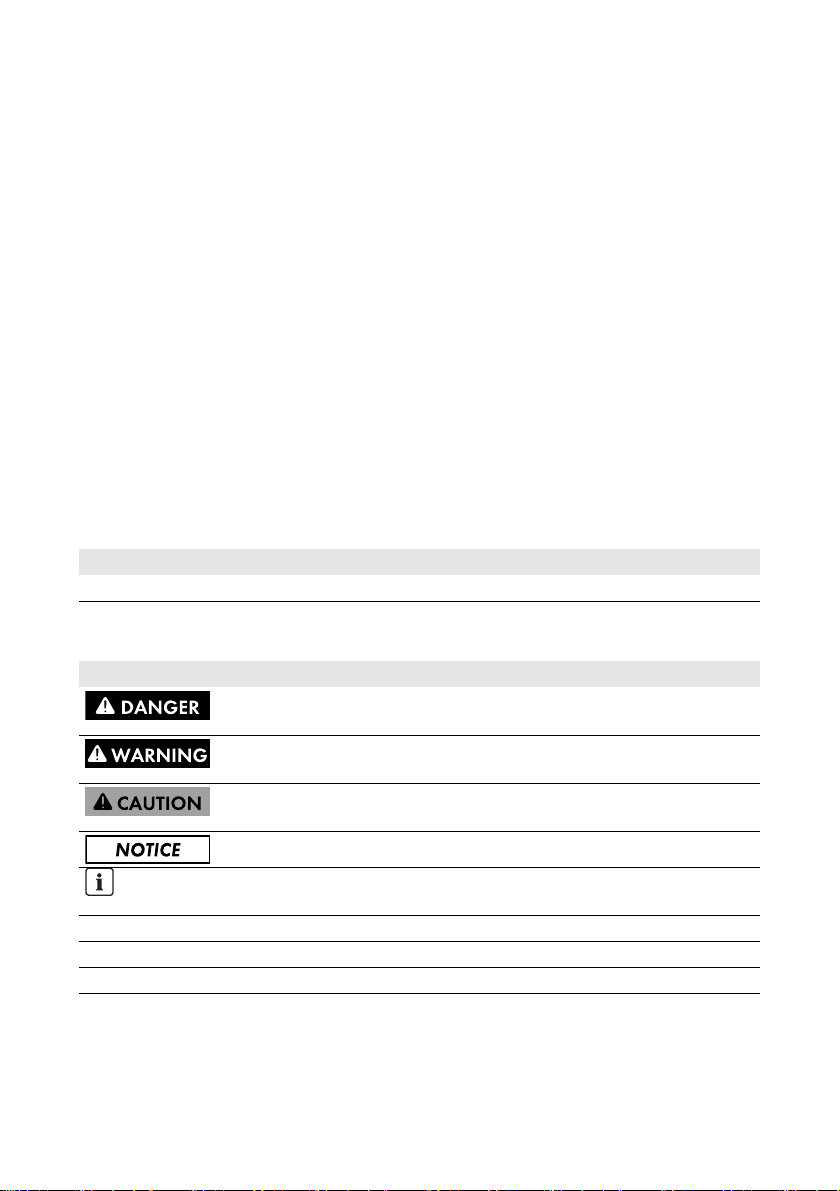
1.4 Symbols
Document title Document type
RS485 Cabling Plan Technical description
Symbol Explanation
Indicates a hazardous situation which, if not avoided, will result in death
or serious injury
Indicates a hazardous situation which, if not avoided, could result in death
or serious injury
Indicates a hazardous situation which, if not avoided, could result in minor
or moderate injury
Indicates a situation which, if not avoided, could result in property damage
Information that is important for a specific topic or goal, but is not
safety-relevant
☐ Indicates an essential requirement for achieving a specific goal
☑ Desired result
✖ A problem that might occur

1 Information on this Document SMA Solar Technology AG
6 485BRD-10-IA-en-12 Installation Manual
1.5 Typography
1.6 Nomenclature
In this document, the "485 Data Module Type B" is referred to as "485 data module".
Typography Explanation Example
bold • Display texts
• Elements of a user interface
•Terminals
• Elements to be selected
• Elements to be entered
• The value can be read from the
Energy field.
• Select Settings.
•Enter the value 10 in the
Minutes field.
>• Connects several elements to
be selected • Select Settings > Date.
[Button/Key] • Button or key to be selected or
pressed • Select [Next].

SMA Solar Technology AG 2 Safety
Installation Manual 485BRD-10-IA-en-12 7
2 Safety
2.1 Appropriate Usage
The 485 data module enables you to setup cable-connected RS485 communication.
The 485 data module can be retrofitted, or installed in the inverter at the factory if specified in the
order.
The inverter still complies with the standard after the product has been installed.
The 485 data module is suitable for installation in the following SMA inverters:
Use this product only in accordance with the information provided in the enclosed documentation and
with the locally applicable standards and directives. Any other use may result in personal injury or
property damage.
For safety reasons, it is not permitted to modify the product or install components that are not explicitly
recommended or distributed by SMA Solar Technology AG for this product.
The enclosed documentation is an integral part of this product.
• Read and observe the documentation.
• Keep the documentation in a convenient place for future reference.
Sunny Tripower Windy Tripower
STP 5000TL-20
STP 6000TL-20
STP 7000TL-20
STP 8000TL-20
STP 9000TL-20
STP 10000TL-20
STP 12000TL-20
WTP 5000TL-20
WTP 6000TL-20
WTP 7000TL-20
WTP 8000TL-20
WTP 9000TL-20

2 Safety SMA Solar Technology AG
8 485BRD-10-IA-en-12 Installation Manual
2.2 Safety Precautions
This section contains safety precautions that must be observed at all times when working on or with
the product.
To prevent personal injury or property damage and to ensure long-term operation of the product,
read this section carefully and follow the safety precautions at all times.
Electric shock due to live voltage
High voltages that can cause fatal electric shocks are present in the live components of the inverter.
• Prior to performing any work on the inverter, always disconnect the inverter from any voltage
sources as described in the corresponding installation manual (see inverter installation
manual).
Risk of burns due to hot enclosure parts
Some parts of the inverter enclosure can get hot during operation.
• During operation, touch the inverter on the enclosure lid and the protective cover only.
Damage to the 485 data module or the inverter due to electrostatic discharge
Touching electronic components on the 485 data module or in the inverter can cause damage to
or destroy the 485 data module and the inverter through electrostatic discharge.
• Earth yourself before touching any components.
• Avoid any contact with components and plug contacts.

SMA Solar Technology AG 3 Scope of Delivery
Installation Manual 485BRD-10-IA-en-12 9
3 Scope of Delivery
Check the scope of delivery for completeness and any externally visible damage. Contact your
specialist dealer if the delivery is incomplete or damaged.
If the 485 data module has already been installed in the inverter at the factory, only those parts
necessary for electrical connection are included in the scope of delivery.
Figure1: Components included in the scope of delivery
Item Number Designation
A 1 485 data module
B 1 M4x10 screw
C2Plastic spacer
D1Metal spacer
E 1 M25 cable gland with sealing plug, cable support sleeve with
one hole and M25 counter nut
F 1 Cable support sleeve with two holes for M25 cable gland
G2 Copper foil
H 2 Spring-cage connector
I1Terminator
K 1 Installation manual, RS485 cabling plan
L 1 Expanding rivet
M 1 Plastic foil for isolating the communication connection from the
AC connection

4 Product Description SMA Solar Technology AG
10 485BRD-10-IA-en-12 Installation Manual
4 Product Description
4.1 485 Data Module
The 485 data module enables you to setup cable-connected RS485 communication.
4.2 Type Label
The type label clearly identifies the 485 data module. The type label is located on the front of the
485 data module.
Figure2: Layout of the type label (example)
You require the information on the type label for customer support from the SMA Service Line.
The type label must remain permanently attached to the 485 data module.
Item Designation
A Holes for attaching the data module using the plastic spacers
B Sockets to plug in the spring clamp terminals
C Hole for attaching the plastic foil
D Shield clamps
E Hole for attaching the data module using the metal spacer
FType label
Item Explanation
A Number of the production order
B Version of the 485 data module
C Device type
D Serial number
Indice
Altri manuali SMA Unità di controllo

SMA
SMA MD.SEN-40 Manuale utente

SMA
SMA MD.485-US-40 Manuale utente

SMA
SMA JBOX TS4-R-O 600VUL Manuale utente

SMA
SMA MD.IO-40 Manuale utente

SMA
SMA MD.SEN-US-40 Manuale utente

SMA
SMA 485 Data Module Manuale utente

SMA
SMA Sunny Home Manage Manuale utente

SMA
SMA RS485 Manuale utente

SMA
SMA SUNNY HOME MANAGER 2.0 Manuale utente

SMA
SMA 1C4-313-001-001 Istruzioni operative e di sicurezza


Manuali Unità di controllo popolari di altre marche

Festo
Festo Compact Performance CP-FB6-E Manuale elenco delle parti

Elo TouchSystems
Elo TouchSystems DMS-SA19P-EXTME Manuale utente

JS Automation
JS Automation MPC3034A Manuale utente

JAUDT
JAUDT SW GII 6406 Series Guida rapida

Spektrum
Spektrum Air Module System Manuale utente

BOC Edwards
BOC Edwards Q Series Manuale utente


