
Sonic Driver POCKET PLUS-UFM Manuale utente

Made in Britain
POCKET PLUS-UFM Ultrasonic Flowmeter
Operating Instructions
Version 3.0
13th March 2023
Copyright Sonic Driver Ltd 2023

Contents
1.0 Introduction
1.1 General Precautions
2.0 Keypad Functionality
3.0 FUNCTION KEY Functions
<1> Quick Start
<2> Transducer Positioning
<3>ATA/ETA %
<4> Flow Rate and Net Total
<5> Flow Velocity, Rate and Totals
<6> Flow Profile
<7> Energy Rate and Net Total
<8> Energy Rate and Totals
<9> Temperature
<.> Time Based Diagnostics
<0> Signal Based Diagnostics
4.0 Powering On
4.1 Power Off
5.0 User Interface (UI)
Quick Start Function
Installation Menu
Pipe Menu
Outer Diameter
Wall Thickness
Material
Roughness
Sound Velocity
WTG SOS
Liner Menu
Material
Sound Velocity
Thickness
Fluid Menu
Type
Temperature
Sound Velocity
Viscosity
Density
SHC
Inlet Temp
Outlet Temp
Transducer Menu
Type
Mounting
WTG Standoff

Calibration Settings Menu
Low Flow Cut
Corrected Flow
User Offset
User Scaling
Set Zero
Zero Tracking
Tup Method
Calculation Method
Display Units Menu
Flow Rate Units
Flow Rate Time Units
Totaliser Units
Energy Units
Energy Time Units
Measurement Units
Damping
Totalisers Menu
Net Flow Total
Pos Flow Total
Neg Flow Total
Flow Total Reset
Energy Total
Energy Total Reset
Load Defaults
System Settings Menu
LCD Backlit
Buzzer
Tag
Identifier
Test Display
Keypad
Memory
Clock
TOFM Scope
TOFM Values
Serial
Logger
System Info Menu
Model Code
Serial No.
HW Issue
SW Issue
Diagnostics Menu

Serial Menu
Mode
Baud
Parity
Logger Menu
Interval
Date
Time
Download
Erase
Load/Save Setups Menu
Save Option
Load Option
Delete Option
Appendix A Transducer parameters
1.0 Introduction
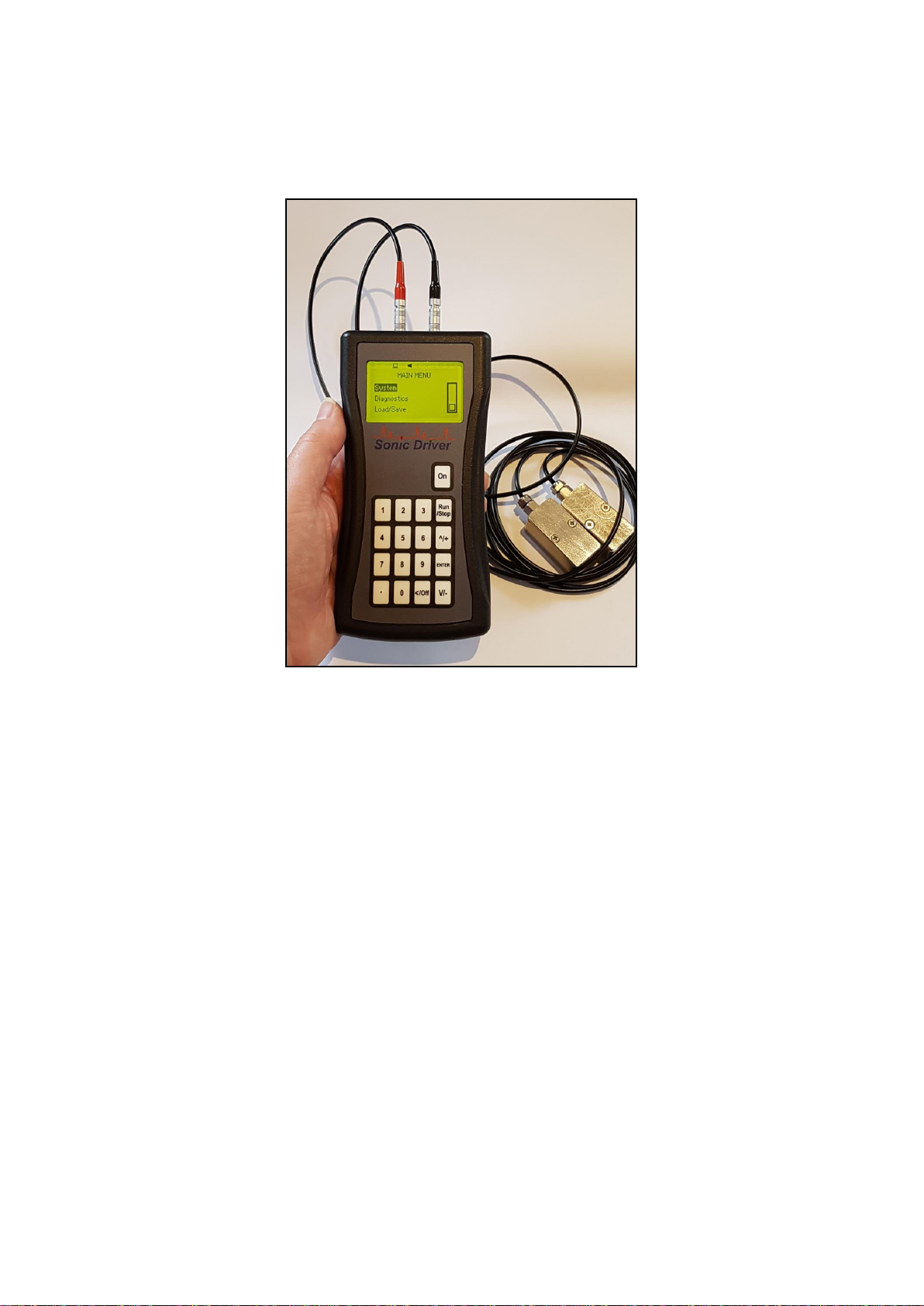
Congratulations on choosing the Sonic Driver TM POCKET PLUS-UFM TM clamp-on ultrasonic
flowmeter, figure(1).
Figure(1) The Sonic Driver POCKET PLUS-UFM.
The ultrasonic flowmeter (UFM) uses advanced Digital Signal Processing (DSP) and transit time
measurement techniques (Sonic Driver TM) to make accurate and reliable clamp-on ultrasonic flow
velocity measurements.
Using information about the installation, entered by the user, using the meters intuitive and easy to
us menu driven User Interface (UI) the UFM can display;
•Flow velocity
•Volumetric flow rate
•Mass flow rate
•Heat quantity flow rate
With the addition of a wall thickness measuring probe the UFM can also function as a pipe wall
thickness gauge (WTG).
The POCKET PLUS-UFM includes a date and time stamped 4MB datalogger and USB serial
communications functionality as standard.
When connected to a computer USB port or USB charger the UFM is powered over the USB. This
allows for extended datalogging sessions.

1.1 General Precautions
The content of this manual has been carefully checked and is believed to be accurate.
Sonic Driver Ltd assumes no responsibility for any inaccuracies that may be contained in this
manual.
In no event will Sonic Driver be liable for direct, indirect, special, incidental or consequential
damages resulting from any defect or omission in this manual, even if we are advised of the
possibility of such damages.
Sonic Driver Ltd reserves the right to make improvements to its manuals, instructions and products
at any time, without notice or obligation. The latest revisions may be found on the company web
site, www.sonic-driver.com
The UFM is a precision measuring instrument and should be handled and operated with care;
•Before operating the UFM for the first time read the installation manual and operating
instruction fully.
•Only use the UFM in the way and for the purpose that it is intended.
•Do not subject the UFM to bumps and shocks such as caused by dropping the UFM.
•Keep the UFM and its transducers and probes clean.
•Only use the UFM within its ambient temperature and stated level of Ingress Protection.
•Avoid excessive stress and bending of transducer cables and connectors.
•Avoid striking the clear display window and keypad with sharp objects.

2.0 Keypad Functionality
The UFM keypad offers several dual operation FUNCTION KEYS for quick setup and display.
Press any of the FUNCTION KEYS to go to the desired menu or display instantly. Note however
that depending on what the user is attempting to do the focus of certain keys will change.
On This key turns the flowmeter on.
When the user is navigating the UI and selecting a Menu screen;
1 Jump to MAIN MENU, the Quick Start option will be highlighted.
2 Jump to show Sensor Positioning screen, the user is prompted to select a
Transducer Type.
3 Jump to show ATA/ETA % diagnostic.
Run/Stop Jump to Measurement screen.
4 Jump to show Flow Rate and Net Total.
5 Jump to show flow velocity, flow rate, net, positive and negative flow totaliser.
6 Jump to show Reynolds Number, flow profile correction K Factor, Raw Flow
velocity and Corrected flow velocity.
^/+ Scroll up through Menu items.
7 Jump to show Energy Rate and Net Total.
8 Jump to show energy rate, net, positive and negative energy totaliser.
9 Jump to show Compensation, Inlet and Outlet temperature.
ENTER Step forward to selected Menu.
. Jump to show time based diagnostics.
0 Jump to show signal based diagnostics.
</Off Step back to previous Menu (When at Main Menu press and hold whilst progress bar
decrements to turn meter off).
V/- Scroll down through Menu items.
When the meter is in measurement mode and measuring the keypad keys have the following
functions;
1 Jump to MAIN MENU, the Quick Start option will be highlighted.
2 Jump to show Sensor Positioning screen, the user is prompted to select a
Transducer Type.
3 Jump to show ATA/ETA % diagnostic.
Run/Stop Jump to UI, show last menu accessed.
4 Jump to show Flow Rate and Net Total.
5 Jump to show flow velocity, flow rate, net, positive and negative flow totaliser.
6 Jump to show Reynolds Number, flow profile correction K Factor, Raw Flow
velocity and Corrected flow velocity.
^/+ Display contrast up.
7 Jump to show Energy Rate and Net Total.
8 Jump to show energy rate, net, positive and negative energy totaliser.
9 Jump to show Compensation, Inlet and Outlet temperature.
ENTER Step through all available display screens.
. Jump to show time based diagnostics.
0 Jump to show signal based diagnostics.
</Off No action.
V/- Display contrast down.

When the user is editing a parameter and the parameter editing cursor starts to flash the keypad keys
change function to become alphanumeric inputs;
1 Enter "1".
2 Enter "2".
3 Enter "3".
Run/Stop No action.
4 Enter "4".
5 Enter "5".
6 Enter "6".
^/+ Enter "+" symbol or scroll up though available parameter options in a list.
7 Enter "7".
8 Enter "8".
9 Enter "9".
ENTER Accept and Save changes and return to last Menu screen.
. Enter ".".
0 Enter "0".
</Off Return to last Menu screen, discard any changes.
V/- Enter "–" symbol or scroll down though available parameter options in a list.

3.0 FUNCTION KEY Functions
The keypad has a number of FUNCTION KEYS, which allow the user to instantly access functions;
<1> Quick Start
This key jumps to the Main Menu with the Quick Start option highlighted.
Press ENTER to start the Quick Start sequence or navigate the UI in the usual way.
<2> Transducer Positioning
This key gives access to a function which calculates the recommended transducer spacing and
displays diagnostics to aid transducer mounting and allows coupling optimization.
After entering the required Quick Start parameters, the spacing between the ends of the 2
transducers is calculated and displayed. Check the value displayed and space the transducers
accordingly.
If the Set Zero calibration function is enabled a zero flow calibration will also be made. It is vitally
important to ensure that there is zero flow during this procedure. If the UFM suspects that there is
flow in the pipe then a visual warning is given.
When the process is complete the user is returned to the UI.
<3>ATA/ETA %
This key gives access to a display of transit time ratio shown as a percentage value. This is a
measure of the ratio of the measured transit time to that which is expected given the parameters
entered by the user during Quick Start. It indicates if the transducer mounting and spacing is
accurate. The normal transit time ratio should be 100 ± 3% if the installation is correct.
It is acceptable to have to move one of the transducers up to ± 5mm to achieve a figure of 100%. If
more movement is necessary then one of the pipe parameters is probably incorrect. This is most
likely to be the value entered for pipe wall thickness as this is often taken from tables or it is an
estimated value.
<4> Flow Rate and Net Total
This key gives access to a display showing;
•Flow rate
•Net flow totaliser
<5> Flow Velocity, Rate and Totals
This key gives access to a display showing;
•Flow velocity
•Flow rate
•Net flow totaliser
•Positive flow totaliser

•Negative flow totaliser
Net total is simply the sum of the positive and negative flow totals.
<6> Flow Profile
This key gives access to a display showing;
•Reynolds Number
•Flow profile correction K factor
•Raw flow velocity
•Rolling average flow velocity
•Corrected flow velocity
The raw flow velocity is displayed without averaging and uncompensated for flow profile.
Rolling average flow velocity is raw flow velocity with average and flow profile compensation
applied.
Corrected flow velocity is rolling average flow velocity with zero flow cut off applied.
<7> Energy Rate and Net Total
This key gives access to a display showing;
•Energy rate
•Net energy totaliser
<8> Energy Rate and Totals
This key gives access to a display showing;
•Energy rate
•Net energy totaliser
•Positive energy totaliser
•Negative energy totaliser
<9> Temperature
This key gives access to a display showing;
•Fluid temperature
•Pipe inlet temperature
•Pipe outlet temperature
The fluid temperature is used for compensation of; speed of sound, density, viscosity and specific
heat capacity.
Indice
Altri manuali Sonic Driver Strumento di misura


