Asus A7V333-X Manuale utente

Motherboard
A7V333-X
User Guide

ii
Checklist
Copyright © 2002 ASUSTeK COMPUTER INC. All Rights Reserved.
No part of this manual, including the products and software described in it, may be
reproduced, transmitted, transcribed, stored in a retrieval system, or translated into any
language in any form or by any means, except documentation kept by the purchaser for
backup purposes, without the express written permission of ASUSTeK COMPUTER INC.
(“ASUS”).
Product warranty or service will not be extended if: (1) the product is repaired, modified or
altered, unless such repair, modification of alteration is authorized in writing by ASUS; or (2)
the serial number of the product is defaced or missing.
ASUS PROVIDES THIS MANUAL “AS IS” WITHOUT WARRANTY OF ANY KIND, EITHER
EXPRESS OR IMPLIED, INCLUDING BUT NOT LIMITED TO THE IMPLIED WARRANTIES
OR CONDITIONS OF MERCHANTABILITY OR FITNESS FORA PARTICULAR PURPOSE.
IN NO EVENT SHALLASUS, ITS DIRECTORS, OFFICERS, EMPLOYEES OR AGENTS BE
LIABLE FOR ANY INDIRECT, SPECIAL, INCIDENTAL, OR CONSEQUENTIAL DAMAGES
(INCLUDING DAMAGES FOR LOSS OF PROFITS, LOSS OF BUSINESS, LOSS OF USE
OR DATA, INTERRUPTION OF BUSINESS AND THE LIKE), EVEN IF ASUS HAS BEEN
ADVISED OF THE POSSIBILITY OF SUCH DAMAGES ARISING FROM ANY DEFECT OR
ERROR IN THIS MANUAL OR PRODUCT.
SPECIFICATIONS AND INFORMATION CONTAINED IN THIS MANUALARE FURNISHED
FOR INFORMATIONAL USE ONLY, ANDARE SUBJECT TO CHANGEATANY TIME
WITHOUT NOTICE,AND SHOULD NOT BE CONSTRUED AS ACOMMITMENT BYASUS.
ASUS ASSUMES NO RESPONSIBILITY OR LIABILITY FOR ANY ERRORS OR
INACCURACIES THAT MAY APPEAR IN THIS MANUAL, INCLUDING THE PRODUCTS
AND SOFTWARE DESCRIBED IN IT.
Products and corporate names appearing in this manual may or may not be registered
trademarks or copyrights of their respective companies, and are used only for identification or
explanation and to the owners’ benefit, without intent to infringe.
E1150
First Edition
October 2002

iii
Features
Contents
Contents ......................................................................................... iii
FCC/CDC statements......................................................................v
Federal Communications Commission Statement .................v
Canadian Department of Communications Statement ...........v
Safety information ..........................................................................vi
About this guide............................................................................. vii
Conventions used in this guide ............................................ vii
Where to find more information ............................................ vii
ASUS contact information ............................................................. vii
Specifications summary .................................................................ix
Chapter 1 - Motherboard Info ................................................... 1-1
1.1 Welcome ...................................................................... 1-2
1.2 Package contents ....................................................... 1-2
1.3 Motherboard components .......................................... 1-3
1.4 Motherboard layout..................................................... 1-6
1.5 Before you proceed..................................................... 1-7
1.6 Central Processing Unit (CPU)................................... 1-7
1.7 System memory........................................................... 1-8
1.8 Expansion Slots........................................................... 1-8
1.8.1 Configuring an expansion card .................................. 1-9
1.8.2 Standard Interrupt Assignments ................................ 1-9
1.8.3 AGP Slot ........................................................ 1-9
1.9 Jumpers ....................................................................... 1-10
1.10 Connectors ................................................................. 1-13
Chapter 2 - BIOS Information ..................................................... .2-1
2.1 Managing and updating your BIOS ............................ 2-2
2.1.1 Using ASUS EZFLASH to update the BIOS................ 2-2
2.1.2 Using ASUS AFLASH to update the BIOS................... 2-4
Updating BIOS procedures.................................... 2-5
2.2 BIOS Setup Program ................................................... 2-7
2.2.1 BIOS menu bar ........................................................... 2-7
2.2.2 Legend bar .................................................................. 2-8

iv
Safeguards
Contents
2.3 Main Menu .................................................................... 2-9
2.3.1 Primary and Secondary Master/Slave......................... 2-11
2.3.2 Keyboard Features ..................................................... 2-13
2.4 Advanced Menu ........................................................... 2-14
2.4.1 Chip Configuration ...................................................... 2-15
2.4.2 I/O Device Configuration ............................................. 2-17
2.4.3 PCI Configuration ........................................................ 2-18
2.4.3.1 PCI IRQ Resource Exclusion ................................... 2-19
2.5 Power Menu .................................................................. 2-20
2.5.1 Power-up Control ........................................................ 2-22
2.5.2 Hardware Monitor ........................................................ 2-23
2.6 Boot Menu ..................................................................... 2-24
2.7 Exit Menu ................................................................. 2-25
Chapter 3 - Starting Up .............................................................. 3-1
3.1 Install an operating system......................................... 3-2
3.2 Support CD information.............................................. 3-2
3.2.1 Running the support CD ............................................ 3-2
3.2.2 Software drivers and installation menus .................... 3-3
3.3 Software Information................................................... 3-5
3.3.1 ASUS Update ............................................................. 3-5
3.3.2 ASUS PC Probe ......................................................... 3-6
Starting ASUS PC Probe ...................................... 3-6
Using ASUS PC Probe ......................................... 3-7
ASUS PC Probe Task Bar Icon ............................... 3-9

v
FCC/CDC statements
Federal Communications Commission Statement
This device complies with FCC Rules Part 15. Operation is subject to the
following two conditions:
• This device may not cause harmful interference, and
• This device must accept any interference received including interference
that may cause undesired operation.
This equipment has been tested and found to comply with the limits for a
Class B digital device, pursuant to Part 15 of the FCC Rules. These limits
are designed to provide reasonable protection against harmful interference
in a residential installation. This equipment generates, uses and can radiate
radio frequency energy and, if not installed and used in accordance with
manufacturer’s instructions, may cause harmful interference to radio
communications. However, there is no guarantee that interference will not
occur in a particular installation. If this equipment does cause harmful
interference to radio or television reception, which can be determined by
turning the equipment off and on, the user is encouraged to try to correct the
interference by one or more of the following measures:
• Reorient or relocate the receiving antenna.
• Increase the separation between the equipment and receiver.
• Connect the equipment to an outlet on a circuit different from that to
which the receiver is connected.
• Consult the dealer or an experienced radio/TV technician for help.
Canadian Department of Communications Statement
This digital apparatus does not exceed the Class B limits for radio noise
emissions from digital apparatus set out in the Radio Interference
Regulations of the Canadian Department of Communications.
This class B digital apparatus complies with Canadian ICES-003.
The use of shielded cables for connection of the monitor to the
graphics card is required to assure compliance with FCC regulations.
Changes or modifications to this unit not expressly approved by the
party responsible for compliance could void the user’s authority to
operate this equipment.

vi
Safety information
Electrical safety
• To prevent electrical shock hazard, disconnect the power cable from
the electrical outlet before relocating the system.
• When adding or removing devices to or from the system, ensure that
the power cables for the devices are unplugged before the signal
cables are connected. If possible, disconnect all power cables from the
existing system before you add a device.
• Before connecting or removing signal cables from the motherboard,
ensure that all power cables are unplugged.
• Seek professional assistance before using an adpater or extension
cord. These devices could interrupt the grounding circuit.
• Make sure that your power supply is set to the correct voltage in your
area. If you are not sure about the voltage of the electrical outlet you
are using, contact your local power company.
• If the power supply is broken, do not try to fix it by yourself. Contact a
qualified service technician or your retailer.
Operation safety
• Before installing the motherboard and adding devices on it, carefully
read all the manuals that came with the package.
• Before using the product, make sure all cables are correctly connected
and the power cables are not damaged. If you detect any damage,
contact your dealer immediately.
• To avoid short circuits, keep paper clips, screws, and staples away from
connectors, slots, sockets and circuitry.
• Avoid dust, humidity, and temperature extremes. Do not place the
product in any area where it may become wet.
• Place the product on a stable surface.
• If you encounter technical problems with the product, contact a
qualified service technician or your retailer.

vii
Conventions used in this guide
To make sure that you perform certain tasks properly, take note of the
following symbols used throughout this manual.
Where to find more information
Refer to the following sources for additional information and for product
and software updates.
1. ASUS Websites
The ASUS websites worldwide provide updated information on ASUS
hardware and software products. The ASUS websites are listed in the
ASUS Contact Information on page viii.
2. Optional Documentation
Your product package may include optional documentation, such as
warranty flyers, that may have been added by your dealer. These
documents are not part of the standard package.
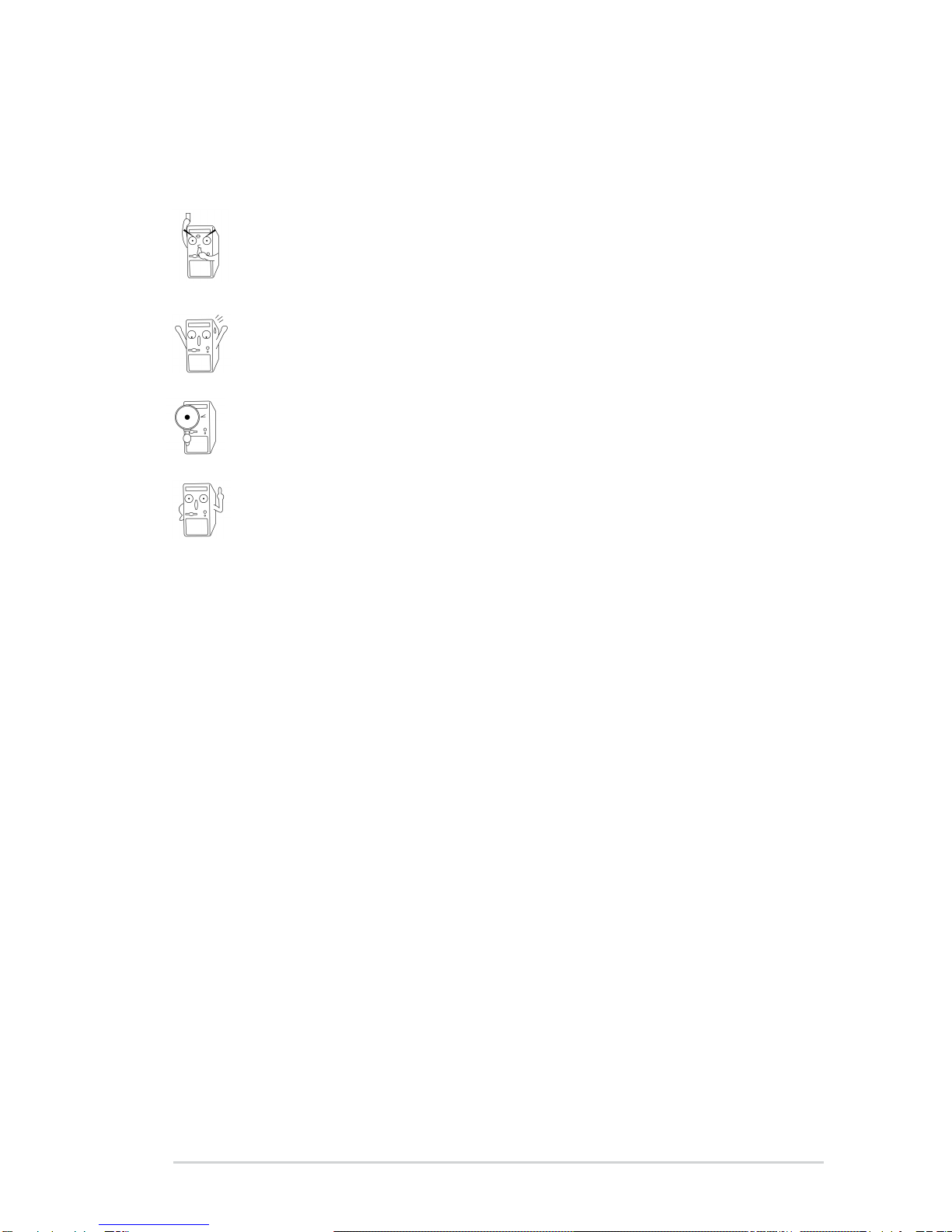
WARNING/DANGER: Information to prevent injury to yourself
when trying to complete a task.
CAUTION: Information to prevent damage to the components
when trying to complete a task.
IMPORTANT: Information that you MUST follow to complete a
task.
NOTE: Tips and additional information to aid in completing a task.

viii
ASUS contact information
ASUSTeK COMPUTER INC. (Asia-Pacific)
Address: 150 Li-Te Road, Peitou, Taipei, Taiwan 112
General Tel: +886-2-2894-3447
General Fax: +886-2-2894-3449
Technical Support
MB/Others (Tel): +886-2-2890-7121 (English)
Notebook (Tel): +886-2-2890-7122 (English)
Desktop/Server (Tel): +886-2-2890-7123 (English)
Support Fax: +886-2-2890-7698
Web Site: www.asus.com.tw
Newsgroup: cscnews.asus.com.tw
ASUS COMPUTER INTERNATIONAL (America)
Address: 6737 Mowry Avenue, Mowry Business Center,
Building 2, Newark, CA 94560, USA
General Fax: +1-510-608-4555
Technical Support
Support Fax: +1-510-608-4555
General Support: +1-502-995-0883
Web Site: www.asus.com
ASUS COMPUTER GmbH (Germany and Austria)
Address: Harkortstr. 25, 40880 Ratingen, BRD, Germany
General Fax: +49-2102-442066
Technical Support
Support Hotline: MB/Others: +49-2102-9599-0
Notebook (Tel): +49-2102-9599-10
Support Fax: +49-2102-9599-11
Support (Email): www.asuscom.de/de/support (for online support)
Web Site: www.asuscom.de

ix
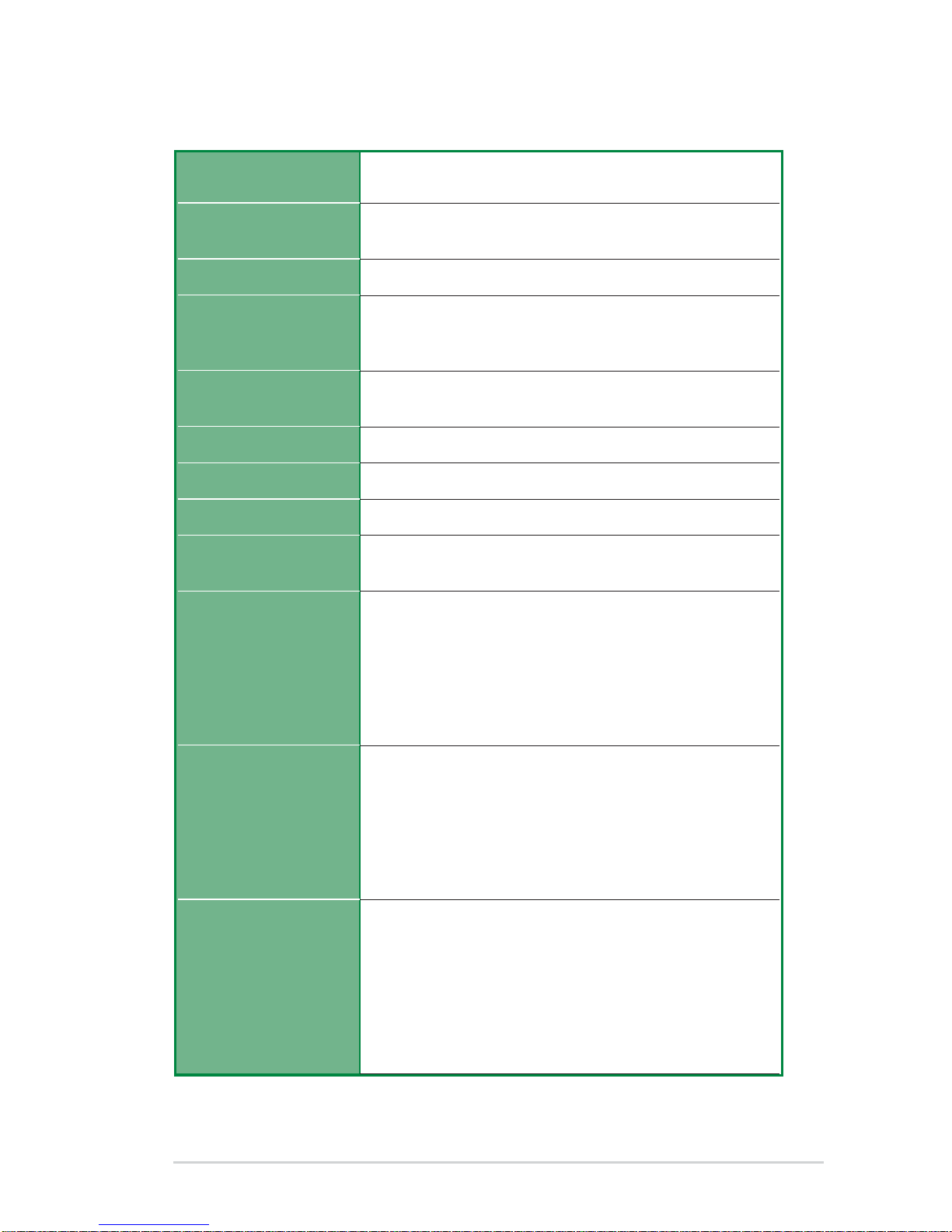
A7V333-X specifications summary
CPU
Chipset
Front Side Bus (FSB)
Memory
Expansion slots
IDE
Audio (optional)
LAN (optional)
USB 2.0
Special Features
Back Panel I/O Ports
Internal I/O
Connectors
(continued on the next page)
Socket A for AMD Athlon XP/Athlon/Duron up to 2.8 GHz+
333 MHz FSB Support
Northbridge: VIA KT333
Southbridge: VIA VT8235
333/266/200Mhz
3 x DDR DIMM Sockets
Max. 3 GB unbuffered PC2100/1600 non-ECC DDR SDRAM
(PC2700 Max. to 4 banks only)
6 x PCI
1 x AGP 4X
2 x UltraDMA 133/100/66
Realtek 6-channel CODEC
BroadCom 10/100 Mbps Ethernet controller
VT8235 built-in USB 2.0
6 x USB 2.0 ports
ASUS MyLogo
ASUS EZ Flash
ASUS Q-Fan
Power Loss Restart
ASUS JumperFree
SFS (Stepless Frequency Selection)
ASUS C.O.P. (CPU Overheating Protection)
1 x Parallel
2 x Serial
1 x PS/2 Keyboard
1 x PS/2 Mouse
1 x Audio I/O (on audio model only)
4 x USB 2.0
1 x RJ-45 Port (on LAN model only)
CPU/Chassis FAN connector
20 pin ATX power connector
IDE LED connector
Chassis Intrusion
Game port (on audio model only)
CD/AUX audio in (on audio model only)
Front panel audio connector (on audio model only)
1 x USB 2.0 connector supports additional 2 USB 2.0 ports

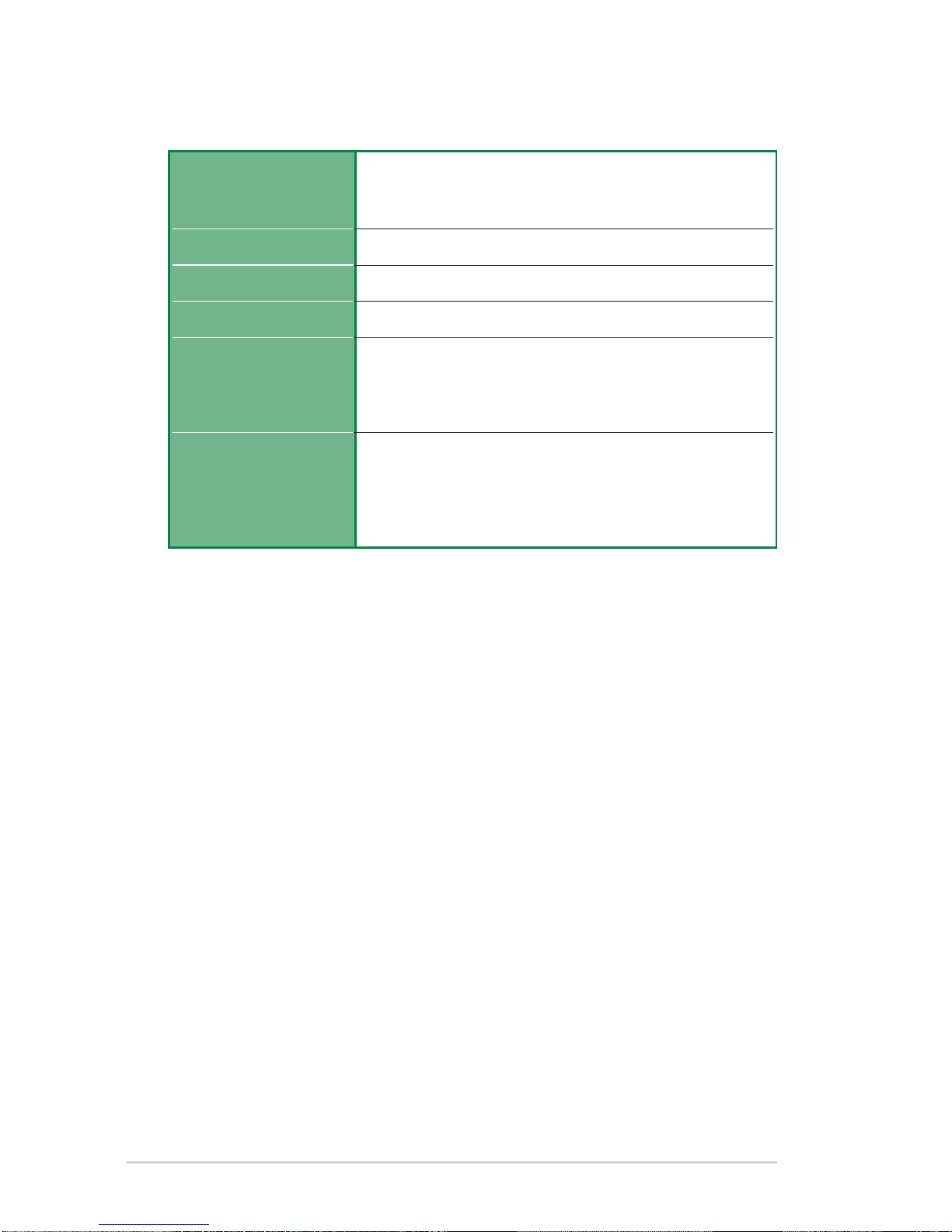
x
BIOS features
Industry standard
Manageability
Form Factor
Support CD contents
Accessories
A7V333-X specifications summary
* Specifications are subject to change without notice.
2Mb Flash ROM, ASUS JumperFree, Award BIOS, DMI2.0,
PnP, WfM2.0, BIOS 2.3, ASUS EZ Flash, ASUS MyLogo,
TCAV (Trend ChipAway Virus)
PCI 2.2, USB 2.0.
WfM2.0, DMI2.0, WOR, WOL, Chassis Intrusion
ATX form factor: 12 in x 9.6 in
Device drivers
ASUS PC Probe
Trend Micro
tm
PC-cillin 2002 anti-virus software
ASUS LiveUpdate Utility
User’s manual
Support CD
1 x UltraDMA 133/100/66 cable
FDD cable
I/O shield
Indice
Altri manuali Asus Scheda madre

Asus
Asus A7N8X-XE Manuale utente

Asus
Asus M3N-H/HDMI Manuale utente

Asus
Asus H81I-PLUS Manuale utente

Asus
Asus Q87M-E Manuale utente

Asus
Asus P8H61-M LX2 R2.0 Manuale utente

Asus
Asus PRIME B365M-K Manuale utente

Asus
Asus F1A75-I DELUXE Manuale utente

Asus
Asus P5GDC Deluxe Manuale utente

Asus
Asus H110M-C Manuale utente

Asus
Asus H110M-K X Manuale utente

Asus
Asus J3455T-IM-A Manuale utente

Asus
Asus P4S-X Manuale utente

Asus
Asus PRIE H610M-K Manuale utente

Asus
Asus P5AD2 Premium Manuale utente

Asus
Asus PRIME H610M-D D4 Manuale utente

Asus
Asus P4P800S-X Manuale utente

Asus
Asus Prime H270-PRO Manuale utente

Asus
Asus H61M-K Manuale utente

Asus
Asus P8H61-I LX R2.0 RM SI Manuale utente

Asus
Asus P5K WS Manuale utente