
CYP EL-42M-PIP Manuale utente
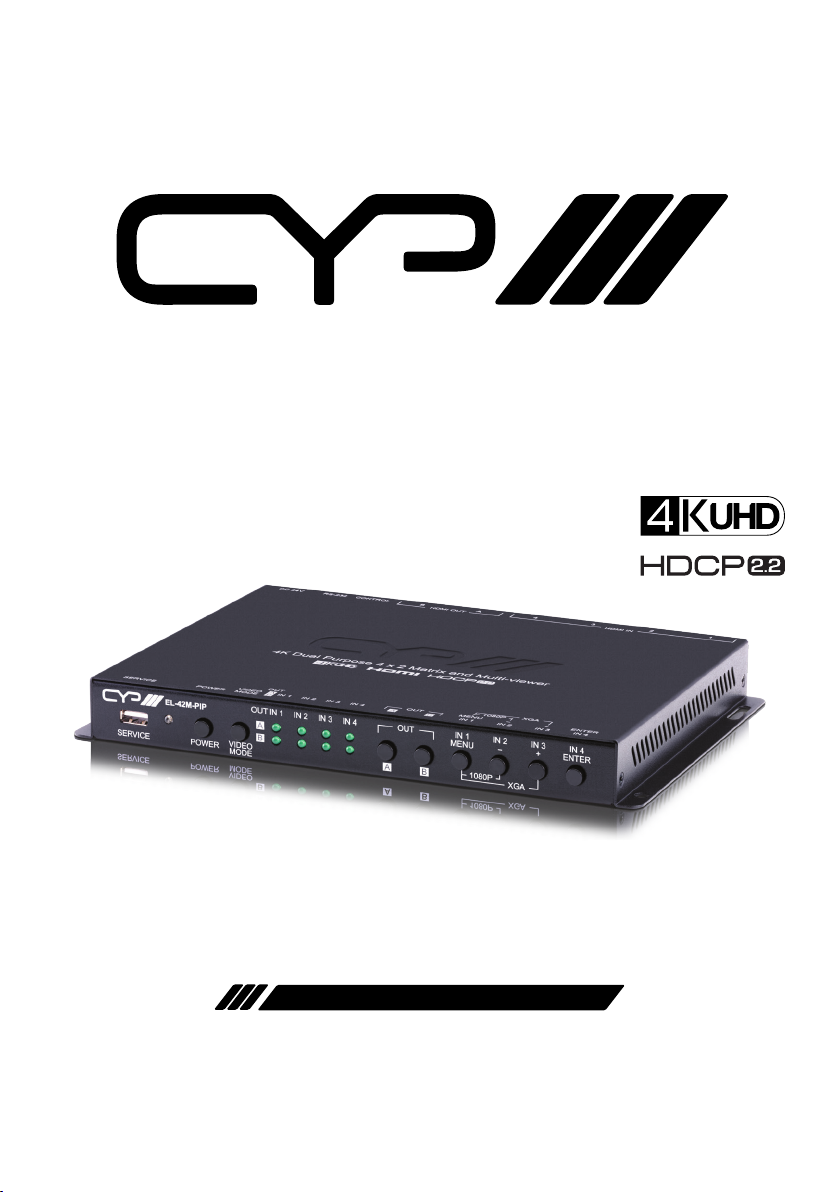
EL-42M-PIP
4x2 Matrix with Picture-in-Picture & Seamless Switching
OPERATION MANUAL

®
registered trademarks of HDMI licensing Administrator, Inc.

DISCLAIMERS
The information in this manual has been carefully checked and is
believed to be accurate. CYP (UK) Ltd assumes no responsibility for any
infringements of patents or other rights of third parties which may result
from its use.
CYP (UK) Ltd assumes no responsibility for any inaccuracies that may be
contained in this document. CYP (UK) Ltd also makes no commitment to
update or to keep current the information contained in this document.
CYP (UK) Ltd reserves the right to make improvements to this document
and/or product at any time and without notice.
COPYRIGHT NOTICE
No part of this document may be reproduced, transmitted, transcribed,
stored in a retrieval system, or any of its part translated into any language
or computer le, in any form or by any means—electronic, mechanical,
magnetic, optical, chemical, manual, or otherwise—without express
written permission and consent from CYP (UK) Ltd.
© Copyright 2020 by CYP (UK) Ltd.
All Rights Reserved.
Version 1.1
TRADEMARK ACKNOWLEDGMENTS
All products or service names mentioned in this document may be
trademarks of the companies with which they are associated.

SAFETY PRECAUTIONS
Please read all instructions before attempting to unpack, install or operate
this equipment and before connecting the power supply.
Please keep the following in mind as you unpack and install this
equipment:
• Always follow basic safety precautions to reduce the risk of re,
electrical shock and injury to persons.
• To prevent re or shock hazard, do not expose the unit to rain,
moisture or install this product near water.
• Never spill liquid of any kind on or into this product.
• Never push an object of any kind into this product through any
openings or empty slots in the unit, as you may damage parts inside
the unit.
• Do not attach the power supply cabling to building surfaces.
• Use only the supplied power supply unit (PSU). Do not use the PSU if
it is damaged.
• Do not allow anything to rest on the power cabling or allow any
weight to be placed upon it or any person walk on it.
• To protect the unit from overheating, do not block any vents or
openings in the unit housing that provide ventilation and allow for
sucient space for air to circulate around the unit.
VERSION HISTORY
REV. DATE SUMMARY OF CHANGE
v1.00 2019/11/22 Preliminary release
v1.01 2020/06/15 Added 3840x2400@60rb output support

CONTENTS
1. Introduction..................................................1
2. Applications ..................................................1
3. Package Contents .........................................1
4. System Requirements .................................. 2
5. Features.........................................................2
6. Operation Controls and Functions ..............3
6.1 Front Panel.............................................................3
6.2 Rear Panel...............................................................5
6.3 RS-232 Pinout and Defaults.............................6
6.4 OSD Menu ..............................................................7
6.5 WebGUI Control ................................................ 25
6.5.1 Upper Tab Windows.............................. 27
6.5.2 Window Layout Tab .............................. 28
6.5.3 Picture Tab................................................ 30
6.5.4 Audio Tab.................................................. 31
6.5.5 Input EDID Tab........................................ 32
6.5.6 HDCP Mode Tab ..................................... 33
6.5.7 OSD Settings Tab ................................... 34
6.5.8 Logo Settings Tab.................................. 35
6.5.9 Ethernet Tab ............................................ 36
6.5.10 Setup Tab ............................................... 37
6.5.11 Information Tab ................................... 38

6.6 Telnet Control..................................................... 39
6.7 Serial and Telnet Commands........................ 40
7. Connection Diagram ..................................61
8. Specications..............................................62
8.1 Technical Specications ................................. 62
8.2 Video Specications......................................... 63
8.3 Audio Specications........................................ 65
8.3.1 Digital Audio ........................................... 65
8.4 Cable Specications ........................................ 66
9. Acronyms.....................................................67

1
1. INTRODUCTION
This 4 by 2 HDMI Matrix with PiP is a high performance HDMI switch with
integrated scaling and multi-windowing technology which can connect
up to four 4K UHD+HDMI sources to up to two 4K UHD+HDMI displays
and freely switch between them. It is an ideal solution for monitoring
or displaying multiple sources simultaneously for use in control rooms,
conference rooms or classrooms. Video resolutions up to 4K@60Hz and
LPCM audio up to 7.1 channels at 192kHz are supported and this unit is
fully compatible with the HDCP 1.x and 2.2 standards.
Any of 4 dierent HDMI sources may be displayed individually, full screen,
with seamless switching in Matrix mode, or they can be displayed using
a variety of multi-window modes including standard views like PiP
(Picture in Picture) and PoP (Picture outside of Picture) as well as fully
customizable quad-window modes. Control of input/window routing,
position and sizing is easy using the front panel controls with OSD menu
as well as by WebGUI, RS-232, and Telnet.
2. APPLICATIONS
Entertainment Room & Home Theater
Show Room & Demo Room
Lecture Room & Hall Presentation
Public Commercial Display
3. PACKAGE CONTENTS
1× UHD+4×2 HDMI Matrix with PiP
1× 24V/2.7A DC Power Adapter
1× Rackmount Ears (Set of 2)
1× Shockproof Feet (Set of 4)
1× Operation Manual

2
4. SYSTEM REQUIREMENTS
HDMI source equipment such as media players, video game consoles
or set-top boxes.
HDMI receiving equipment such as HDTVs, monitors or audio
ampliers.
5. FEATURES
HDMI 2.0 and DVI 1.0 compliant (with the use of an HDMI-DVI adapter)
HDCP 1.x and 2.2 compliant
4 HDMI inputs and 2 HDMI outputs
Supports up to 4K UHD+(18Gbps, 4K@50/60Hz 4:4:4, 8-bit) video input
and output
Seamless switching (no loss of sync to display) when switching sources
in Matrix mode
Supports up to four simultaneous, freely scalable, windows in multi-
windowing modes
Supports the ability to store a multi-window arrangement as a preset
that can be recalled later
Independent audio source selection and routing in all modes
Inputs 1 & 2 support pass-through of many audio formats including 8
channel LPCM, Bitstream, and HD Bitstream (Inputs 3 & 4 are limited to
2 channel LPCM only)
Each window can have a border with a selectable colour
Uploadable and freely positionable graphic logo support
Intuitive and easy adjustment of window size, position and settings in
multi-window modes via the WebGUI
Per-input EDID management with internal or external EDID options
Controllable via front panel buttons, WebGUI, Telnet, and RS-232
3
6. OPERATION CONTROLS AND FUNCTIONS
6.1 Front Panel
SERVICE POWER 1080P XGA
IN 1 IN 1 IN 2 IN 3 IN 4
MENU
-
+ ENTER
IN 2 IN 3 IN 4 OUT
VIDEO
MODE
OUT
A
B
AB
1 2 3 4 5 6 7 8 9
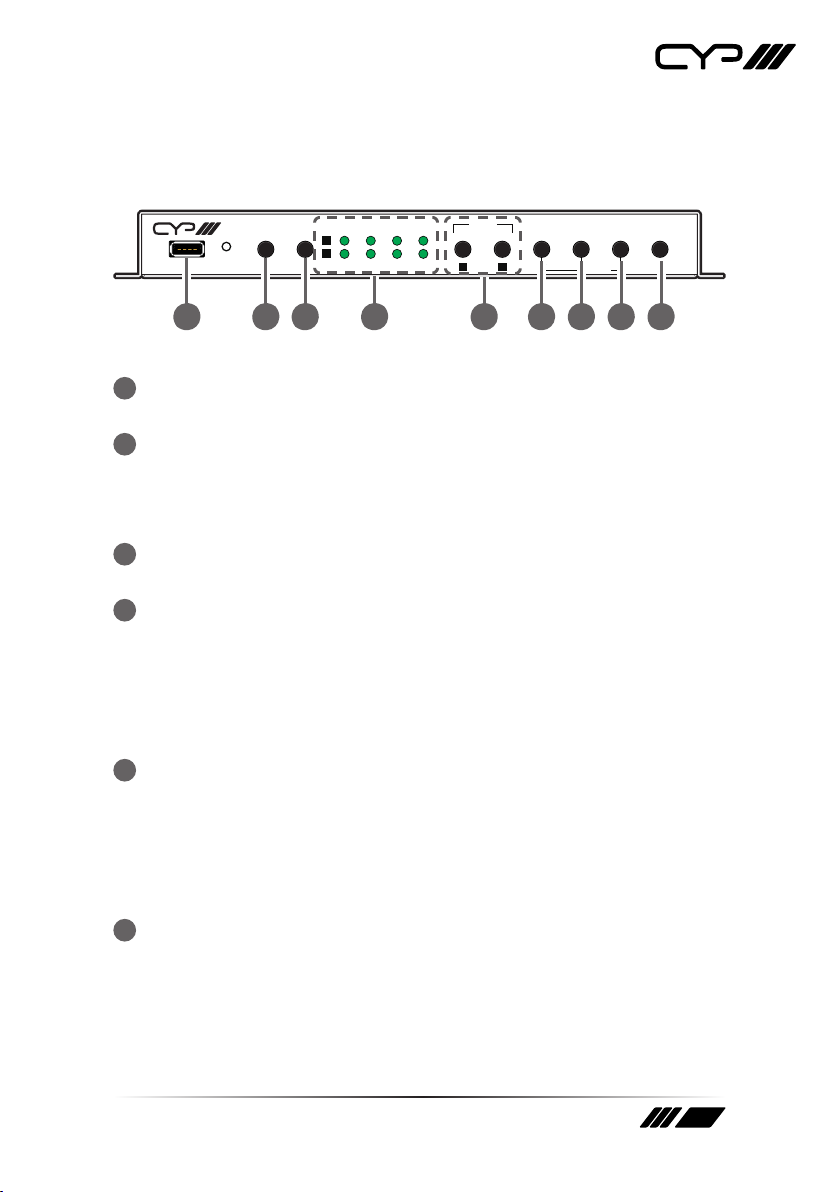
1SERVICE Port: This port is reserved for rmware update and user
EDID/logo upload use only.
2POWER LED & Button: Press this button to power the unit on (green
LED) or place it into stand-by mode (red LED).
Note: Ethernet and RS-232 remain active when the unit is in stand-by
mode.
3VIDEO MODE Button: Press this button to sequentially switch the
unit’s operational mode between Matrix, PiP, PoP, and Quad.
4OUT A~B/IN 1~4 LED Array: In Matrix mode, these LED’s indicate the
currently selected sources (IN 1~4) routed to each of the two outputs
(OUT A~B). When the unit is in a multi-windowing mode (PiP/PoP/
Quad/Preset) all LEDs will be illuminated simultaneously.
Note: When source selection is active the associated output’s LED(s) will
blink.
5OUT A/B Buttons: In Matrix mode, either of these buttons to activate/
deactivate discrete source selection for the associated output. In
multi-windowing modes (PiP/PoP/Quad/Preset) either button will
activate/deactivate sequential source selection for the 4 windows.
Note: These buttons only activate/deactivate the ability to change
sources. Actual source selection is accomplished using the IN 1~4 buttons.
6IN 1/MENU Button: When not in source selection mode, press to
enter the OSD menu, or to back out from menu items. When source
selection is active, pressing this button will either select input 1 (Matrix
mode) or sequentially switch through all 4 inputs for window 1 (PiP/
PoP/Quad/Preset modes).
Note: Pressing “MENU” and “+” together will reset the output resolution

4
to XGA (1024×768@60Hz). Pressing “MENU” and “-” together will reset the
output resolution to 1080p@60Hz.
7IN 2/- (MINUS) Button: When not in source selection mode, press
to move down or adjust selections within OSD menus. When source
selection is active, pressing this button will either select input 2 (Matrix
mode) or sequentially switch through all 4 inputs for window 2 (PiP/
PoP/Quad/Preset modes).
8IN 3/+ (PLUS) Button: When not in source selection mode, press
to move up or adjust selections within OSD menus. When source
selection is active, pressing this button will either select input 3 (Matrix
mode) or sequentially switch through all 4 inputs for window 3 (PiP/
PoP/Quad/Preset modes).
9IN 4/ENTER Button: When not in source selection mode, press to
conrm a selection within the OSD or to go deeper into a menu item.
When source selection is active, pressing this button will either select
input 4 (Matrix mode) or sequentially switch through all 4 inputs for
window 4 (PiP/PoP/Quad/Preset modes).
Indice
Altri manuali CYP Commutatore a matrice

CYP
CYP OR-HD42S Manuale utente

CYP
CYP CPLUS-32FX Manuale utente

CYP
CYP PU-O4H4C Manuale utente

CYP
CYP CMSI-3232 Manuale utente

CYP
CYP CPLUS-V8H8HP Manuale utente

CYP
CYP PUV-44XPL-AVLC Manuale utente

CYP
CYP PUV-1082-4K22N Manuale utente

CYP
CYP nT17BX19 Manuale utente

CYP
CYP CMSDI-164 Manuale utente

CYP
CYP CDPS-44SM Manuale utente

CYP
CYP PUV-662PL-4K22 Manuale utente

CYP
CYP CPLUS-44PLV Manuale utente

CYP
CYP PU-8H8HBTPL Manuale utente

CYP
CYP OR-32USBC-4K22 Manuale utente

CYP
CYP CPLUS-662CVEA Manuale utente

CYP
CYP CDPS-44SM Manuale utente

CYP
CYP PUV-1210PL-RX Manuale utente

CYP
CYP CDPS-44SM Manuale utente

CYP
CYP CMSDI-1616S Manuale utente

CYP
CYP PU-8H8HBTPL-4K Manuale utente


