
CYP CH-1529TXV Manuale utente

CH-1529TXV
4K UHD+HDMI over HDBaseT Transmitter
with HDR & OAR
Operation Manual
Operation Manual


DISCLAIMERS
The information in this manual has been carefully checked and
is believed to be accurate. Cypress Technology assumes no
responsibility for any infringements of patents or other rights of third
parties which may result from its use.
Cypress Technology assumes no responsibility for any inaccuracies
that may be contained in this document. Cypress also makes no
commitment to update or to keep current the information contained
in this document.
Cypress Technology reserves the right to make improvements to this
document and/or product at any time and without notice.
COPYRIGHT NOTICE
No part of this document may be reproduced, transmitted,
transcribed, stored in a retrieval system, or any of its part translated
into any language or computer le, in any form or by any means—
electronic, mechanical, magnetic, optical, chemical, manual, or
otherwise—without express written permission and consent from
Cypress Technology.
© Copyright 2018 by Cypress Technology.
All Rights Reserved.
TRADEMARK ACKNOWLEDGMENTS
All products or service names mentioned in this document may be
trademarks of the companies with which they are associated.

SAFETY PRECAUTIONS
Please read all instructions before attempting to unpack, install or
operate this equipment and before connecting the power supply.
Please keep the following in mind as you unpack and install this
equipment:
• Always follow basic safety precautions to reduce the risk of re,
electrical shock and injury to persons.
• To prevent re or shock hazard, do not expose the unit to rain,
moisture or install this product near water.
• Never spill liquid of any kind on or into this product.
• Never push an object of any kind into this product through any
openings or empty slots in the unit, as you may damage parts
inside the unit.
• Do not attach the power supply cabling to building surfaces.
• Use only the supplied power supply unit (PSU). Do not use the PSU
if it is damaged.
• Do not allow anything to rest on the power cabling or allow any
weight to be placed upon it or any person walk on it.
• To protect the unit from overheating, do not block any vents or
openings in the unit housing that provide ventilation and allow for
sufcient space for air to circulate around the unit.
• Please completely disconnect the power when the unit is not in
use to avoid wasting electricity.
REVISION HISTORY
VERSION NO. DATE SUMMARY OF CHANGE
RDV1 02/05/18 Preliminary release
VS1 07/05/18 Final technical review
VS2 21/05/18 Updated section 6.1 & 6.5

CONTENTS
1. Introduction......................................................1
2. Applications.....................................................1
3. Package Contents ..........................................2
4. System Requirements......................................2
5. Features............................................................2
6. Operation Controls and Functions.................3
6.1 Front Panel ................................................. 3
6.2 Rear Panel.................................................. 5
6.3 Right Panel................................................. 6
6.4 IR Cable Pinouts ........................................ 6
6.5 RS-232 Control ........................................... 7
6.6 RS-232 Commands.................................... 7
6.7 EDID Management ................................... 9
6.7.1 EDID Dipswitch Settings ................... 9
6.7.2 EDID Management Tool................ 11
7. Connection Diagram ....................................15
8. Specications ................................................16
8.1 Technical Specications ........................ 16
8.2 Video Specications............................... 17
8.3 Audio Specications............................... 18
8.4 Cable Specications .............................. 19
8.5 HDBaseT Features.................................... 19
9. Acronyms .......................................................20

1
1. INTRODUCTION
This HDMI over single Cat.5e/6/7 Transmitter is a great solution for
extending HD audio and video as well as Ethernet and control via
a single run of Cat.5e/6/7 cable over distances of up to 100 meters.
Multiple data and control interfaces are provided, including IR, RS-232
and LAN connections. This Transmitter complies with the advanced
HDCP 2.2 and HDMI 2.0 standards, as well as supporting the legacy
HDCP 1.x and HDMI 1.x standards. Despite HDBaseT’s 10.Gbps
bandwidth limitation, 4K UHD HDMI video sources, up to and including
4K@60Hz (4:4:4, 8-bit) as well as 10/12-bit sources with HDR, are able
to be processed and extended by the use of AVLC (Adaptive Visually
Lossless Compression) when connected to a compatible AVLC
Receiver.
Beyond video, data, and control this unit also contains useful audio
features. The Optical Audio Return (OAR) feature supports transmitting
optical audio back from a compatible Receiver for local playback.
Rounding out the feature set is robust EDID management as well as
automatic HDBaseT clock stretching and TMDS re-clocking support.
This Transmitter (PSE) can provide 48V PoH (Power over HDBaseT)
to a compatible Receiver (PD), allowing for greater exibility within
different installation scenarios.
2. APPLICATIONS
• 48V PoH from Transmitter (PSE) to Receiver (PD)
• Household entertainment sharing and control
• Lecture room display and control
• Showroom display and control
• Meeting room presentation and control
• Classroom display and control

2
3. PACKAGE CONTENTS
• 1×HDMI over HDBaseT Transmitter with HDR & OAR
• 1×48V/0.83A DC Power Adapter
• 1×Power Cord
• 1×3.5mm to IR Blaster Cable
• 1×3-pin Terminal Block to 9-pin D-sub Adapter Cable
• 1×Rackmount Ears (Set of 2)
• 1×Operation Manual
4. SYSTEM REQUIREMENTS
• HDMI source equipment such as a media player, video game
console or set-top box.
• A compatible HDBaseT Receiver with AVLC and 48V PoH support is
recommended.
• The use of industry standard Cat.6, Cat.6a or Cat.7 cable is highly
recommended.
• The use of “Premium High Speed HDMI” cables is highly
recommended.
5. FEATURES
• HDMI with HDR, 3D & 4K@60Hz support, DVI 1.0 compatible
• HDCP 2.2 and HDCP 1.x compliant
• Supports up to 4K UHD (18Gbps, 4K@50/60Hz 4:4:4, 8-bit) video input
and output
• Supports Deep Color input and output up to 12-bit
• Supports 10-bit and 12-bit HDR (High Dynamic Range) input/output
• Supports CEC bypass
• Simultaneous transmission of uncompressed video, audio and data
over a single Cat.5e/6/7 cable up to 100m/328ft at 1080p60 and
70m/230ft at 4K
• HDBaseT feature support: HD Video and Audio, 100BaseT Ethernet,
48V PoH, and Control (bidirectional IR/RS-232 pass-through)

3
• Integrated AVLC (Adaptive Visually Lossless Compression) activates
when the bandwidth requirements of the source are beyond
10.2Gbps (340MHz) allowing for sources up to 18Gbps (600MHz) to
be sent to a compatible Receiver with no loss of visual quality
• The AVLC feature allows manual selection between High Quality
Mode (Full bandwidth) and Standard Mode (Lower bandwidth,
useful for longer cable runs with 4K sources)
• Supports the Optical Audio Return (OAR) function to transmit optical
audio from a compatible Receiver to the Transmitter
• Comprehensive EDID management support including 6 pre-dened
EDIDs, 9 user EDIDs and an EDID bypass mode
• PC-based EDID management software allows for the uploading of
customized user EDIDs via USB
• Supports HDMI DDC bus clock stretching for improved compatibility
with certain Blu-ray players
• Performs TMDS re-clocking and signal re-generation for improved
signal integrity
• Ultra-thin wall plate design (16mm thickness) for convenient
installation
• Supports standard 48V PoH from Transmitter (PSE) to Receiver (PD)
(compatible Receivers only)
6. OPERATION CONTROLS AND FUNCTIONS
6.1 Front Panel
CONSOLE/
BYPASS
RX
RS-232SERVICE
OPT. OUT
DC 48V
+
-
POWER
LINK
TX
IR BLASTER 2IR EXTENDER 1
1 2 3 4 5 6 7 8

4
1DC 48V: Plug the 48V DC power adapter into this port and connect
it to an AC wall outlet for power.
Note: Please be sure to follow the polarity labels on the unit and
the adapter’s wires.
2POWER LED: This LED will illuminate to indicate the unit is on and
receiving power.
LINK LED: This LED will illuminate solidly when a live connection with
a compatible Receiver is active.
3OPT. OUT: Connect to powered speakers or an amplier for digital
audio output using an appropriate optical cable. Audio is sourced
from the Optical Audio Return input on a connected compatible
Receiver.
4IR EXTENDER 1: Connect to an IR Extender to extend the IR control
range of devices connected to the other end of the HDBaseT
connection. Ensure that the remote being used is within direct line-
of-sight of the IR Extender.
5IR BLASTER 2: Connect to the provided IR Blaster to transmit IR
signals from the other end of the HDBaseT connection to devices
within direct line-of-sight of the IR Blaster.
6SERVICE: This USB port is reserved for rmware update and user
EDID upload use.
7RS-232: Connect to a PC, laptop or other serial control device with
a 3-pin adapter cable for the extension of RS-232 signals to the
Receiver in "Bypass" mode, or for control this unit when in "Console"
mode.
Note: Depending on the controlled device connected to the
Receiver side, the Tx and Rx pins might need to be reversed.
8CONSOLE/BYPASS: This switch controls the operational mode of the
RS-232 port. When set to “Bypass”, RS-232 signals will be passed to
the connected Receiver. When set to “Console” the RS-232 port
may be used to send commands directly to the Transmitter.
Note: RS-232 bypass requires both the Transmitter and Receiver to
be set to “Bypass” mode.
5
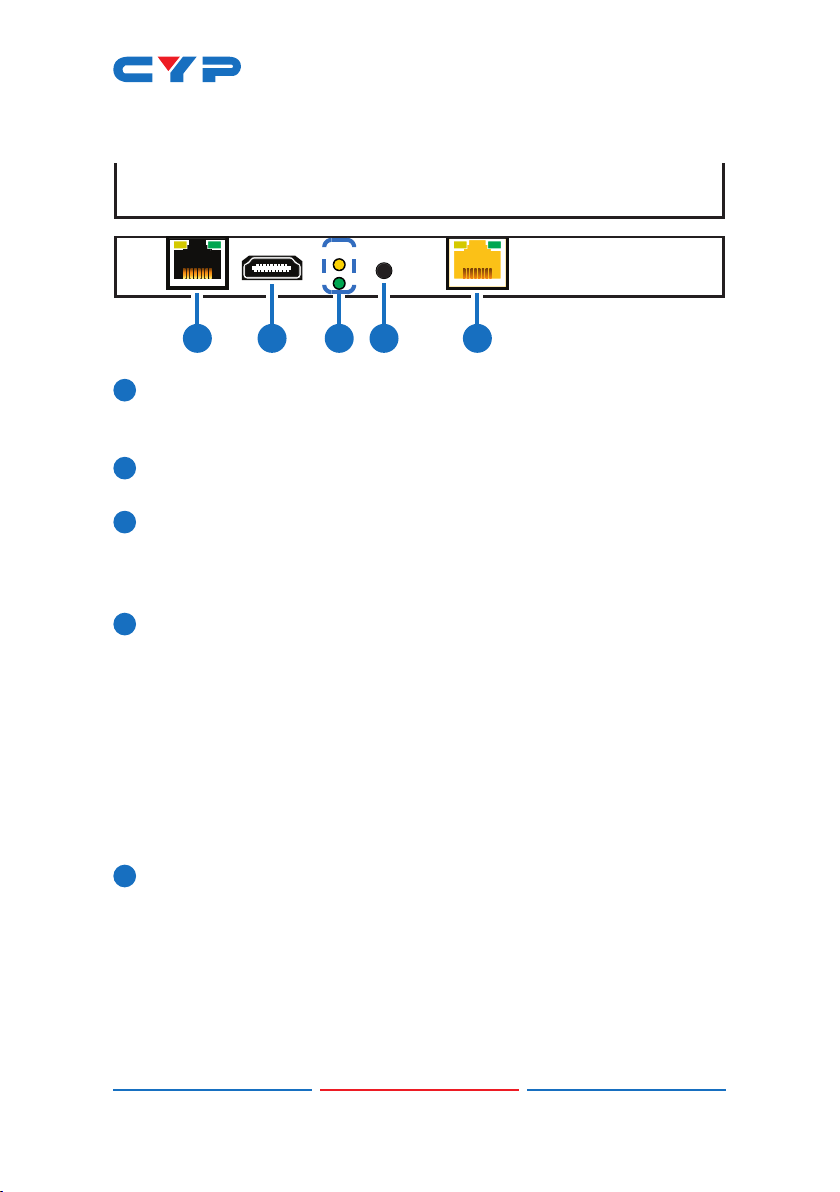
6.2 Rear Panel
CAT5e/6/7 OUTHQ / STD
SWITCH
HQ
STD
HDMI IN LAN
1 2 3 4 5
1LAN: Connect to an Ethernet supporting device or to your local
network, as appropriate, to extend the network to both ends of
the HDBaseT connection.
2HDMI IN: Connect to HDMI source equipment such as a media
player, game console or set-top box.
3HQ & STD LEDs: These LEDs illuminate to indicate which AVLC mode
will be used when AVLC is required. The lower green LED indicates
that AVLC will use HQ (High Quality) mode. The upper yellow LED
indicates that AVLC will use STD (Standard) mode.
4HQ/STD SWITCH: This switch allows the user to select which
compression mode to use when AVLC is active, High Quality or
Standard.
Note: HQ (High Quality) mode uses the least amount of
compression and provides the highest possible visual quality
(perceptually identical to the original). STD (Standard Quality)
mode applies additional signal reduction methods to lower
the bandwidth requirements of 4K sources further, improving
transmission reliability over longer cable runs at the cost of some
visual delity.
5CAT5e/6/7 OUT: Connect to a compatible HDBaseT Receiver with
a single Cat.5e/6/7 cable for transmission of all data signals. 48V
PoH will also be supplied when connected to a compatible PD
Receiver.
Note: The 48V PoH function is designed for powering compatible
Receiver units only. Non-PoH Receivers will need their own power
supply. Receivers from other brands may not be compatible.
Indice
Altri manuali CYP Trasmettitore

CYP
CYP PRO-SDIOF-KIT Manuale utente

CYP
CYP CH-507TX Manuale utente

CYP
CYP PU-515PLTX-1H Manuale utente

CYP
CYP CSI-8H8CVTX Manuale utente

CYP
CYP CH-306TXA & RXA Manuale utente

CYP
CYP PU-501 Manuale utente

CYP
CYP CH-1602RX Manuale utente

CYP
CYP PUV-3000TX Manuale utente

CYP
CYP PU-507TX-CVGA Manuale di installazione

CYP
CYP PUV-1830TX-AVLC Manuale utente

CYP
CYP PU-8H8CTXIR Manuale utente

CYP
CYP DCT-30TX Manuale utente

CYP
CYP PU-305BD-TX Manuale utente

CYP
CYP PU-1H7HBTL Manuale utente

CYP
CYP Dante AU-DTI4-TX Manuale utente

CYP
CYP PUV-1605S-TXWP Manuale utente

CYP
CYP PU-507-KIT Manuale utente

CYP
CYP CH-U331TX Manuale utente

CYP
CYP CH-507TX Manuale utente

CYP
CYP PUV-1510TX Manuale utente


