
MerCs Strider M4 V2 Series Manuale utente
1
02 4047 0777 www.mercs.com.au02 4047 0788
MerCs Pty Ltd, 55 Pendlebury Rd, Cardi, NSW, 2285, Australia | 2019 V1.1
Two pulse output indicates real time energy measurement. An RS485 outp ut allows remote monitoring from another display or a computer.
The Unit can measure and display: The unit has password protected set up screens for:
Unit Characteristics
• Line voltage and THD% (total harmonic distortion) of all phases
• Line Frequency
• Currents, Current demands and current THD% of all phases
• Power, maximum power demand and power factor
• Active energy imported and exported
• Reactive energy imported and exported
• Changing password
• Supply system selection 1p2w, 3p3w, 3 p 4w
• Demand Interval time
• Reset for demand measurements
• Pulse output duration
User Manual
IntroductionApplications
Features
The unit measures and displays the characteristics of single phase two wires (1p2w), three phase
three wires (3p3w,) and three phase four wires (3p4w) supplies, including voltage, frequency,
current, power ,active and reactive energy, imported or exported. Energy is measured in terms
of kWh, kvarh. Maximum demand current can be measured over preset periods of up to 60min-
utes. In order to measure energy, the unit requires voltage and current inputs in addition to the
supply required to power the product. The requisite current input(s) are obtained via current
transformers (CT). This meter can be congured to work with a wide range of CTs, giving the unit
a wide range of applications. Built-in interfaces provides pulse and RS485 Modbus RTU outputs.
Conguration is password protected. This unit can be powered from a separate auxiliary (AC or
DC) supply. Alternatively it can be powered from the monitored supply, where appropriate.
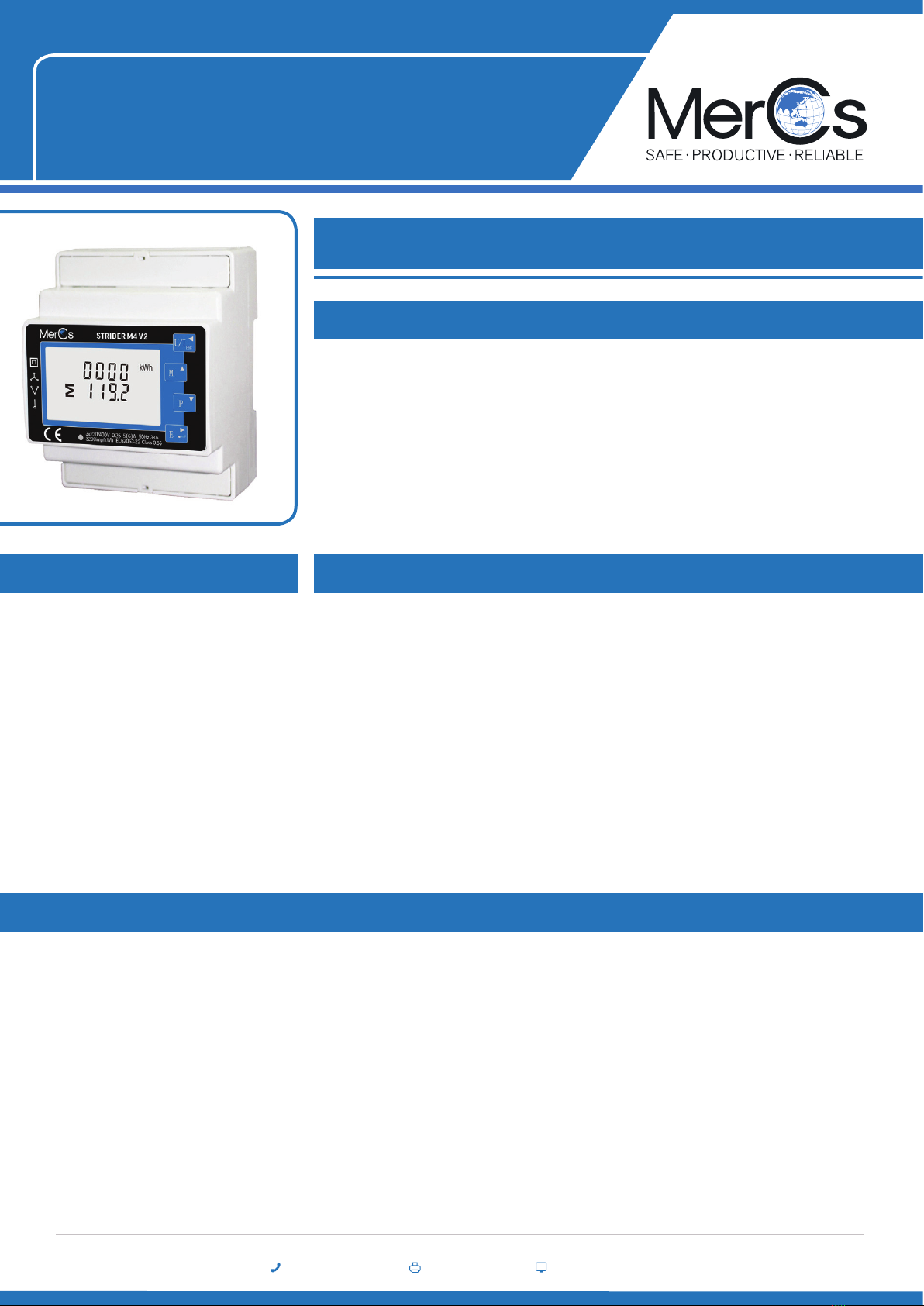
Strider M4 V2
Multi-Function Energy Meter
ME-PM-M4-5
• Measures kWh Kvarh, KW, Kvar, KVA, P, F, PF, Hz, dmd, V, A, THD, etc.
• • Bi-directional measurement IMP & EXP
• • Two pulse outputs
• • RS485 Modbus
• • Din rail mounting 35mm
• • 1/5A CT connection
• • Accuracy Class 0.5s
• Main Switchboards
• Control Panels
• Sub Circuits
• Air Conditioning Systems
• Solar panel installations
02 4047 0777 www.mercs.com.au02 4047 0788 2
Strider M4 V2 ME-PM-M4-5
MerCs Pty Ltd, 55 Pendlebury Rd, Cardi, NSW, 2285, Australia | 2019 V1.1
1 2 3
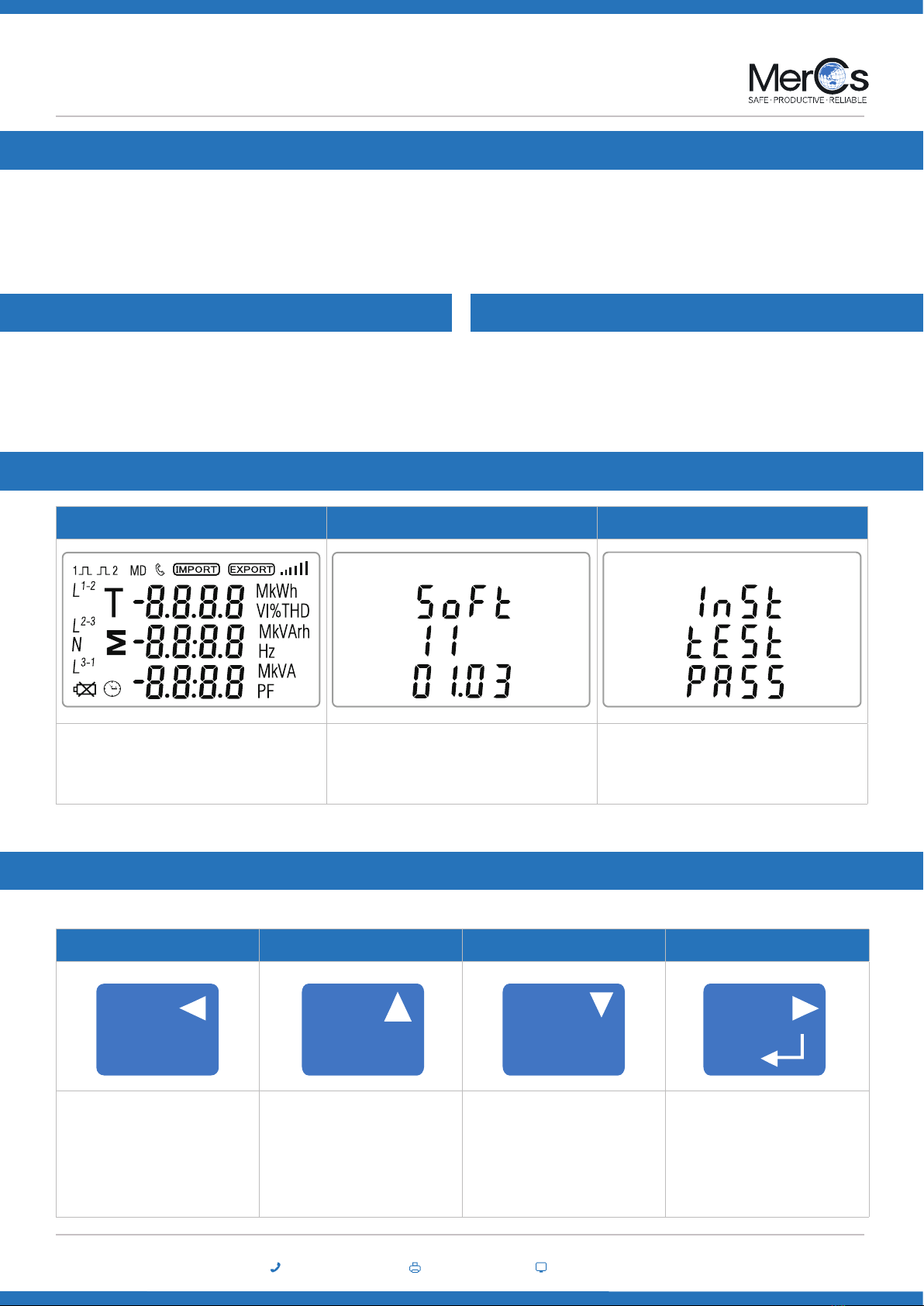
The rst screen lights up all display seg-
ments and can be used as a display check. Software version information The interface performs a self-test and
indicates the result if the test passes.
1 2 3 4
Selects the Voltage and
Current display screens. In
Set-up Mode, this is the “Left”
or “Back” button.
Select the Frequency and
Power factor display screens. In
Set-up Mode, this is
the “Up” button.
Select the Power display
screens. In Setup Mode, this is
the “Down” button.
Select the Energy display
screens. In Setup mode, this is
the “Enter” or “Right” button.
Start-up Screens
Measurements
The buttons operate as follows:
*After a short delay, the screen will display active energy measurements.
Current Transformer Primary Current
RS485 Serial Modbus RTU Pulse output
Strider M4 V2 Series is CT operated. you will need to set the correct ratio.
As an example: If using 100/5A CT, you will need to insure CT2 (Secondary) is set to 5 and CT rate is 0020. You divide
the primary by the secondary to get the CT rate to be entered (100/5=20).
This uses an RS485 serial port with Modbus RTU protocol to provide a
means of remotely monitoring and controlling the Unit.
Set up screens are provided for setting up the RS485 port.
This provides two pulse outputs that cloc k up measured active
and reactive energy. The constant for active energy is 3200imp/k
W h (Terminals 11& 12). The pulse width for pulse 1(Terminals 9&10)
can be set from the s et up menu.
C1C2
U/I
ESC MPE
02 4047 0777 www.mercs.com.au02 4047 0788 3
Strider M4 V2 ME-PM-M4-5
MerCs Pty Ltd, 55 Pendlebury Rd, Cardi, NSW, 2285, Australia | 2019 V1.1
Voltage and Current
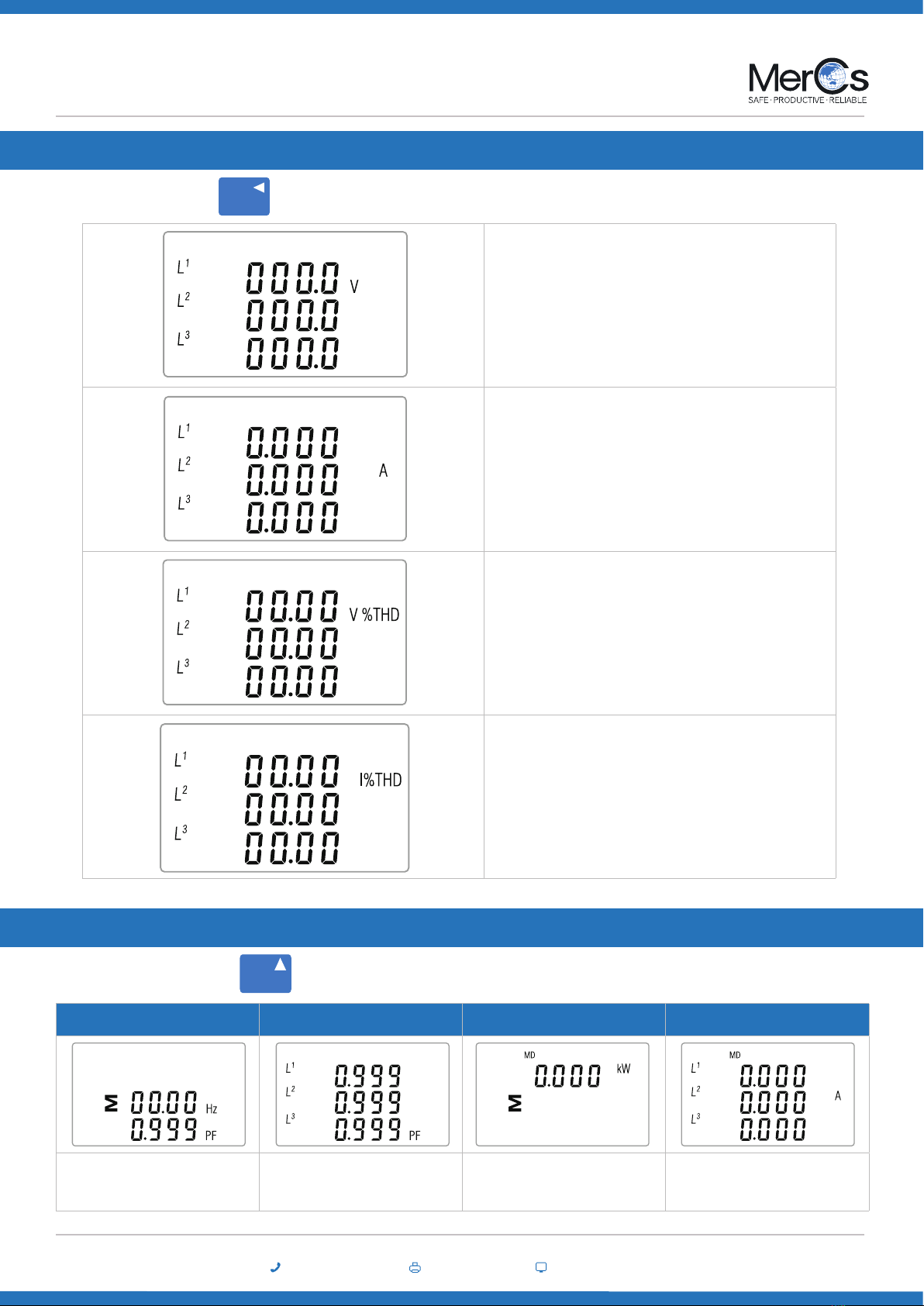
Each successive press of the button selects a new parameter:
Phase to neutral voltages
Current on each phase.
Phase to neutral voltage THD%.
Current THD% for each phase.
U/I
ESC
1 2 3 4
Frequency and Power Factor
(total) Power Factor of each phase Maximum Power Demand Maximum Current Demand
Frequency and Power Factor and Demand
Each successive pressing of the button selects a new range:
M
02 4047 0777 www.mercs.com.au02 4047 0788 4
Strider M4 V2 ME-PM-M4-5
MerCs Pty Ltd, 55 Pendlebury Rd, Cardi, NSW, 2285, Australia | 2019 V1.1
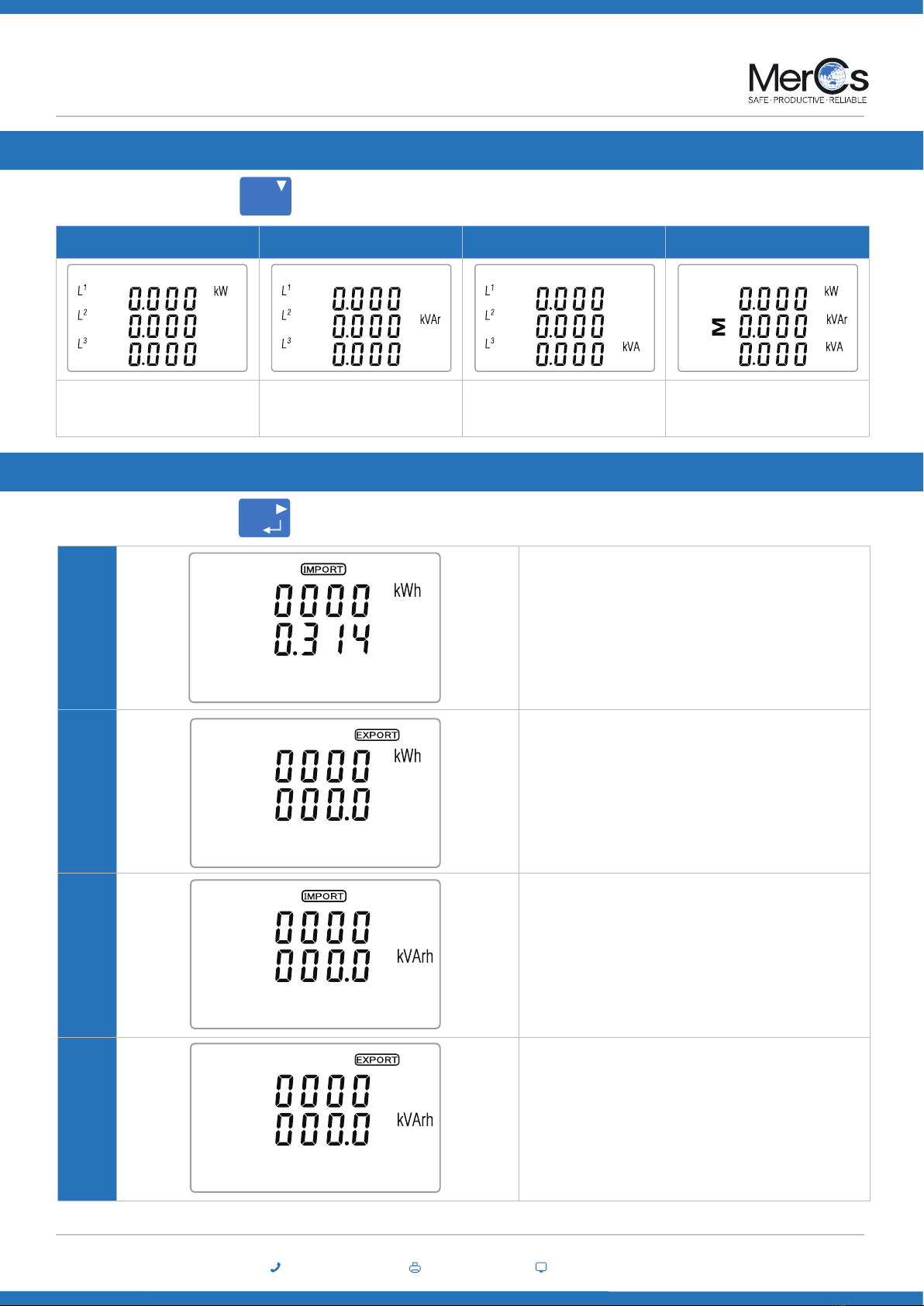
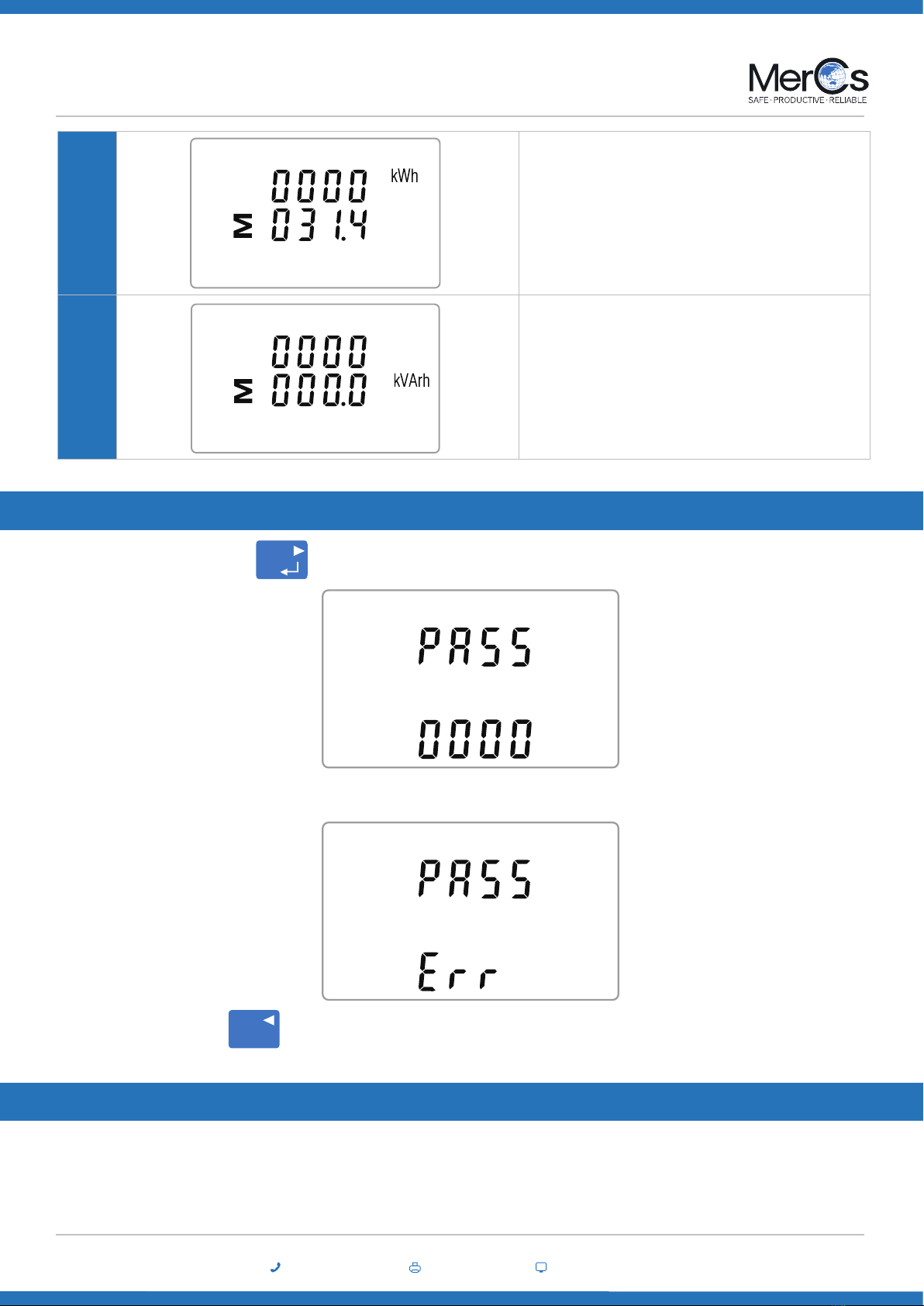
1 -1 Import active energy in kWh
1-2 Export active energy in kWh
2-1 Import reactive energy in kVArh
2-2 Export reactive energy in kVArh
Energy Measurements
Each successive pressing of the button selects a new range:
1 2 3 4
Instantaneous Active Power
in kW
Instantaneous Reactive
Power in kVAr
Instantaneous Volt-Amps
in KVA Total kW, kVArh, kVA
Power
Each successive pressing of the button selects a new range:
P
E
02 4047 0777 www.mercs.com.au02 4047 0788 5
Strider M4 V2 ME-PM-M4-5
MerCs Pty Ltd, 55 Pendlebury Rd, Cardi, NSW, 2285, Australia | 2019 V1.1
3 -1 Total active energy in kWh
3-2 Total reactive energy in kVArh
Setting Up
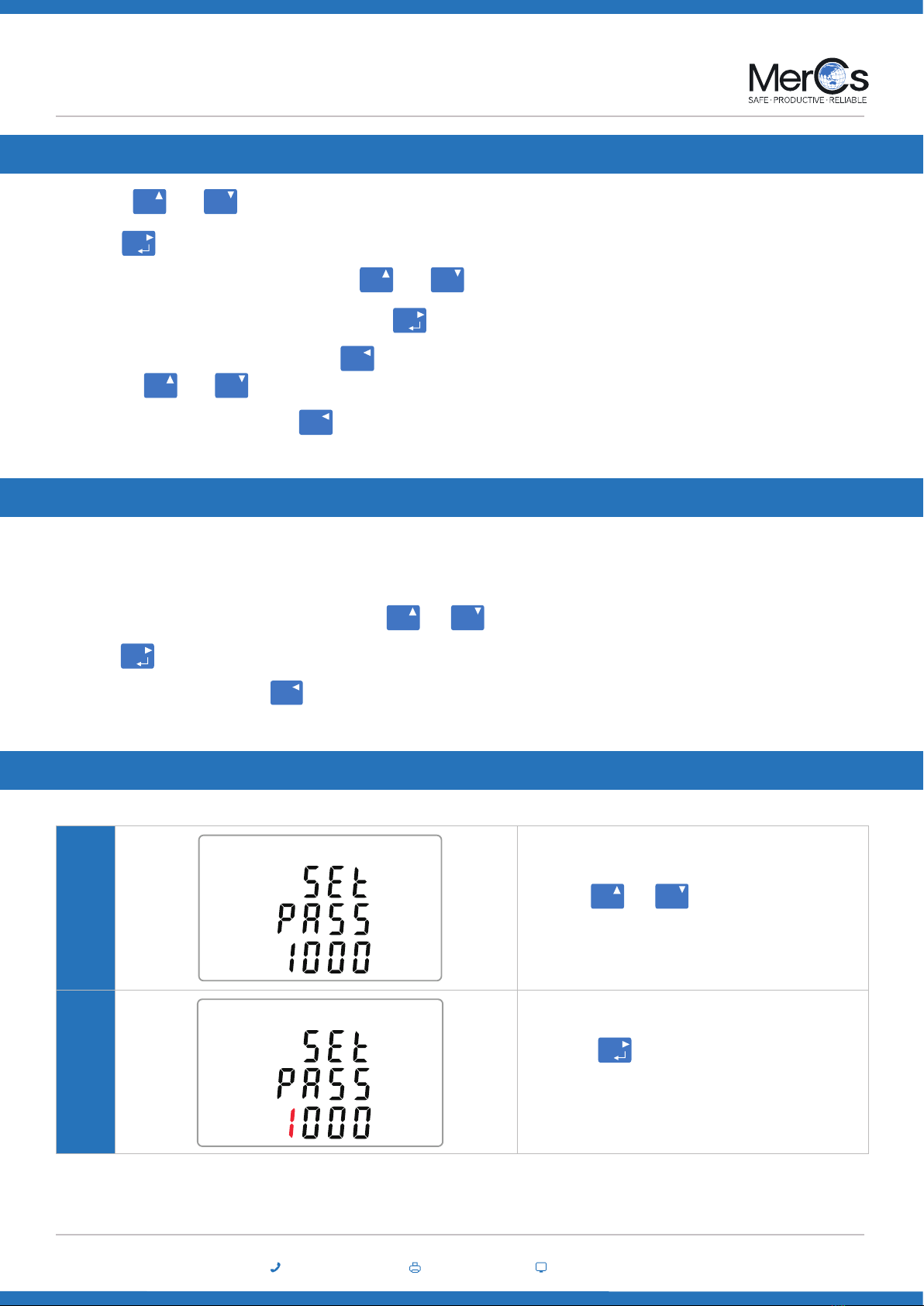
To enter set-up mode, pressing the button for 3 seconds, until the password screen appears.
Setting up is password-protected so you must enter the correct password (default ‘1000’) before processing. If an incorrect password is entered, the
display will show: PASS Err
To exit setting-up mode, press repeatedly until the measurement screen is restored.
E
U/I
ESC
Set-up Entry Methods
Some menu items, such as password and CT, require a four-digit number entry while others, such as supply system, require selection from a number
of menu options.
02 4047 0777 www.mercs.com.au02 4047 0788 6
Strider M4 V2 ME-PM-M4-5
MerCs Pty Ltd, 55 Pendlebury Rd, Cardi, NSW, 2285, Australia | 2019 V1.1
Menu Option Selection
1. Use the and buttons to select the required item from the menu . Selection does not roll over between bottom and top of list
2. Press to conrm your selection
3. If an item ashes, then it can be ad justed by the and buttons. If not, there maybe a further layer.
4. Having selected an option from the current layer, press to conrm your selection. The SET indicator will appear.
6. On completion of all setting up, press repeatedly until the measurement screen is restored.
5. Having completed a parameter setting, press to return to a high er menu level. The SET indicator will be removed and you will be able
to use the and buttons for further menu selection.
E
MP
MP
E
U/I
ESC
U/I
ESC
MP
When setting up the unit , some screens require the entering of a number. In particular, on entry to the setting up section, a password must be
entered. Digits are set individually, from left to right. The procedure is as follows:
1. The current digit to be set ashes and is set using the and buttons.
2. Press to conrm each digit setting. The SET indicator appears after the last digit has been set.
3. After setting the last digit, press to exit the number setting routine. The SET indicator will be removed.
Number Entry Procedure
MP
E
U/I
ESC
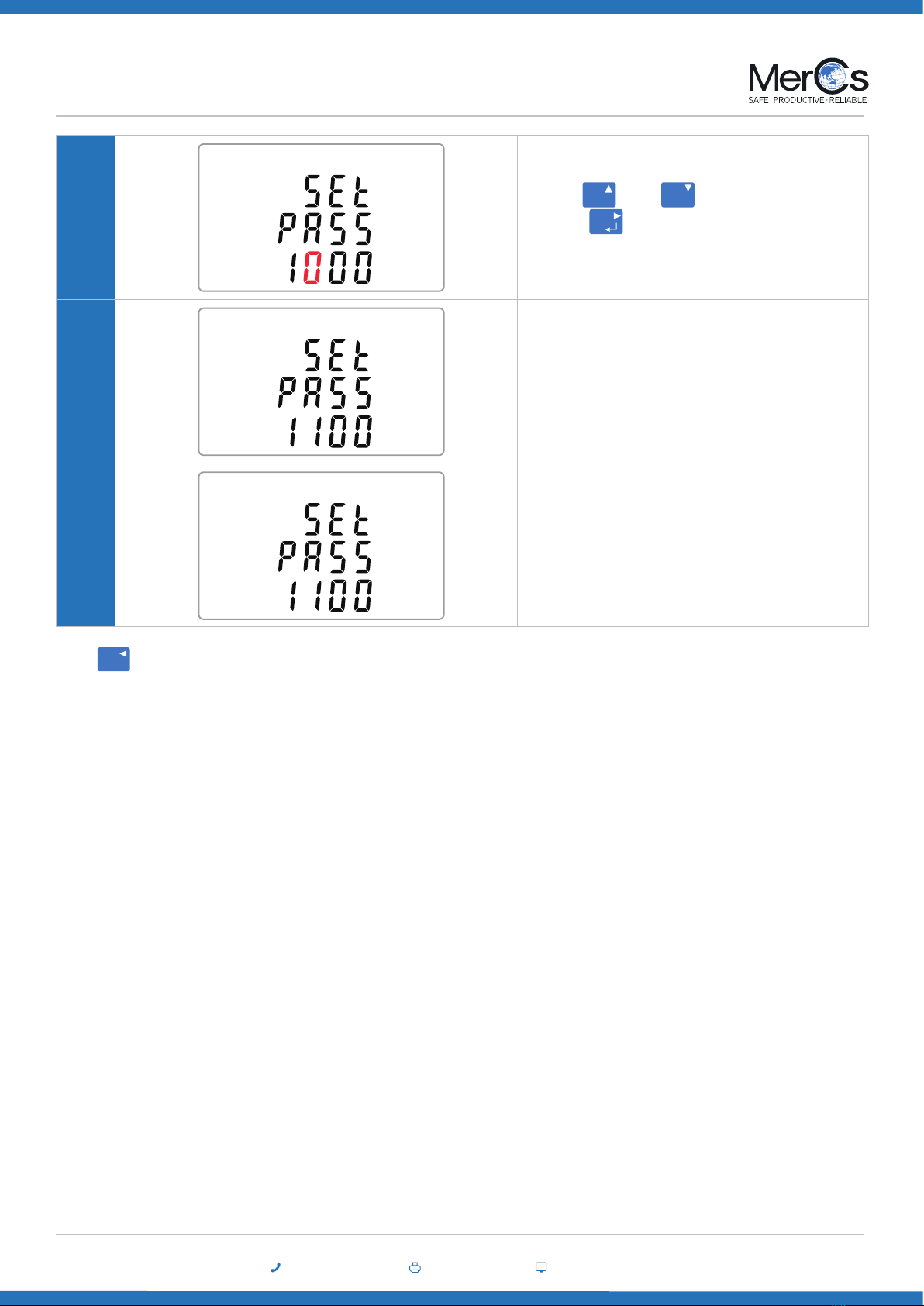
Change Password
1Use the and to choose the change pass-
word option.
2-1
Press the to enter the change password routine.
The new password screen will appear with the rst
digit ashing
MP
E
02 4047 0777 www.mercs.com.au02 4047 0788 7
Strider M4 V2 ME-PM-M4-5
MerCs Pty Ltd, 55 Pendlebury Rd, Cardi, NSW, 2285, Australia | 2019 V1.1
2-2
Use and to set the rst digit and
press to conrm your selection. The next
digit will ash.
2-3 Repeat the procedure for the remaining three digits.
2-4 After setting the last digit, SET will show.
MP
E
Press to exit the number setting routine and return to the Set-up menu. SET will be removed
U/I
ESC
02 4047 0777 www.mercs.com.au02 4047 0788 8
Strider M4 V2 ME-PM-M4-5
MerCs Pty Ltd, 55 Pendlebury Rd, Cardi, NSW, 2285, Australia | 2019 V1.1
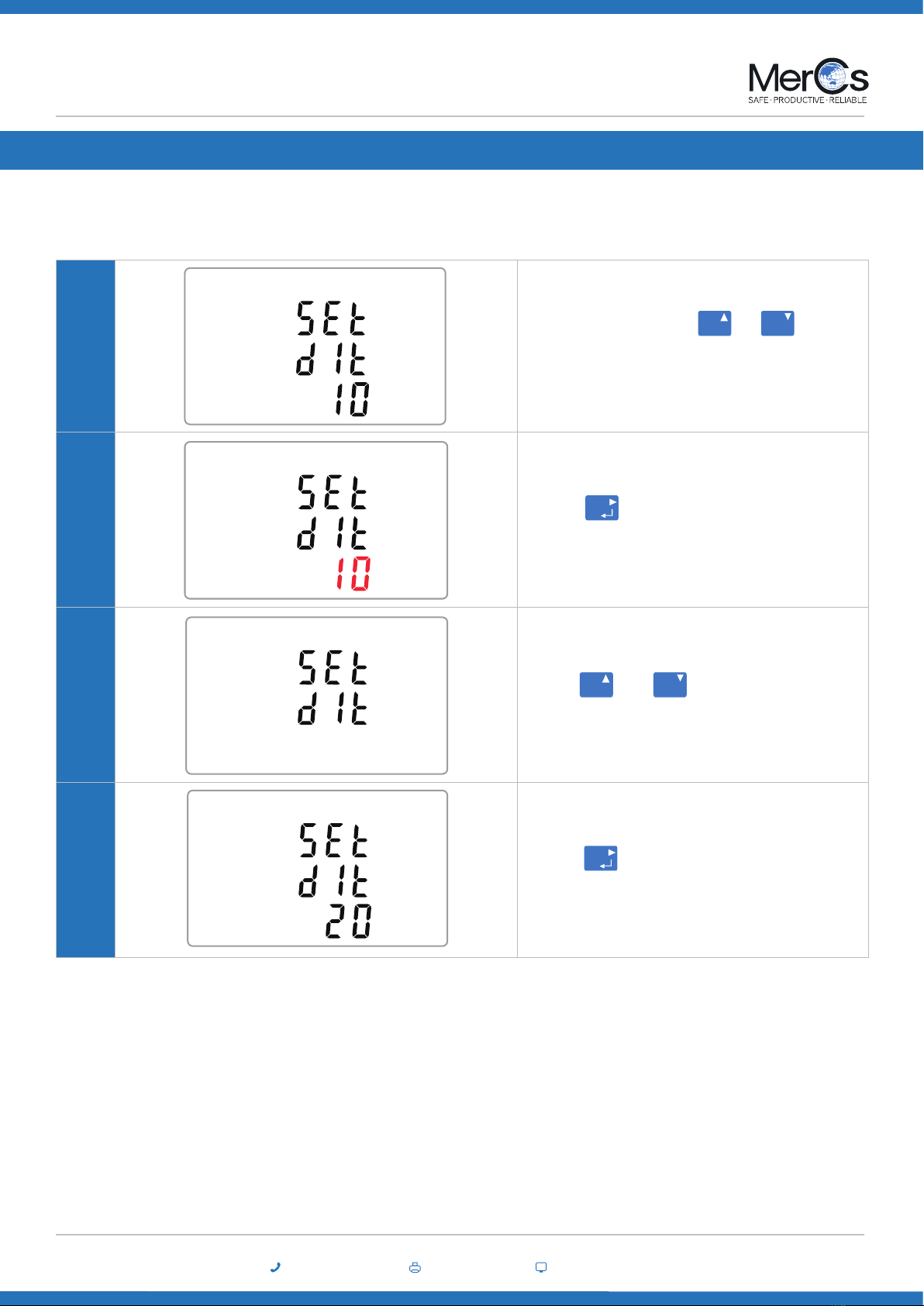
DIT Demand Integration Time
This sets the period in minutes over which the current and power readings are integrated for maximum demand measurement. The options are: o,
5, 8, 10, 15 20, 30, 60 minutes
1
From the set up menu, use and buttons
to select the DIT option. The screen will show the cur-
rently selected integration time.
2-1 Press to enter the selection routine. The cur-
rent time interval will ash
2-2 Use and buttons to select the time
required.
2-3 Press to conrm the selection.
SET indicator will appear.
M
M
P
P
E
E
02 4047 0777 www.mercs.com.au02 4047 0788 9
Strider M4 V2 ME-PM-M4-5
MerCs Pty Ltd, 55 Pendlebury Rd, Cardi, NSW, 2285, Australia | 2019 V1.1
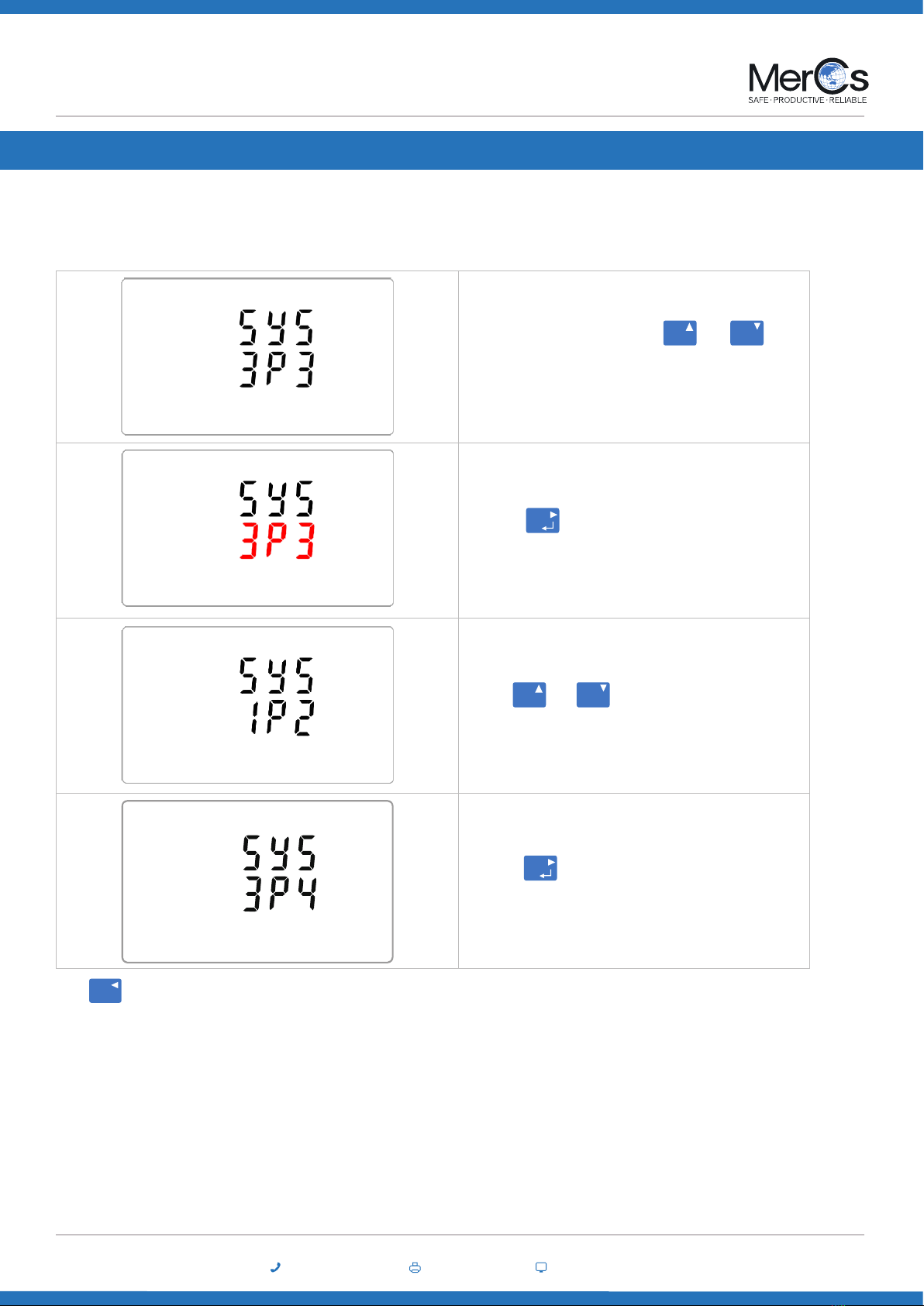
Supply System
This Unit has a default setting of 3 Phase 4 wire (3P4).
Use this section to set the type of power supply being monitored.
From the Set Set-up menu, use and
buttons to select the System option. The screen will
show the currently selected power supply supply.
Press to enter the selection routine. The cur-
rent selection will ash
Use and buttons to select the required
system option: 1P21P2(W),3P33P3(W) ,3P43P4(W)
Press to conrm the selection. SET indicator
will appear.
MP
E
MP
E
Press to exit the system selection routine and return to the menu. SET will disappear and you will be returned to the main Set Set-up Menu
U/I
ESC
02 4047 0777 www.mercs.com.au02 4047 0788 10
Strider M4 V2 ME-PM-M4-5
MerCs Pty Ltd, 55 Pendlebury Rd, Cardi, NSW, 2285, Australia | 2019 V1.1
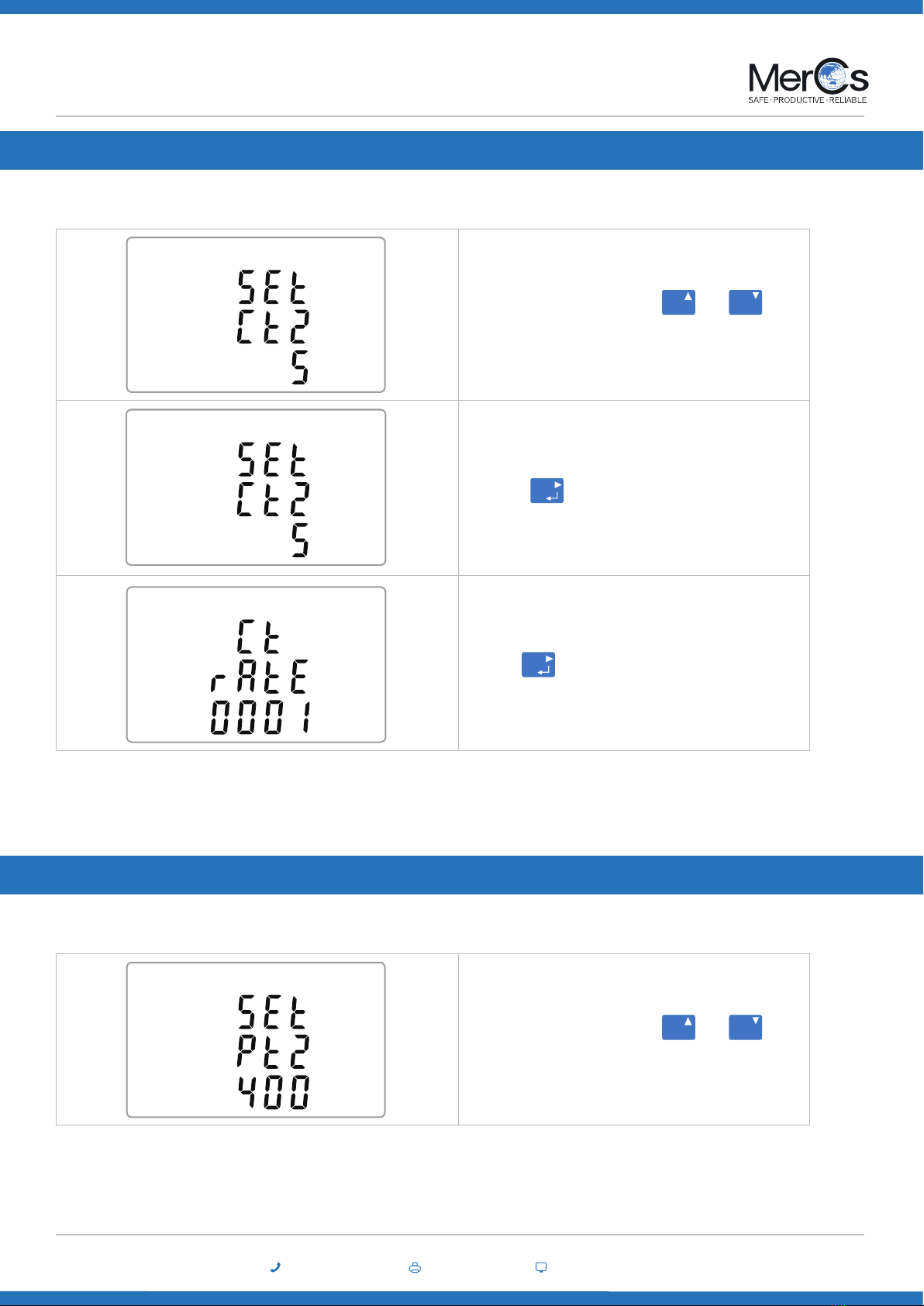
From the Set Set-up menu, use and
buttons to select the CT option.
Secondary CT setting
Press to enter the CT secondary current
selection routine. routine.:5A/1A
Set CT Ratio value
Press to enter the CT Ratio setting screen. The
range is from 0001 to 9999.
MP
E
E
CT Settings
The CT option sets the secondary current (CT2 1A or 5A) of the current transformer (CT) that wires to the meter.
For example, if using a 100/5A current transformer you will enter 0020, as you need to divide the primary by the secondary to get the ratio
(CT rate).
* Please note for the MID approved version device,you will only have one opportunity to set the ratio.
From the Set Set-up menu, use and
buttons to select the CT option.
MP
PT Settings
The PT option sets the secondary voltage (PT2 100 to 500V) of the Voltage transformer (PT) that wires to the meter.
Questo manuale è adatto per i seguenti modelli
1
Indice
Altri manuali MerCs Strumento di misura


