
NetComm Wireless AIMWLLR0-35 Manuale utente

Quick Start Guide
Antenna Alignment Tool
AIMWLLR0-35
QSG-00097 rev 7 AIMWLLR0-35 [NRB-0200] QSG.indd 1 21/12/2016 2:02 PM
All manuals and user guides at all-guides.com
all-guides.com

| AIMWLLR0-35
2
Welcome
This quick start guide is designed to familiarize you with the features and use of
the NetComm Wireless Antenna Alignment Tool. The Antenna Alignment Tool is
a battery-powered tool which connects to the alignment port on the back of a
NetComm Wireless Outdoor Antenna, providing power and a wireless access
point. The installer can then use a portable wireless device, such as a laptop or
tablet, to connect to the antenna to read signal strength data and align it in the
optimal position.
QSG-00097 rev 7 AIMWLLR0-35 [NRB-0200] QSG.indd 2 21/12/2016 2:02 PM
All manuals and user guides at all-guides.com

| AIMWLLR0-35
3
Antenna Alignment Tool
Package contents
The AIMWLLR0-35 package includes:
1 x AIMWLLR0-35 Antenna
Alignment Tool (in pouch)
1 x Quick Start Guide1 x WiFi security card
1 x Micro USB to Type-A charge cable 1 x AC wall charger (5V/2A)
1 x Antenna Alignment Tool pouch
QSG-00097 rev 7 AIMWLLR0-35 [NRB-0200] QSG.indd 3 21/12/2016 2:02 PM
All manuals and user guides at all-guides.com

| AIMWLLR0-35
4
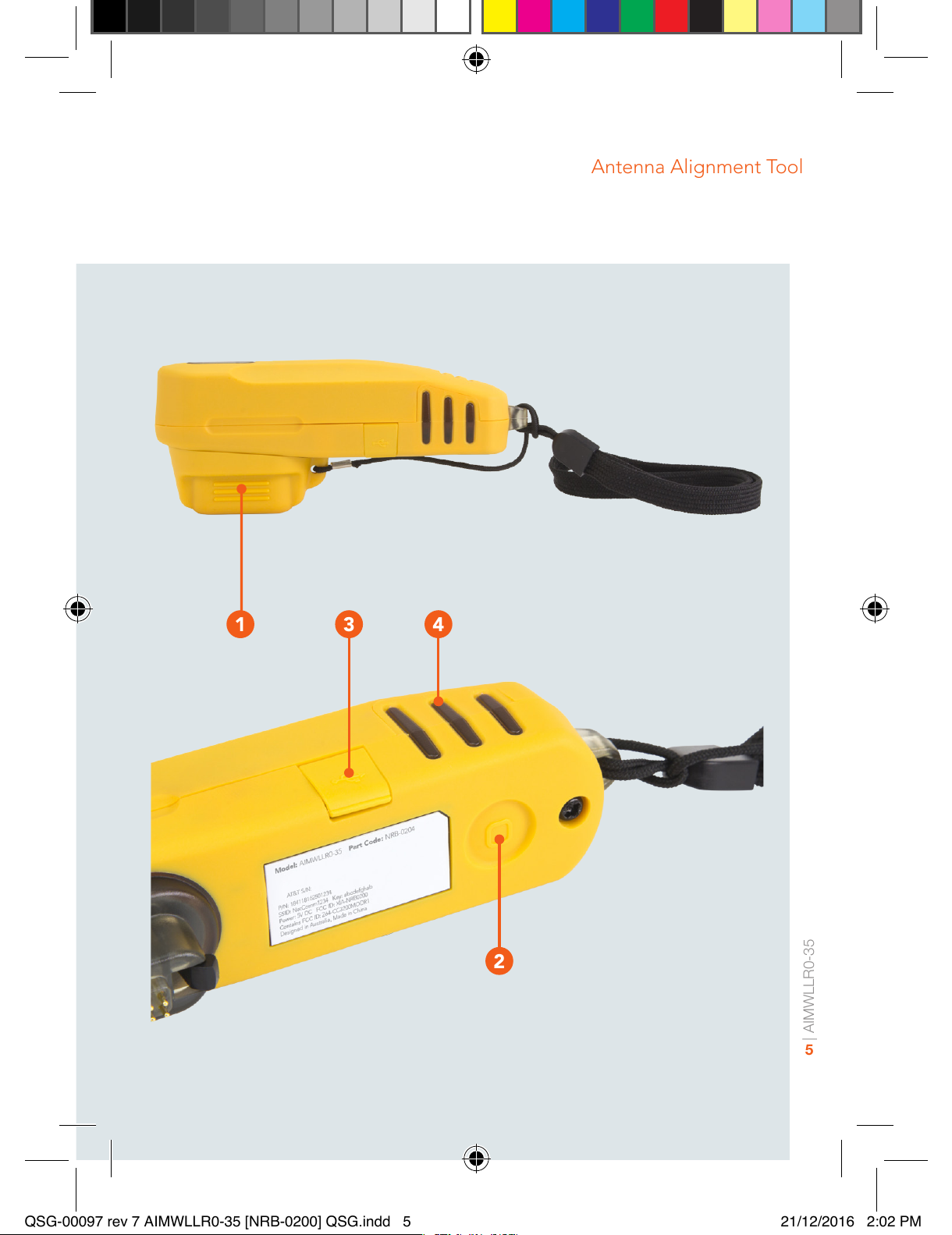
Device overview
ITEM DESCRIPTION
1Connector
protective cap
Protects the connector from dust and moisture when the
Antenna Alignment Tool is not in use.
2Power button Push once to toggle the Antenna Alignment Tool on and
off. When not connected to the antenna and turned
on, the Antenna Alignment Tool displays the remaining
battery charge level. See the LED indicator section
for details on the battery level indication. When it is
turned on, if it is not connected to the antenna within
approximately 20 seconds, the Antenna Alignment Tool
turns off automatically. When the Antenna Alignment
Tool is disconnected from the antenna, it powers off
automatically.
3Micro USB
port to charge
the battery
The Micro USB port connects to a USB power source
using the supplied USB cable to charge the internal
battery. Connect the Antenna Alignment Tool to a 5V/2A
power source for optimum charging speed.
4Multipurpose
LED indicators The LED indicators on the Antenna Alignment Tool are
multifunctional. They display:
1. Remaining battery level when the battery check
button is pressed or the unit is charging (Battery
check mode)
2. RF signal strength during alignment (Cell scanning
mode)
3. System status when the outdoor antenna is in
normal operation (Normal operation mode).
See the LED indicator section for more information.
QSG-00097 rev 7 AIMWLLR0-35 [NRB-0200] QSG.indd 4 21/12/2016 2:02 PM
All manuals and user guides at all-guides.com
| AIMWLLR0-35
5
Antenna Alignment Tool
1 3
2
4
QSG-00097 rev 7 AIMWLLR0-35 [NRB-0200] QSG.indd 5 21/12/2016 2:02 PM
All manuals and user guides at all-guides.com

| AIMWLLR0-35
6
Charging the Antenna
Alignment Tool
The included USB cable can be used to charge the Antenna Alignment Tool.
Connect the USB cable from the Micro USB port on the Antenna Alignment Tool
to the included AC wall charger or another 5V/2A power source for optimum
charging speed. The LED indicators on the side of the Antenna Alignment Tool
light up and may ash depending on the remaining battery level. See the LED
indicator section for details on reading the battery level.
QSG-00097 rev 7 AIMWLLR0-35 [NRB-0200] QSG.indd 6 21/12/2016 2:02 PM
All manuals and user guides at all-guides.com
all-guides.com

| AIMWLLR0-35
7
Antenna Alignment Tool
Checking the remaining
battery level
Press the Power button once. The Antenna Alignment Tool goes into Battery
check mode and the LED indicators light up according to the description in the
LED indicators section of this guide.
QSG-00097 rev 7 AIMWLLR0-35 [NRB-0200] QSG.indd 7 21/12/2016 2:02 PM
All manuals and user guides at all-guides.com

| AIMWLLR0-35
8
LED Indicators
The LED indicators display different things depending on the mode of the Antenna
Alignment Tool.
a) Battery check mode – When the power button is pressed or the battery is
charging.
95-100% 80-94% 65-79% 50-64%
35-49% 20-34% 0-19%
QSG-00097 rev 7 AIMWLLR0-35 [NRB-0200] QSG.indd 8 21/12/2016 2:02 PM
All manuals and user guides at all-guides.com

| AIMWLLR0-35
9
Antenna Alignment Tool
b) Cell scanning mode - When the Antenna Alignment Tool is connected to
an Outdoor Antenna.
Strong signal Medium signal Low signal No cell detected
QSG-00097 rev 7 AIMWLLR0-35 [NRB-0200] QSG.indd 9 21/12/2016 2:02 PM
All manuals and user guides at all-guides.com

| AIMWLLR0-35
10
c) Normal operation mode – When the Antenna Alignment Tool is connected
to an Outdoor Antenna.
LED 1 indicates the Ethernet
connection status of the antenna.
LED 1 DESCRIPTION
Link is up
Activity on Ethernet
LED 2 indicates the Cellular
connection status of the antenna.
LED 2 STATUS DESCRIPTION
Data APN attached
Data APN attaching
LTE registered
LTE registering
LTE not registered
LED 3 indicates the Power status of
the antenna.
LED 3 STATUS DESCRIPTION
No power
Power on
QSG-00097 rev 7 AIMWLLR0-35 [NRB-0200] QSG.indd 10 21/12/2016 2:02 PM
All manuals and user guides at all-guides.com
Indice


